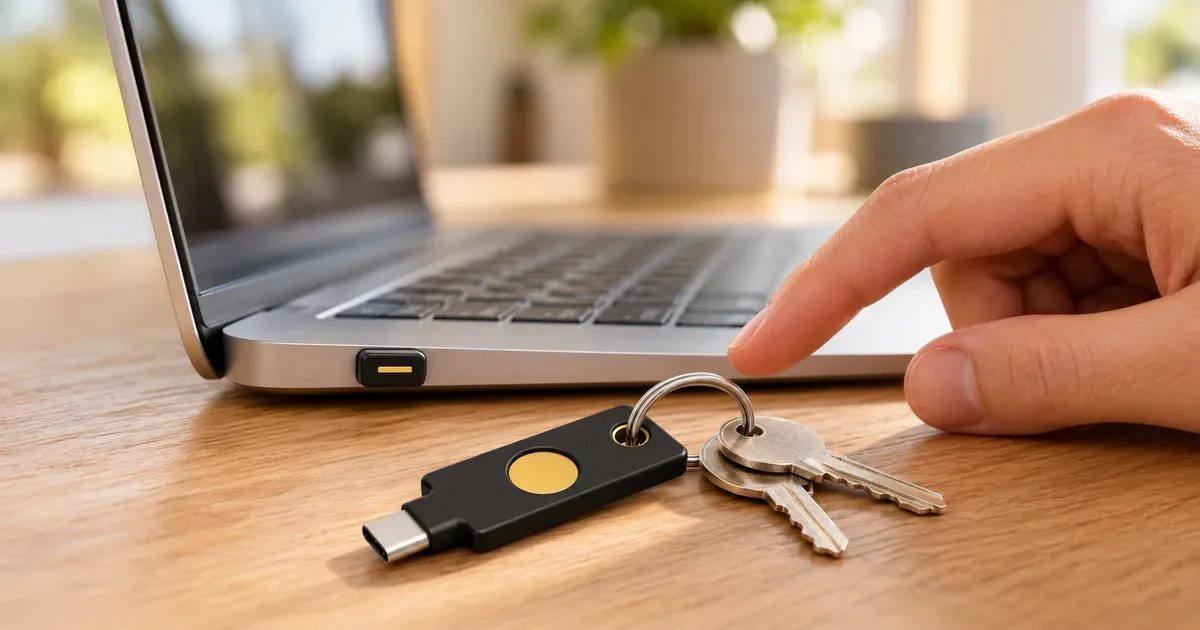
I own both of these keys. My YubiKey 5C Nano stays plugged into my Mac every day, and my YubiKey 5C NFC is my stored backup. They protect the same accounts, my email, password manager, developer accounts, and financial accounts, and I’d buy both again.
The short answer: if you’re buying one model, get the 5C NFC. It’s $10 cheaper, it works over USB-C or by tapping an NFC phone, and it goes on a keyring. Get the 5C Nano if your key will live in one USB-C computer and you want it always ready. The best setup is one of each, which is exactly what I use.
The security is identical. Both run the same protocols and hold the same 100 passkeys. The differences are how you connect them, how you carry them, and how easy they are to lose.
YubiKey 5C NFC vs. 5C Nano at a Glance
YubiKey 5C NFC vs. 5C Nano
| Spec | 5C NFC | 5C Nano |
|---|---|---|
| Price | $58 | $68 |
| Connection | USB-C and NFC | USB-C only |
| Size | 18 x 45 x 3.7mm | 12 x 10.1 x 7mm |
| Weight | 4.1g | 1g |
| Keyring hole | Yes | No |
| Passkey slots | 100 | 100 |
| Authenticator code slots | 64 | 64 |
| Durability | IP68, crush resistant | IP68, crush resistant |
| Best for | Carrying, phones, and backup | Staying in one computer |
| How I use it | Stored backup | Daily, plugged into my Mac |
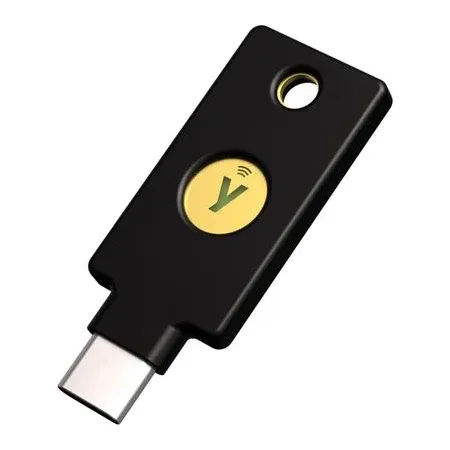
Best if you buy one model
YubiKey 5C NFC
USB-C and NFC, fits on a keyring, and $10 cheaper. My backup key.
What’s the Same
Both keys run the same security functions: FIDO2/WebAuthn passkeys, FIDO U2F, Yubico OTP, OATH authenticator codes, smart card (PIV), and OpenPGP. Both hold 100 passkeys and 64 authenticator codes in the Yubico Authenticator app, need no battery or network connection, and work with Windows, macOS, ChromeOS, and Linux. Yubico rates both IP68 and crush resistant.
You confirm a sign-in the same way too: plug in or tap, then touch the key. Neither key’s firmware can be updated, so buy a current one rather than old stock. Older YubiKeys held 25 passkeys, not 100.
In other words, a site that accepts one will accept the other, and an attacker can’t phish either one. You’re choosing a shape, not a security level.
The Differences That Matter
NFC and phones
The 5C NFC can tap on NFC-enabled iPhones and Android phones, according to Yubico. The 5C Nano has no NFC, so it only works where you can plug it into a USB-C port.
For Apple devices, Apple’s security key support page is clear: NFC keys work only with iPhone, while USB-C keys work with iPhone 15 or later and most Macs. So on an older Lightning iPhone, only the 5C NFC works. On an iPhone 15 or later, both work, but tapping is far easier than plugging a tiny Nano into your phone.
Always there vs. easy to carry
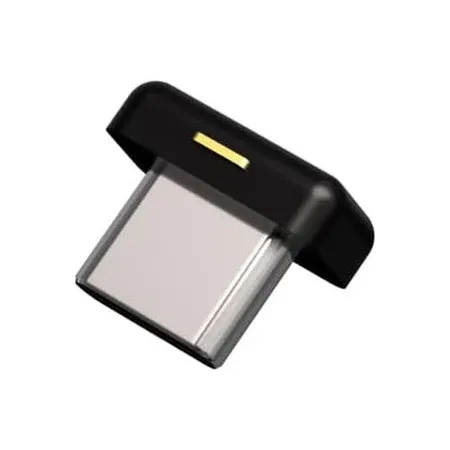
The Nano is the reason I like security keys day to day. It sits nearly flush in the port, so it’s always there, and signing in is a single touch on its gold edge. Compared with opening an app and typing a six-digit code, it’s just faster.
The 5C NFC is a normal key-shaped YubiKey with a hole for a keyring. It sticks out of the port, so it’s not something you leave in a laptop, but it’s easy to carry between computers and much harder to lose.
Losing it, and laptop theft
Once a Nano is out of the computer, it’s tiny and easy to misplace. Leaving it plugged in also means it travels with your laptop. A thief would still need your password or the key’s PIN, but it’s a good reason to set a PIN and lock your computer.
Ports
The Nano permanently takes up a USB-C port. On a laptop with only two ports, that’s a real cost. The 5C NFC only uses a port while you’re signing in.
Price
The 5C NFC is $58 and the Nano is $68 at both Amazon and Yubico. Yubico sells a cheaper Security Key C NFC for about half the price of either, but it skips one-time passwords and the Yubico Authenticator app, so it’s only enough if you need passkeys and basic two-factor sign-in.
Which Should You Get?
- Only buying one model? Get the 5C NFC. It’s cheaper, works with computers and phones, and goes on a keyring.
- You work on one USB-C computer all day? Get the 5C Nano as your daily key, plus a 5C NFC as the backup.
- You switch between computers often? Get the 5C NFC. A Nano is easy to lose when you keep pulling it out.
- You use an iPhone 14 or earlier? Get the 5C NFC. Lightning iPhones can’t use a USB-C key.
- You want to sign in on your phone a lot? Get the 5C NFC and tap it.
Whatever you choose, buy two keys. You can’t copy a YubiKey, so each key has to be registered on each account, and a spare is what saves you if one breaks or goes missing. Yubico recommends one for daily use and one as a spare, and Apple requires at least two security keys for its Apple Account feature. A Nano plus a 5C NFC costs $126, and two 5C NFCs cost $116.
Why I Use Both
I wanted the convenience of a key that’s always in my Mac, so my daily key is the Nano. For the spare, the 5C NFC made more sense: it adds NFC, which my Nano lacks, it’s easy to keep somewhere safe on a keyring, and it’s $10 cheaper. I don’t rely on its NFC every day, but it means my backup works on more devices than my main key does.
The one thing to know with either key: not every site supports security keys, which I’ve run into myself. Check the accounts you care about first, and remove weaker sign-in options like text codes where you can. For more, read my full YubiKey 5C Nano review and YubiKey 5C NFC review.
YubiKey 5C NFC vs. 5C Nano FAQ
What’s the difference between the YubiKey 5C NFC and 5C Nano?
The 5C NFC works over USB-C or NFC and fits on a keyring. The 5C Nano is a tiny USB-C-only key made to stay plugged in. Their security features are the same.
Is the YubiKey 5C Nano more secure than the 5C NFC?
No. Both run the same protocols and hold 100 passkeys. The Nano is just a different shape.
Does the YubiKey 5C Nano work with iPhone?
Only with iPhone 15 or later, through the USB-C port. Apple says NFC keys work only with iPhone, and USB-C keys work with iPhone 15 or later and most Macs.
Can I leave a YubiKey 5C NFC plugged in?
You can, but it sticks out of the port and is easy to knock. The Nano is designed to stay in.
Which YubiKey should I buy as a backup?
The 5C NFC. It’s cheaper, adds NFC, and is easy to store on a keyring. That’s my own backup.
Do I need two YubiKeys?
Yes. You can’t copy one key to another, so register a spare on every account in case one is lost or breaks.