A USB-C hub should make a thin laptop easier to use, but the connector alone tells you almost nothing. One port may carry video, fast data, and charging, while another identical-looking port handles only basic data. That gap is how a cheap hub turns into a monitor that will not light up or a laptop that slowly loses charge at a desk.
Start with the connections you use every day, then check what the laptop can actually send through its USB-C port. DisplayPort Alt Mode is required for ordinary HDMI output, Power Delivery is required for pass-through charging, and every device on a bus-powered hub shares the bandwidth of one host connection. A 10Gbps label describes a port’s ceiling, not the speed of every attached drive running at once.
Portable hubs suit a laptop and one external monitor. A powered Thunderbolt dock makes more sense when the same computer returns to a desk full of storage, network gear, audio equipment, and displays. The picks below cover those separate jobs instead of pretending that the biggest port count is always better.
Best overall
Plugable USBC-9IN1E
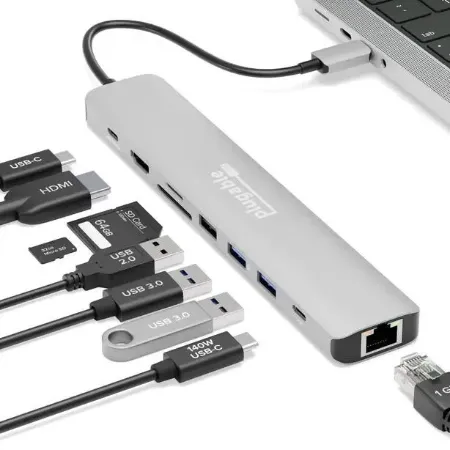
A balanced nine-port USB-C hub with 4K 60Hz HDMI, fast USB data, Gigabit Ethernet, UHS-II card readers, and high-wattage pass-through charging.
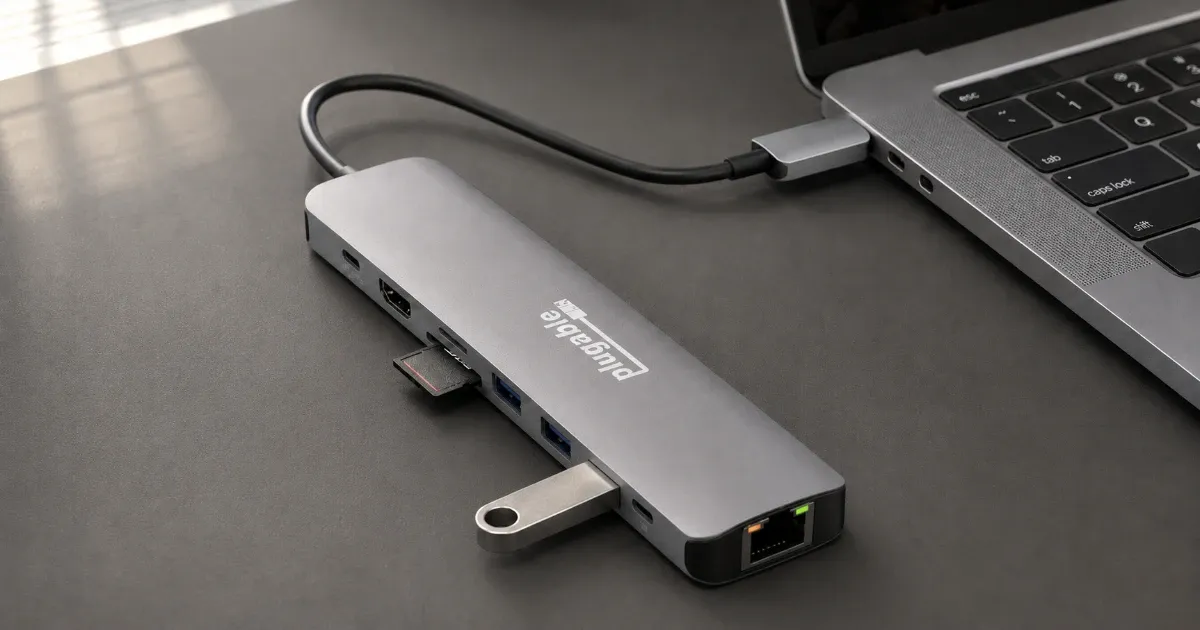
The Plugable USBC-9IN1E covers the ports most people miss without turning a laptop bag into a cable drawer. It is the right general-purpose hub for one monitor, wired networking, removable storage, and a mix of USB-C and USB-A accessories. Just as important, its limits are easy to understand before you buy it.
The HDMI port supports one display at up to 4K and 60Hz when the host USB-C port provides DisplayPort Alt Mode. Gigabit Ethernet handles a stable wired connection, while separate UHS-II SD and microSD slots suit cameras and other removable media. The hub does not create extra display capability, so the laptop’s graphics hardware and operating system still decide which resolutions are available.
One 10Gbps USB-C data port and two 10Gbps USB-A ports provide useful room for fast storage and current peripherals. A fourth USB-A port runs at USB 2.0 speed, which is a deliberate fit for a keyboard, mouse receiver, or printer that gains nothing from a faster lane. All of that traffic still travels through one 10Gbps host link, so simultaneous transfers divide the available bandwidth.
Charging is more nuanced than the 140W headline suggests. With a compatible PD 3.1 EPR laptop, charger, and cable, the hub can accept 140W and send up to 125W to the computer. More common PD 3.0 systems are limited to 100W input and 85W to the host. The hub does not include a charger, and the lowest-rated part of the chain sets the final result.
At 4.7 ounces, the metal hub is portable enough for a work bag, although its captive cable is only about seven and a half inches long. Clearly labeled ports reduce setup mistakes, and the two-year warranty is reassuring for an accessory that may be connected and disconnected every day. The fixed cable is the main wear point because it cannot be replaced separately.
This is not a dual-monitor dock, nor is its downstream USB-C port a display output. Buyers with several high-speed drives may also run into the shared host bandwidth before they run out of sockets. Those are fair limits for a compact hub, but they matter if the goal is a permanent workstation.
Choose the USBC-9IN1E when one cable needs to connect a single 4K display, Ethernet, cards, and ordinary peripherals. It gives most laptop owners the ports they will use rather than a row of duplicate connectors added for a larger marketing number.
Best budget
Plugable USBC-4IN1
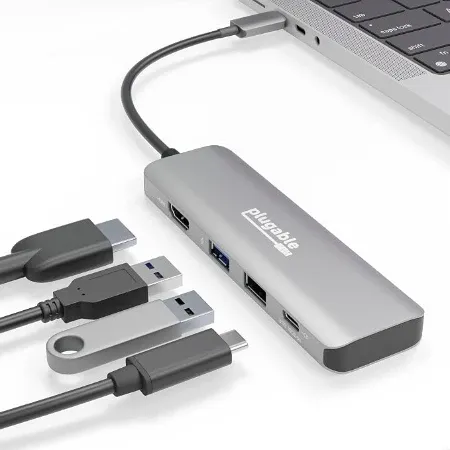
A compact four-port hub for one 4K 60Hz display, laptop charging, and a small set of USB accessories.
The Plugable USBC-4IN1 is for the common setup that needs HDMI, charging, and two USB accessories. It skips Ethernet and card readers, which keeps the body small and the cost sensible. That focus makes it a better budget buy than a crowded no-name hub with an uncertain controller and a vague model number.
Its HDMI 2.0 port can drive one display at up to 4K and 60Hz when the laptop supplies enough DisplayPort Alt Mode bandwidth. Some restricted hosts fall back to 4K at 30Hz, so a capable hub cannot rescue a limited computer port. A proper HDMI 2.0 cable and a compatible display are also part of the chain.
The two USB-A sockets serve different jobs. One runs at up to 10Gbps for storage or another fast peripheral, while the USB 2.0 socket is suited to a mouse, keyboard, or receiver. This is a useful split at the price, but buyers who need several fast devices should move to the larger overall pick.
The lone downstream USB-C port is a fork in the road. It can accept a charger and pass up to about 92W to a compatible host, or it can operate as a 10Gbps data port. It cannot do both at the same time. Plugging in a charger turns that socket into a power-only input, a compromise worth understanding before planning a USB-C-heavy desk.
The two-ounce hub travels easily, and its captive cable is just under nine inches. No charger is included, so budget for one if the laptop’s existing adapter cannot spare enough power. Plugable covers the model for two years, which is better support than many inexpensive adapters provide.
There is no wired network connection, no SD slot, and no path to a second display. That is exactly why this pick works. Buy it for a straightforward presentation, dorm, or home-office kit with one screen and a few peripherals. If Ethernet or removable media already appears on your checklist, the larger USBC-9IN1E is the less frustrating purchase.
Best for USB-C devices
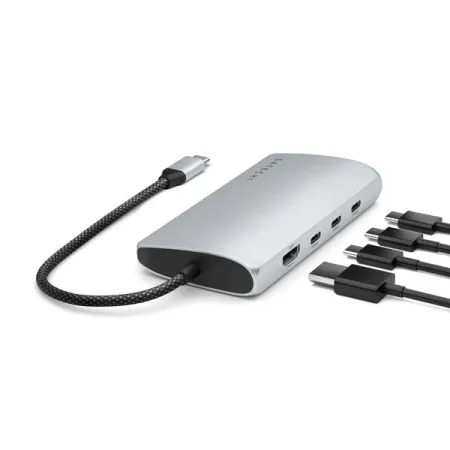
Satechi USB-C Multiport Adapter 8K
A USB-C-focused adapter with four data ports, fast HDMI output, Gigabit Ethernet, UHS-II SD, and 85W host charging.
Most hubs still devote their fastest sockets to USB-A. The Satechi USB-C Multiport Adapter 8K With Ethernet V3 goes the other way, giving modern storage, cameras, keyboards, and other USB-C accessories room to stay connected without adapters. It is the strongest fit for a setup that has already left legacy plugs behind.
Three of its four downstream USB-C data ports run at up to 10Gbps, while the fourth reaches 5Gbps. The ports are labeled on the chassis, which matters when an external SSD and a slower accessory are connected together. As with every bus-powered hub in this guide, those ratings are individual ceilings and the host connection remains shared.
The dedicated charging input accepts up to 100W and can pass as much as 85W to the laptop. Because it carries no data or video, all four USB-C data ports remain available while the computer charges. That arrangement is cleaner than the budget pick’s combo port, although a workstation-class laptop that expects more than 85W may charge slowly under load.
HDMI 2.1 is the attention-grabbing socket, but host compatibility matters more than the number printed beside it. Supported Windows hardware can reach the adapter’s highest display modes. Macs are limited to 4K at 60Hz through this model. The adapter passes through the display signal it receives and does not bypass a computer’s native external-monitor limits.
Gigabit Ethernet and a UHS-II full-size SD reader fill out a sensible creative-work kit. There is no dedicated microSD slot, so small cards need an adapter, and there are no USB-A ports at all. Those omissions are the point of the designation, not minor fine print. A mixed collection of old and new peripherals is better served by the Plugable overall pick.
The fixed braided cable is roughly six and a half inches long, and the aluminum body weighs a little over four ounces. A two-year warranty matches the rest of Satechi’s current hardware coverage. Choose this model for several USB-C data devices and one external display. Do not pay for its high video ceiling unless the laptop and monitor can actually use it.
Best desktop dock
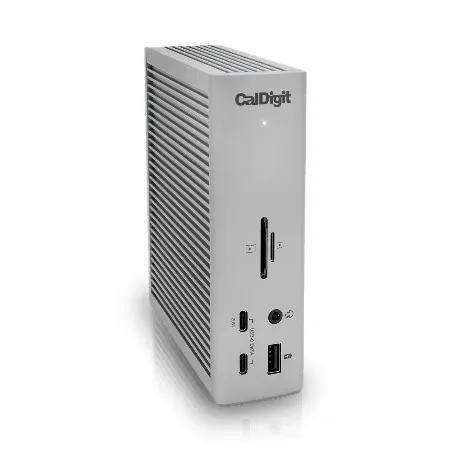
CalDigit TS4
A powered 18-port Thunderbolt 4 dock with 98W laptop charging, 2.5GbE, fast card readers, and a broad mix of USB and display connections.
The CalDigit Thunderbolt Station 4 is meant to stay on the desk, where its own 230W power supply and 18 connections can replace a pile of smaller adapters. It costs much more than the portable picks, but the extra money buys a real powered workstation rather than another slim dongle.
Three Thunderbolt 4 connections include the host port and two downstream ports for displays, storage, or chained Thunderbolt devices. CalDigit also supplies three 10Gbps USB-C ports and five 10Gbps USB-A ports. That mix is useful when a desk has accumulated audio interfaces, drives, a webcam, keyboard, and other equipment across several connector generations.
DisplayPort 1.4 provides a direct monitor connection, while the downstream Thunderbolt ports can carry compatible displays. The number, resolution, and refresh rate supported at once depend on the laptop’s port, graphics hardware, and operating system. Check the exact computer specification before buying, especially with base-model Apple silicon or a high-refresh monitor.
A 2.5GbE jack makes more sense here than on a travel hub because the dock can remain wired to a fast router or network storage. UHS-II SD and microSD readers can be used together, and separate front and rear audio connections accommodate a headset and fixed speakers. The front USB-C port can also provide more charging power to a connected device than an ordinary low-power data socket.
The dock supplies up to 98W to the host laptop through its Thunderbolt connection. That covers many thin-and-light and professional notebooks, but a gaming or mobile-workstation laptop may still need its original high-wattage adapter for full performance. The TS4 itself weighs about 1.4 pounds and can stand vertically or lie horizontally, so stiff cables are less likely to drag it around the desk.
Thunderbolt bandwidth is substantial, but it is still shared, and compatibility gets more complicated as displays and fast storage accumulate. Firmware, operating-system updates, and certified cables matter. The two-year warranty is adequate rather than exceptional, and this is too expensive for anyone who only needs HDMI and a mouse.
Buy the TS4 when a supported Thunderbolt or USB4 laptop repeatedly returns to the same demanding desk. Its older Thunderbolt 4 generation is also part of the appeal: broad compatibility and mature support matter more here than paying flagship money for Thunderbolt 5 bandwidth that many current computers cannot use.
List the devices that must be connected at the same time before shopping. One monitor, charging, and a couple of peripherals call for a portable hub. Ethernet, card readers, several fast drives, and a fixed display setup may justify the larger overall pick or a powered dock. Unused ports add cost and confusion without improving the connection you actually need.
Then check the laptop manual for DisplayPort Alt Mode, Power Delivery, Thunderbolt or USB4 support, and its external-display limits. Use a charger and cables rated for the required power and video mode. The right hub cannot create capabilities the host lacks, but it can make the capabilities already there much easier to live with.