

A monitor shapes every hour spent at a desk, but the most useful upgrade is not always the largest panel or highest resolution. Text density, scaling, refresh rate, color requirements, port bandwidth, and the distance from your eyes determine whether impressive specifications translate into comfortable work.
We compared manufacturer data with broad professional testing and owner experience, emphasizing image quality, motion, connectivity, ergonomics, firmware behavior, and value. The picks cover distinct jobs, so begin with the applications and computers on the desk rather than trying to crown one display for every use.
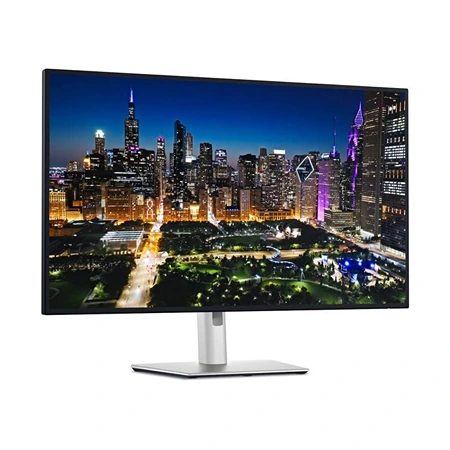
Dell UltraSharp U3225QE
Best 4K Monitor
A 32-inch 4K IPS Black monitor with excellent contrast, accurate colors, and Thunderbolt connectivity for demanding productivity setups.
At 31.5 inches, the Dell UltraSharp U3225QE makes 4K practical at a comfortable scaling level while leaving room for two substantial windows. Its 120Hz refresh rate is equally important: cursor movement, scrolling, and interface animation look markedly smoother than on a traditional 60Hz office panel.
Enhanced IPS Black technology is rated for a 3,000:1 contrast ratio, substantially deeper than ordinary IPS while preserving useful viewing angles. Factory color performance and broad gamut coverage suit design and editing after workflow-appropriate calibration. This is still an edge-lit LCD, so dark-room blacks, blooming, and HDR impact cannot match OLED or a sophisticated mini-LED backlight.
The monitor functions as a serious Thunderbolt 4 dock. A single connection can deliver up to 140W to a compatible laptop while carrying video, data, Ethernet, and attached peripherals. DisplayPort, HDMI, a 2.5GbE jack, accessible USB ports, daisy chaining, and a KVM make it particularly effective for a laptop-and-desktop desk.
Subscribe to Product Bible
Stay updated with the latest product reviews, buying guides, and expert recommendations. Fresh advice on the best things we've researched, tested, and reviewed, sent to your inbox weekly.
Want to know more about how we handle your data or opt out of marketing emails? Check out our Privacy Policy. If you have any questions, we're always here to help.
Dell adds an ambient-light sensor, automatic input and peripheral switching, and a fully adjustable stand. Those conveniences reduce desk friction, though software features and KVM behavior can depend on drivers and operating systems. A monitor arm remains useful if the broad stand consumes needed keyboard or notebook space.
The U3225QE is expensive for an LCD and its pixel response does not make 120Hz motion as crisp as a gaming-first display. HDR is largely compatibility rather than a reason to buy it. For text-heavy professional work, accurate SDR, and a powerful one-cable laptop setup, however, the combination is unusually complete.
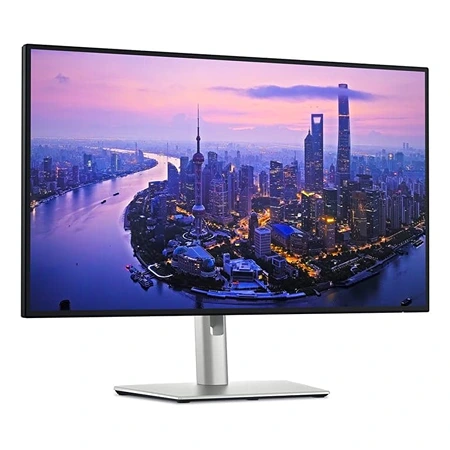
Dell UltraSharp U2725QE
Best 27” Monitor
A 27-inch 4K IPS Black monitor with excellent contrast, accurate color, 120Hz refresh, and Thunderbolt connectivity for modern desks.
Pixel density is the defining quality of the Dell UltraSharp U2725QE. Packing 3840×2160 pixels into 27 inches produces exceptionally clean type and fine detail, especially with operating-system scaling. It fits a smaller desk than the 32-inch model without surrendering the calmer motion of a 120Hz refresh rate.
Its enhanced IPS Black panel targets the same 3,000:1 contrast class, giving documents, photographs, and dark interfaces more depth than conventional IPS. Color is strong out of the box for general creative use, while print, video, or client-delivery work still calls for calibration and a managed color workflow. HDR support cannot overcome the lack of meaningful local dimming.
Thunderbolt connectivity turns the display into a dock, supplying up to 140W while exposing a large USB hub, 2.5GbE networking, and video connections. The integrated KVM can share a keyboard and mouse between systems, and daisy-chain support simplifies a second compatible monitor. Computer, cable, and operating-system support must all align for the highest power and bandwidth modes.
Everyday operation feels premium: scrolling is fluid, the stand offers height, swivel, tilt, and pivot, and Dell’s pixel-exchange coverage is reassuring for a dense panel. Some desks expose a little stand wobble during vigorous typing, an issue a solid VESA arm can solve while reclaiming surface area.
This is not the cheapest route to 27-inch 4K, nor the quickest choice for competitive gaming. Scaling also reduces the amount of usable workspace relative to a larger 4K screen, even as it improves sharpness. It is best for someone who reads and writes all day and wants dock-level connectivity without moving to 32 inches.
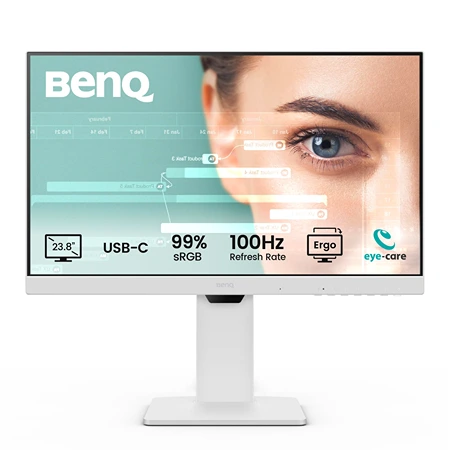
BenQ GW2486TC
Best Budget Option
A 24-inch Full HD IPS monitor with USB-C 65W charging, 100Hz refresh rate, and eye-care features ideal for office work and productivity.
Budget monitors usually force a choice between a useful stand and useful ports; the BenQ GW2486TC includes both. Its 23.8-inch IPS panel runs at 1920×1080 and 100Hz, a sensible combination for email, documents, and browser work where responsiveness matters more than extreme pixel density.
USB-C carries display data and up to 65W of laptop charging, enough for many thin-and-light systems. HDMI and DisplayPort accept other sources, while DisplayPort output can daisy-chain a compatible second screen. Check the laptop’s USB-C video support and power requirement because a USB-C-shaped port does not guarantee either feature.
The ergonomic stand offers roughly 130mm of height adjustment plus tilt, swivel, and portrait rotation. That range is rare at this price and often improves comfort more than a minor panel upgrade. Slim bezels also make a matched pair practical, although the base still occupies more desk depth than an arm.
BenQ rates the display at 250 nits and 99% sRGB, adequate for controlled indoor light and ordinary web color. Direct sun can make it look washed out, while 1080p provides less workspace and visibly softer type than 1440p or 4K at a close viewing distance. The built-in speakers are serviceable for calls, not satisfying media playback.
The GW2486TC is therefore an office value rather than a bargain creative or HDR display. Its 100Hz motion, full stand, and one-cable laptop connection solve tangible daily problems. Users editing wide-gamut photographs, working in dense spreadsheets, or sitting in a very bright room should spend more on the panel itself.
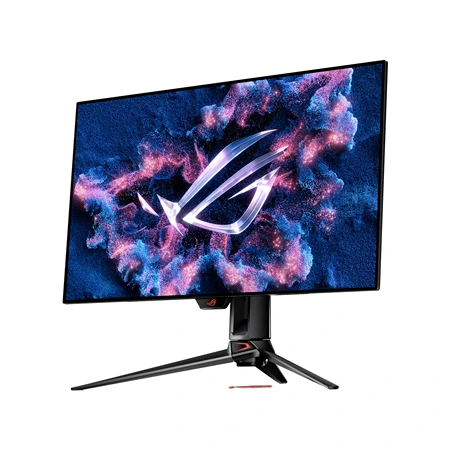
Asus ROG Swift PG32UCDM
Best for Gaming
A 32-inch 4K OLED gaming monitor with 240Hz refresh rate and vibrant HDR, delivering top-tier visuals and responsiveness for serious PC gamers.
Games with dark corridors and bright effects reveal the Asus ROG Swift PG32UCDM at its best. Its 31.5-inch QD-OLED panel switches individual pixels off for true black, while near-instant response and a 240Hz refresh rate keep fast motion exceptionally clear. Driving modern games at 4K and high frame rates requires a powerful GPU.
Quantum-dot color gives HDR scenes vivid saturation and precise highlights, with support for HDR10 and Dolby Vision. Small bright objects have tremendous contrast, but full-screen white is dimmer than on a strong LCD because OLED protection limits sustained brightness. Ambient light can also give the glossy QD-OLED surface a slightly raised, purplish black appearance.
DisplayPort 1.4 with compression and HDMI 2.1 accommodate PCs and current consoles, while USB-C supplies video, hub data, and up to 90W charging. A KVM shares peripherals between sources. Console users should plan around port assignments, audio routing, and the fact that consoles top out well below the panel’s 240Hz ceiling.
Static desktop use introduces OLED’s principal compromise: uneven wear and eventual burn-in remain possible. Pixel shifting, logo detection, panel refresh routines, and a heatsink reduce risk without erasing it. Asus includes three-year burn-in coverage, but varied content, sensible brightness, screen sleep, and hidden taskbars remain prudent for an expensive display.
This monitor is overkill for spreadsheets and poorly lit offices, and text fringing from the subpixel layout may bother sensitive readers. For a mixed PC-and-console setup centered on visually rich games, its combination of 4K detail, perfect blacks, rapid response, and broad connectivity is difficult for LCD technology to reproduce.
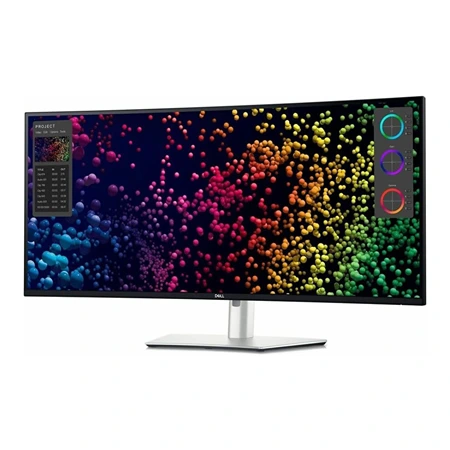
Dell UltraSharp U4025QW
Best Ultrawide Monitor
A massive 40-inch 5K2K IPS Black ultrawide with excellent contrast, Thunderbolt 4 connectivity, and built-in KVM support.
Replacing two displays with one continuous canvas is the purpose of the Dell UltraSharp U4025QW. Its 39.7-inch, 2500R curved panel provides 5120×2160 pixels in a 21:9 shape, preserving the vertical resolution of 4K while adding substantial horizontal room for timelines, code, spreadsheets, and reference windows.
The 120Hz refresh makes that enormous desktop feel more immediate than older 60Hz ultrawides. IPS Black improves native contrast over standard IPS and viewing consistency is strong across the curve. It remains a productivity LCD: HDR highlights, black-room contrast, and pixel response do not compete with gaming OLED or high-zone mini-LED alternatives.
A Thunderbolt 4 connection can deliver up to 140W and turn the monitor into a dock with USB-A, USB-C, 2.5GbE, audio, and downstream connectivity. HDMI and DisplayPort expand source options, while the KVM and picture-by-picture modes make two-computer work far more natural than it is on a single-input ultrawide.
Five-thousand-by-two-thousand pixels demand planning. Some laptops cannot drive the native resolution at 120Hz through every port or cable, and operating-system scaling can reduce the workspace advantage. Screen sharing also presents remote colleagues with an unusually wide or tiny image unless a single window or virtual region is shared.
The price and physical footprint are substantial, and the stand requires a deep, stable desk. Users who need independent portrait and landscape panels may still prefer two monitors. For one-system creative and analytical workflows, as well as a polished laptop/desktop command center, the seamless resolution and docking hardware can justify the extravagance.
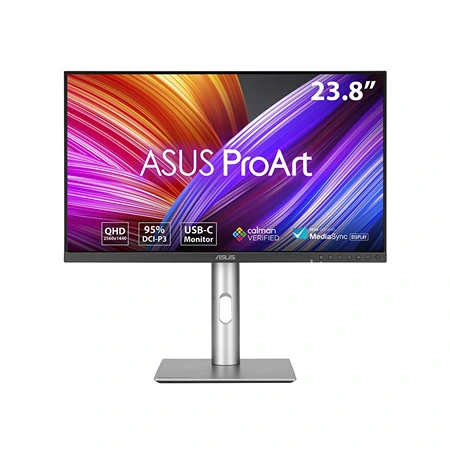
Asus ProArt PA24ACRV
Best 24” Monitor
A compact 23.8-inch QHD IPS monitor with factory-calibrated color and USB-C charging at up to 96W.
Compact does not mean low resolution on the Asus ProArt PA24ACRV. Its 23.8-inch, 2560×1440 panel packs QHD detail into a smaller footprint than the more common 27-inch format. The extra density produces crisp tools and images on a small desk, though interface scaling may be helpful for users who prefer larger type.
Asus specifies 95% DCI-P3 coverage, factory calibration, Calman verification, and Delta E below 2. Those claims make it a credible starting point for photography, illustration, and video work, while a hardware calibrator is still appropriate for controlled professional delivery. Different color-space presets help prevent wide-gamut content from oversaturating ordinary sRGB work.
USB-C provides up to 96W of charging with video and hub data, complemented by HDMI, DisplayPort, and DisplayPort output for daisy chaining. That makes the small panel a capable laptop dock or one half of a compact dual-display setup. The connected computer and cable must support the necessary DisplayPort mode for chained monitors.
Subscribe to Product Bible
Stay updated with the latest product reviews, buying guides, and expert recommendations. Fresh advice on the best things we've researched, tested, and reviewed, sent to your inbox weekly.
Want to know more about how we handle your data or opt out of marketing emails? Check out our Privacy Policy. If you have any questions, we're always here to help.
The stand adjusts for height, swivel, tilt, and portrait orientation, and the restrained chassis fits professional environments. DisplayHDR 400 support permits HDR input and modest highlights, but the 60Hz IPS panel lacks local dimming and deep native contrast. Its strengths are accurate SDR color and fine detail, not cinematic HDR or fast gaming.
At this price, some shoppers can move to a larger 27-inch QHD display, but few 24-inch alternatives combine this density, color handling, 96W USB-C, and ergonomics. It is especially well suited to a crowded editing desk, a portrait-oriented companion, or anyone who deliberately wants a smaller field of view without settling for 1080p.
Check the computer before paying for a monitor’s headline mode. GPU capability, Thunderbolt or DisplayPort version, cable certification, scaling behavior, and docking power all affect whether native resolution and refresh rate are available together. Desk depth and stand footprint deserve the same attention as diagonal size.
Finally, separate the display technology from the job. OLED excels at contrast and motion but requires static-content care; IPS favors text, viewing consistency, and predictable SDR; ultrawide resolution rewards specific workflows. A good return policy protects against dead pixels, uniformity variation, and simple ergonomic mismatch that specifications cannot predict.