The Dell UltraSharp U3225QE is my main monitor. I bought it in June, and it sits on my desk connected to my MacBook with a single Thunderbolt cable. I use it for coding and writing, for games and for watching movies and YouTube. Text looks sharp, which is what I care about most, and it has made my desk much simpler.
The short answer: if you work on a laptop and want one big, sharp screen that also acts as your dock, the U3225QE is one of the best monitors you can buy. The catch is the price. I paid $867 on Amazon, and Dell lists it at $969.99.
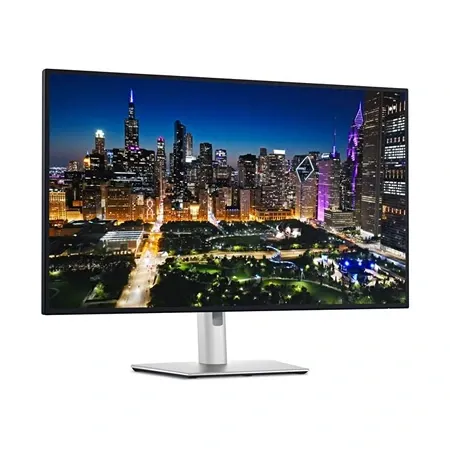
Best 32-Inch 4K monitor for a MacBook
Dell UltraSharp U3225QE
A 32-inch 4K, 120Hz monitor with a Thunderbolt hub that runs my whole desk from one cable.
Dell UltraSharp U3225QE Review: Quick Verdict
Most of what I do on this monitor is reading and writing text: code, documents, articles. On a 32-inch 4K screen with macOS scaling, text is crisp, and there’s room for two full windows side by side. That’s the part I’d miss most if I went back to a smaller or lower-resolution display.
The one-cable setup is the other big win. I plug in my MacBook, and it charges, drives the screen and connects to my keyboard and mouse, which are plugged into the monitor. The 120Hz refresh rate also makes scrolling and games look smoother than a typical office monitor.
My only complaint is the price. It’s a lot of money for an LCD monitor, even one this complete.
Dell UltraSharp U3225QE specs
| Spec | Value | Note |
|---|---|---|
| Price | $969.99 | At Dell; often less on Amazon |
| Screen | 31.5 in, 3840 x 2160 (4K) | |
| Pixel density | About 140 ppi | |
| Panel | IPS Black | |
| Refresh rate | 120Hz | Variable refresh from 48 to 120Hz |
| Contrast | 3,000:1 | |
| Brightness | 600 nits peak | VESA DisplayHDR 600 |
| Color | 99% DCI-P3, 100% sRGB | |
| Response time | 5ms gray to gray (Fast mode) | |
| Laptop charging | Up to 140W over Thunderbolt 4 | |
| Ports | TB4 in and out, USB-C in, 2 USB-C, 5 USB-A, HDMI 2.1, DP in and out, 2.5GbE, audio out | |
| Stand | Height, tilt, swivel and pivot | |
| Weight | 20.6 lb with stand | |
| Warranty | 3 years | With Advanced Exchange |
Sharp Text for Coding and Writing
The U3225QE has a 31.5-inch 4K panel, which works out to about 140 pixels per inch. On my Mac, I run it at the “looks like 1920 x 1080” setting, so macOS renders everything at double resolution. That’s why text looks so clean. Letters have smooth edges, small code fonts are easy to read, and long writing sessions are comfortable.
The trade-off is space. At that setting, you get the workspace of a 1080p monitor, just much sharper and larger. That’s plenty for a code editor next to a browser or a document next to research. If you want more room, macOS can scale it to look like 2560 x 1440, though text is then rendered at a non-integer scale and isn’t quite as crisp.
If sharpness matters more to you than size, a 27-inch 4K monitor like the U2725QE packs the same resolution into a smaller screen, at about 163 ppi. Apple’s Studio Display goes further with 5K at 27 inches, but costs much more.
One Cable From My MacBook
This is the feature that changed my desk the most. The U3225QE has a Thunderbolt 4 port that carries video, data and up to 140W of power. My MacBook connects with one cable, which charges the laptop and drives the display at 4K and 120Hz.
My keyboard and mouse plug into the monitor’s USB ports, so they connect to the MacBook through that same cable. When I sit down, I plug in one cable and everything works.
The hub has more than I use:
- Five USB-A and two USB-C downstream ports at 10Gbps.
- 2.5GbE Ethernet, for wired internet through the monitor.
- A Thunderbolt 4 out port for daisy-chaining a second monitor.
- A built-in KVM, which lets you share the keyboard and mouse between two computers.
Dell includes a 1-meter Thunderbolt 4 cable in the box. If your laptop sits farther away, you’ll need a longer one.
120Hz, Gaming and Video
Most office monitors run at 60Hz. The U3225QE runs at 120Hz, which makes scrolling, moving windows and the mouse cursor look noticeably smoother. It also helps in games, and I play on it as well as work. Variable refresh rate from 48 to 120Hz keeps motion smooth when a game’s frame rate dips.
It isn’t a dedicated gaming monitor. Dell rates the response time at 5ms in its Fast mode, and gaming monitors run at much higher refresh rates. For casual gaming alongside work, it’s a big step up from a 60Hz office screen.
For movies and YouTube, the IPS Black panel helps. Its 3,000:1 contrast ratio is about three times that of a typical IPS monitor, so dark scenes look less gray. It’s still an LCD with an edge-lit backlight, though, so in a dark room it can’t match the deep blacks of an OLED.
Color, Stand and Eye Comfort
The panel covers 99% of DCI-P3 and 100% of sRGB, so colors are vivid and accurate enough for most photo and video work. Dell also includes an ambient light sensor that can adjust brightness and color temperature to your room, and ComfortView Plus, which reduces blue light at the hardware level.
The stand adjusts for height, tilt, swivel and pivot, so it’s easy to get the screen at eye level. It also has a VESA mount if you’d rather use a monitor arm.
What to Know Before You Buy
It’s expensive. That’s my only real complaint. Dell lists it at $969.99, and Amazon is often cheaper. I paid $867 in June. It’s worth watching for sales.
There are no speakers or webcam. If you use your laptop closed, you’ll need separate speakers and a camera. I use separate desk speakers, and the monitor has a 3.5mm audio out if you’d rather run speakers from it.
Check your laptop’s support. The 4K at 120Hz over one cable and 140W charging need a Thunderbolt or USB-C laptop that supports them. A MacBook works. Some older or cheaper laptops won’t charge at full speed or run 120Hz.
Dell U3225QE vs. U2725QE
Dell UltraSharp U3225QE vs. U2725QE
| Spec | U3225QE | U2725QE |
|---|---|---|
| Price at Dell | $969.99 | $849.99 |
| Size | 31.5 in | 27 in |
| Resolution | 4K | 4K |
| Pixel density | About 140 ppi | About 163 ppi |
| Refresh rate | 120Hz | 120Hz |
| Thunderbolt charging | 140W | 140W |
| Best for | More room, bigger text | Sharper text, smaller desk |
The two monitors share the same panel technology, 120Hz refresh rate and Thunderbolt hub. The difference is size. I like the extra room of the 32-inch, but the 27-inch is sharper and cheaper. Both are in our guide to the best monitors.
Is the Dell UltraSharp U3225QE Worth It?
For me, yes. The text is sharp, the one-cable setup makes my desk simple, and it handles work, games and video well. The price is my only complaint, and it’s worth buying on sale if you can.
Buy it if you use a MacBook or another Thunderbolt laptop, spend most of your day with text, and want one large monitor that also replaces your dock.
Skip it if you mainly game and want a high-refresh gaming monitor, you want the sharpest possible text and don’t mind a smaller screen, or you need built-in speakers and a webcam.
Dell UltraSharp U3225QE FAQ
Does the Dell U3225QE work with a MacBook?
Yes. I use it with a MacBook over a single Thunderbolt cable, which drives the display at 4K and 120Hz, charges the laptop and connects the peripherals plugged into the monitor.
Is the Dell U3225QE good for coding?
It is for me. Text is sharp at macOS’s “looks like 1920 x 1080” setting, and there’s room for an editor and a browser side by side.
Is the Dell U3225QE good for gaming?
It’s good for casual gaming. The 120Hz refresh rate and variable refresh make motion smooth, but dedicated gaming monitors are faster.
Does the Dell U3225QE have speakers?
No. It has no speakers or webcam, but it does have a 3.5mm audio out.
How much does the Dell U3225QE cost?
Dell lists it at $969.99. I paid $867 on Amazon in June 2026, and Amazon’s price is often lower than Dell’s.