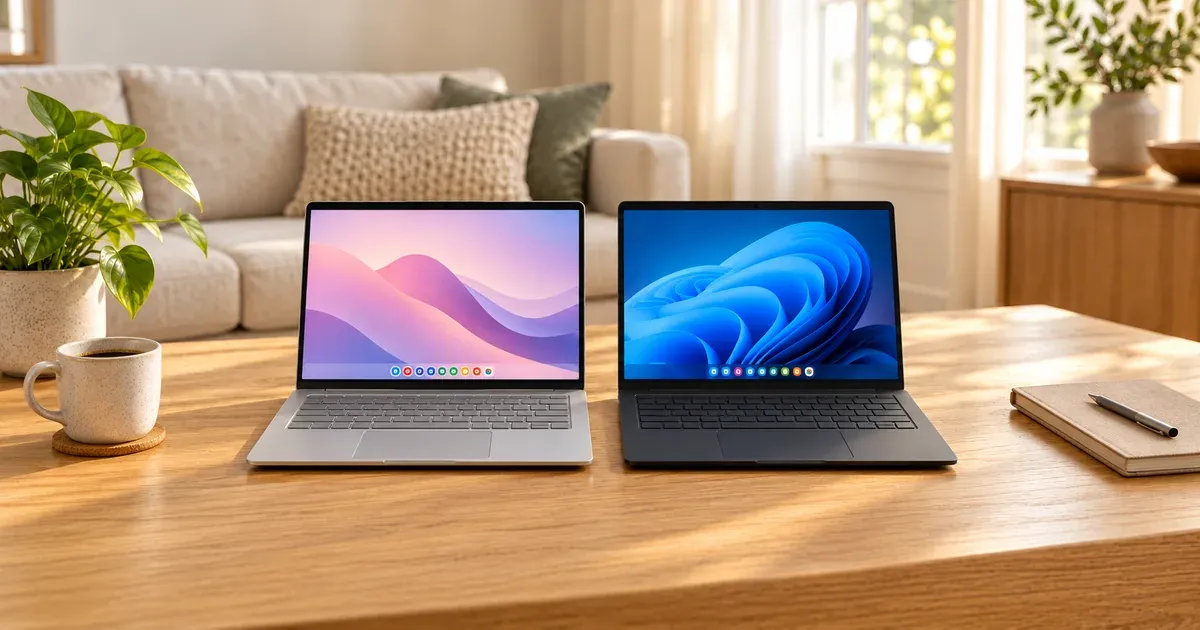
A Chromebook is a laptop. What sets it apart is the operating system. A Chromebook runs Google’s ChromeOS, which is built around the Chrome browser, web apps, and Android apps from the Google Play Store. A regular Windows laptop runs Windows 11 and can install almost any desktop program, from full Microsoft Office to Steam games to specialist software for school or work.
The short answer: buy a Chromebook if you spend most of your time in a browser, use Google Docs or Microsoft 365 on the web, and want something cheap, fast to start, low-maintenance, and hard to infect with malware. Buy a Windows laptop if you need a specific desktop program, play PC games, edit a lot of video or photos, or aren’t sure what software a class or job will require. At the same price, a Windows laptop does more, and a Chromebook stays simpler.
Chromebook vs. Windows laptop at a glance
| Spec | Chromebook | Windows laptop |
|---|---|---|
| Operating system | ChromeOS | Windows 11 |
| Software | Web apps, Chrome extensions, Android apps, optional Linux | Desktop programs (.exe), web apps, Microsoft Store apps |
| Microsoft Office | Web versions only | Full desktop apps |
| PC games | Cloud gaming only (GeForce NOW, Xbox Cloud Gaming) | Steam, Epic, Xbox app, and more |
| Updates | Automatic, 10 years from release on 2021+ models | Ongoing on Windows 11-capable hardware |
| Antivirus | Not needed, per Google | Microsoft Defender included |
| Typical storage | 128 GB eMMC on budget models; 256–512 GB SSD on better ones | 256–512 GB SSD on most; 128 GB on the cheapest |
| Typical price | $180 to $800 | $350 and up |
What a Chromebook Can Run
ChromeOS does three kinds of software:
- The web. Anything that runs in Chrome works on a Chromebook: Gmail, Google Docs, Microsoft 365 on the web, Canva, Netflix, Zoom, Slack, and Chrome extensions. For most people this covers the bulk of a day.
- Android apps from the Google Play Store, like Spotify, Apple Music, CapCut, and LumaFusion. Most consumer Chromebooks have the Play Store, but a school or work Chromebook may have it switched off by the administrator.
- Linux, which you can turn on in Settings for coding tools and editors like VS Code. It’s meant for developers and doesn’t support the camera or GPU acceleration.
What a Chromebook Can’t Run
The big one: Windows desktop programs. A Chromebook can’t install .exe files. Microsoft says you can’t install the desktop versions of Microsoft 365 or Office on a Chromebook. Its Android Office, Outlook, OneNote, and OneDrive apps aren’t supported on Chromebooks either, so you use Word, Excel, PowerPoint, Outlook, and Teams through the browser. The web versions handle everyday documents fine, but they lack some advanced features like complex Excel macros.
Other gaps to check before you buy:
- Specialist software. Desktop AutoCAD, SolidWorks, most tax software downloads, many engineering and accounting programs, and some school lockdown or testing apps need Windows or a Mac. Ask your school or employer for a software list first.
- Running Windows apps another way. Parallels Desktop for ChromeOS, which ran Windows in a virtual machine, was discontinued in April 2026. Google’s replacement streams Windows apps for businesses only.
- Steam games. Google ended its Steam for Chromebook beta at the start of 2026. Cloud gaming is the Chromebook route to PC games: GeForce NOW and Xbox Cloud Gaming both run in the browser and stream games you own or subscribe to, as long as your internet is fast (GeForce NOW asks for 15 Mbps for 720p and 25 Mbps for 1080p).
- Heavy creative work. Photoshop on the web, Clipchamp, and LumaFusion all run on Chromebooks, but long or 4K video projects push the limits of budget Chromebook hardware.
School testing is usually fine. Google says properly set-up Chromebooks meet K–12 testing standards, and many districts hand them out for exactly that reason.
Googlebook: Google’s New Laptop Platform
In October 2026 Google started selling Googlebooks, a new kind of laptop from Acer, ASUS, Dell, HP, and Lenovo. They run Googlebook OS, which is built on Android with desktop features carried over from ChromeOS. They run the full desktop Chrome browser with extensions, Android apps, native Adobe Photoshop and Lightroom, and an isolated Linux environment. They start at $899, come with up to 10 years of updates, and include a year of Google AI Pro and GeForce NOW.
Chromebooks aren’t going away overnight. Google still sells them, and it says ChromeOS devices will keep getting regular updates and security patches through mid-2034. It also says many of its newest Chromebooks will be able to switch to Googlebook OS, with details to come. A Chromebook bought today will be supported for years. Googlebook is the better fit if you want a premium laptop that works closely with an Android phone, but at $899 and up, it competes with mid-range Windows laptops and the MacBook Air, not with $300 Chromebooks.
Updates and How Long They Last
Chromebooks get automatic updates in the background. Google guarantees 10 years of automatic updates for Chromebooks released from 2021 onward, counted from the model’s release. The clock starts when the model came out, not when you bought it, so a Chromebook that’s been on shelves for three years has about seven left. Check the date before buying an older model on sale: on a Chromebook, it’s under Settings > About ChromeOS > Additional details > Update schedule, and Google publishes the update date for every model.
Windows laptops get Windows 11 updates as long as the hardware meets Microsoft’s requirements, which include TPM 2.0 and a supported processor. Any new Windows laptop qualifies. Windows 10 support ended on October 14, 2025. If you have an older Windows 10 laptop, Microsoft’s consumer Extended Security Updates program now runs to October 12, 2027. You can enroll free by syncing your PC settings to a Microsoft account, with Microsoft Rewards points, or for $30.
Security
ChromeOS is hard to infect. Every web page and app runs in its own sandbox, the system files are read-only, and the laptop checks itself every time it starts (verified boot), repairing itself if anything has changed. Your files are encrypted. Google says Chromebooks don’t need antivirus software, and it isn’t aware of any successful virus attack on one.
Windows 11 is much safer than it used to be. Microsoft Defender antivirus, the firewall, and SmartScreen are built in at no extra cost. But Windows runs downloaded programs, which is both its biggest strength and its biggest risk. For a child, a grandparent, or anyone who clicks on everything, a Chromebook is the lower-maintenance choice.
Storage and Offline Use
Chromebooks are designed to keep files in Google Drive, so budget models often have only 64 or 128 GB of eMMC storage, which is slower than an SSD. Better Chromebooks, including most Chromebook Plus models, have 256 or 512 GB SSDs.
You can work offline more than many people expect. Gmail can store about 30 days of mail and queue replies to send later. Google Docs, Sheets, and Slides work offline once you turn on offline access while connected, and purchased movies and offline games work without a connection. Still, a Chromebook is at its best online.
Budget Windows laptops are more often the ones short on space. The $372 Acer Aspire Go 15 we looked at has 128 GB of storage and ships in Windows 11 Home in S mode, which only installs apps from the Microsoft Store until you switch out of it. That switch is free but one-way. Aim for at least 256 GB on any Windows laptop.
Chromebook Plus
Chromebook Plus is Google’s label for Chromebooks with better hardware. When Google launched it in 2023, the minimum was an Intel Core i3 (12th gen) or AMD Ryzen 3 7000 processor, 8 GB of RAM, 128 GB of storage, a 1080p IPS screen, and a 1080p webcam. Current Chromebook Plus models also use newer chips like Intel’s Core 3 N355 and MediaTek’s Kompanio Ultra.
Chromebook Plus models add Google’s AI features, such as Gemini built into the system, NotebookLM, Help me read, text capture from images, and Magic Eraser. Buy one by January 31, 2027, and you can redeem 12 months of Google AI Pro with 5 TB of cloud storage, which Google values at $239.88. Basic Chromebooks get three months.
If you’re buying a Chromebook as your main laptop, get a Chromebook Plus. The extra RAM and faster processor are what keep a Chromebook feeling quick with 20 tabs and a video call open.
Price: What the Same Money Buys
At the low end, Chromebooks win. A basic Acer Chromebook 315 starts at $179, and the ASUS Chromebook CX15 below costs about $317 with 8 GB of RAM. Windows laptops at those prices tend to be sluggish.
Around $450, the two meet. Here’s a Chromebook Plus and a Windows laptop at nearly the same Amazon price:
Same price, different laptop
| Spec | Acer Chromebook Plus 514 | ASUS Vivobook Go 15 |
|---|---|---|
| Amazon price (Oct. 2026) | About $455 | About $449 |
| Operating system | ChromeOS (Chromebook Plus) | Windows 11 Home |
| Processor | Intel Core 3 N355 | AMD Ryzen 5 7520U |
| Memory and storage | 8 GB / 512 GB SSD | 8 GB / 512 GB SSD |
| Screen | 14 in., 1920 x 1200, touchscreen | 15.6 in., 1920 x 1080 |
| Extras | 12 months of Google AI Pro | Fast charging to 50% in 30 minutes |
The Chromebook gets a touchscreen, a taller screen, and a year of Google AI Pro. The Windows laptop gets a bigger screen and runs any Windows program. Above about $700, Windows laptops and MacBooks pull ahead on build quality, screens, and performance, and Googlebooks start at $899.
Battery Life
Battery claims depend on how each company tests them, so compare them loosely. Google lists 10 hours for most budget and Chromebook Plus models, and up to 17 hours for the newest Chromebook Plus models with MediaTek Kompanio Ultra chips. Budget Windows laptops are rated from about 8 hours (HP’s 15-inch laptop in mixed use) to 12.5 hours (the Acer Aspire Go 15). Video-playback tests, which many makers use, run longer than a real day of tabs and video calls.
Which Should You Buy?
Best chromebook for most people
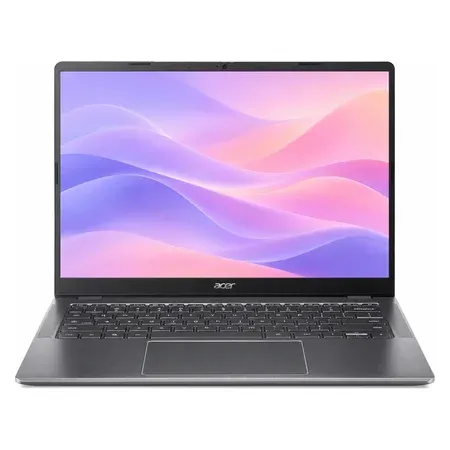
Acer Chromebook Plus 514
A 14-inch touchscreen Chromebook Plus with an Intel Core 3 N355, 8 GB of RAM, and a 512 GB SSD.
The Acer Chromebook Plus 514 is the Chromebook we’d buy for a student or as an everyday home laptop. It has Chromebook Plus features, a 1920 x 1200 touchscreen, Wi-Fi 6E, and a 512 GB SSD, which is a lot of storage for a Chromebook at about $455. It weighs 3.1 pounds and comes with a year of Google AI Pro.
Best cheap chromebook
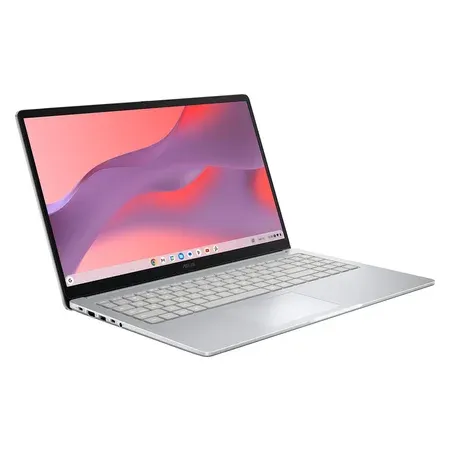
ASUS Chromebook CX15
A 15.6-inch Chromebook with an Intel N50, 8 GB of RAM, 128 GB of storage, and an anti-glare screen.
The ASUS Chromebook CX15 is the pick for web browsing, schoolwork, email, and streaming on a tight budget, at about $317. It has a large 15.6-inch anti-glare screen and 8 GB of RAM, twice what the cheapest Chromebooks have. Its listing rates it at up to 10 hours of battery life. Its Intel N50 is an entry-level chip, so keep it to everyday tasks.
Best budget windows laptop
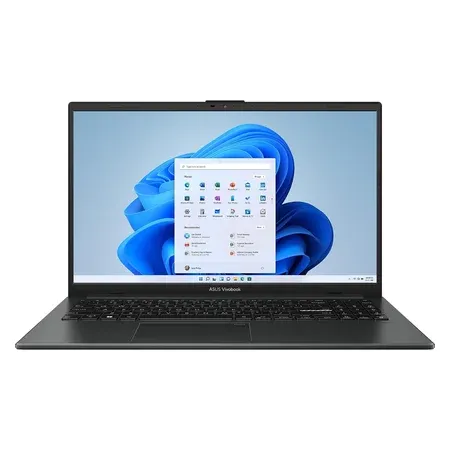
ASUS Vivobook Go 15
A 15.6-inch Windows 11 laptop with an AMD Ryzen 5 7520U, 8 GB of RAM, and a 512 GB SSD.
If you need Windows, the ASUS Vivobook Go 15 gets the basics right for about $449: a Ryzen 5 processor, a 512 GB SSD, Windows 11 Home, USB-C, HDMI, and Wi-Fi 6E. It runs desktop Office and Windows-only school software that a Chromebook can’t. It isn’t for gaming or heavy editing.
For more options, see our guides to the best Chromebooks, the best budget laptops, and the best laptops, including the MacBook Air.
Chromebook vs. Laptop FAQ
Is a Chromebook a laptop?
Yes. A Chromebook is a laptop that runs ChromeOS instead of Windows or macOS. The hardware is the same kind of thing: a screen, keyboard, trackpad, battery, and Intel, AMD, or MediaTek processor.
Can a Chromebook run Microsoft Word and Excel?
Yes, through the web versions at microsoft365.com, which work with a free Microsoft account or a Microsoft 365 subscription. You can’t install the desktop versions, and Microsoft doesn’t support its Android Office apps on Chromebooks.
Can I install Windows on a Chromebook?
Not in any supported way. Chromebooks can’t run Windows programs, and the Parallels Desktop option for businesses was discontinued in 2026. If you need Windows, buy a Windows laptop.
Is a Chromebook good for college?
It depends on your major. For writing, research, and online classes, a Chromebook Plus works well. Engineering, architecture, computer science, film, and some business programs need Windows or Mac software, so check your department’s requirements before buying.
Will my Chromebook become a Googlebook?
Google says many of its newest Chromebooks will be able to move to Googlebook OS but hasn’t said which ones yet. Either way, ChromeOS devices will keep getting updates through mid-2034, or until their own update date if that comes first.