A projector can make movies and games feel enormous, but the room has more influence on the result than any resolution badge. Ambient light weakens contrast, throw distance determines whether the picture will fit the wall, and a large image magnifies shortcomings that would be easy to miss on a television. The first decision is not simply how much to spend. It is where the projector will live and how much control you have over that space.
For most people, useful brightness, credible contrast, flexible placement, and uncomplicated access to movies matter more than the highest advertised specification. A fixed home-theater projector can deliver the strongest picture, while an all-in-one model trades some of that focus for streaming, speakers, and easier repositioning. Portable machines make another compromise: battery power and handles are convenient, but they do not remove the need for darkness and a flat screen.
The six projectors here solve distinct problems, from a low-cost smart setup to a carefully planned theater. None is the right answer for every room. If daytime viewing is the priority and you cannot dim the space, one of the best TVs will usually look better. A projector makes the most sense when image size, movie-night atmosphere, or a flexible display matters enough to accept more deliberate setup.
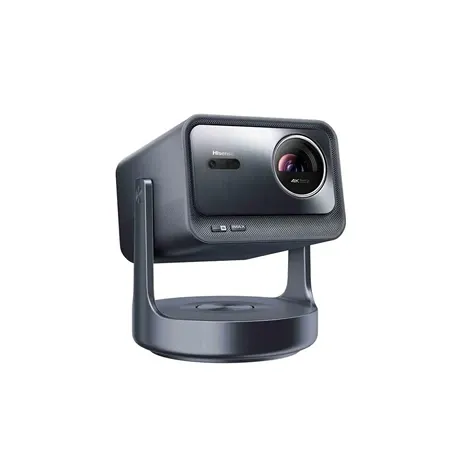
Best overall
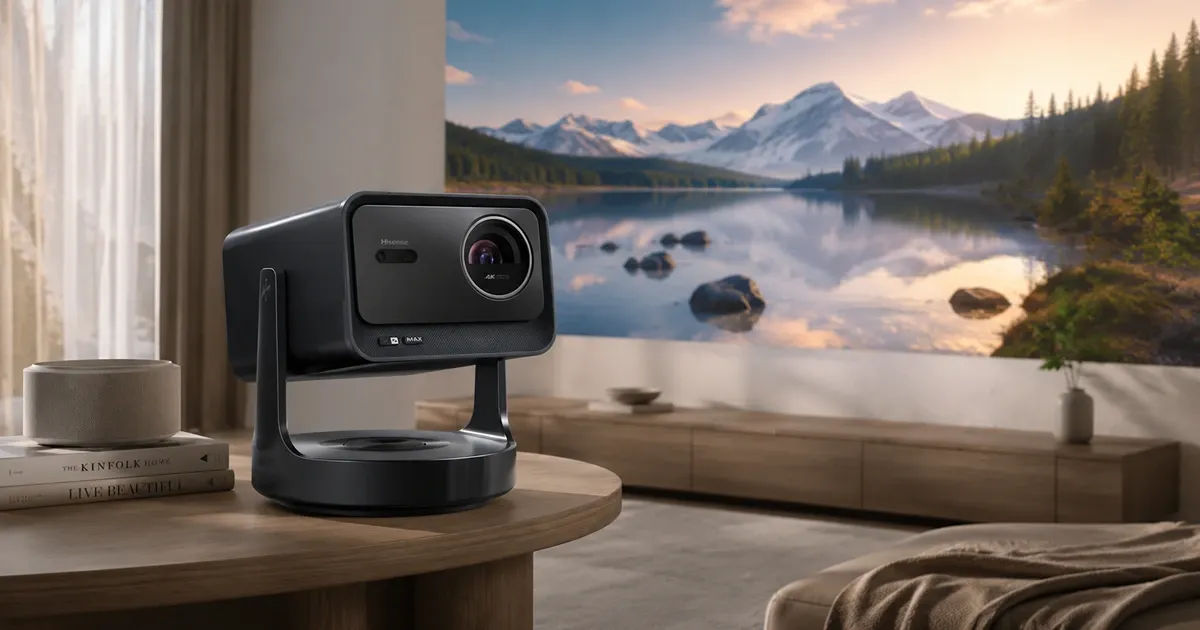
Hisense C2 Ultra
A bright triple-laser all-in-one projector with flexible placement, integrated sound, and strong movie and gaming capability.
Living-room projectors often make you choose between a substantial picture and genuinely easy setup. The Hisense C2 Ultra comes closest to avoiding that split. Its triple-laser light engine, pixel-shifted 4K DLP image, optical zoom, and integrated gimbal give it the range to handle movies, television, and games without turning the room into a permanent installation.
Hisense rates brightness at around 3,000 ANSI lumens, which gives this model more tolerance for ordinary room light than a small portable projector. It still benefits greatly from curtains or evening use. Dark scenes lose depth as ambient light reaches the screen, and no amount of output can create convincing black where the room itself is reflecting gray back at the viewer.
The gimbal stand and optical zoom make the C2 Ultra easier to aim and resize than a conventional box with a fixed base. Automatic focus and geometry tools can clean up a quick setup, but physical alignment remains preferable. Digital keystone correction reshapes the image by discarding part of the available pixel area, so convenience can come at the expense of fine detail.
Built-in speakers and an integrated smart platform reduce the amount of equipment needed for a casual movie night. App support and the operating system can vary between regional versions, however, so the exact US listing deserves a close look before purchase. Buyers who rely on a particular service should confirm it rather than assuming that every C2 Ultra has the same software package.
Gaming support is unusually capable for an all-in-one design, with low-latency and high-refresh modes that suit consoles and PCs. The projector is also easy to reposition when a game room needs to serve another purpose. Competitive players should still compare its supported resolution and refresh combinations with a dedicated display, since the best gaming monitors provide a sharper fit for desk-distance play and the highest frame rates.
The broad utility comes with real compromises. Black level and color accuracy do not reach the standard of the best dedicated theater projectors, the stand limits some permanent mounting arrangements, and people sensitive to DLP rainbow artifacts may notice brief flashes of color. For a multipurpose room where a polished large image and low-friction setup matter equally, the C2 Ultra offers the best balance in this group.
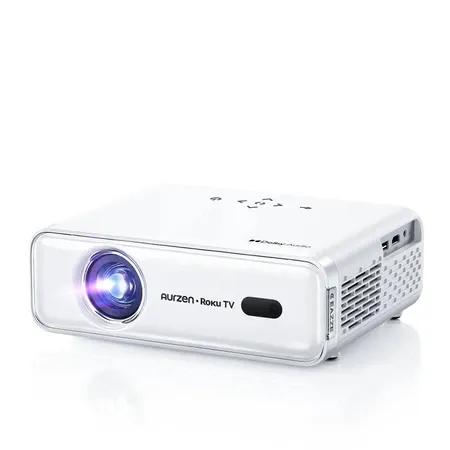
Best budget
Aurzen EAZZE D1R Roku TV Smart Projector
An inexpensive 1080p projector with Roku TV, autofocus, and built-in speakers for simple lights-off viewing.
At this price, the Aurzen EAZZE D1R Roku TV Smart Projector succeeds by removing extra purchases. Roku TV is built in, two 5-watt speakers handle basic sound, and the native 1080p panel provides enough detail for a modest living-room or bedroom image. It is a sensible first projector for occasional viewing, not a cut-price version of the much brighter models above it.
The 280-ANSI-lumen rating sets a firm boundary around how it should be used. Turn off the lights, wait until evening, and keep the picture to a reasonable size. Under those conditions, its color and clarity can be satisfying for the money. Daylight or an aggressively large image will wash it out quickly, regardless of the advertised 200-inch maximum.
Roku is the D1R’s strongest everyday advantage. Streaming services and inputs share a familiar interface, so the projector does not need a separate stick dangling from its single HDMI port. One USB port and an audio output cover basic accessories and external sound, but this is not the model for a rack full of sources.
Automatic focus helps when the machine is moved, and automatic keystone can square the picture when perfect placement is inconvenient. The latter should be used sparingly because it reduces usable image detail. There is also no integrated tilt stand, so getting the lens at the right height may require a stable table or a suitable mount rather than relying on digital correction.
Budget hardware shows up in other ways. Fan noise can be noticeable during quiet scenes, manual picture controls are limited, and the single-LCD optical system does not have the refinement of more expensive projectors. The D1R is mains powered, has no meaningful weather protection, and should not be mistaken for a battery-powered outdoor model simply because it is light enough to carry.
Standard warranty coverage lasts one year, with a second year available through registration. That is less reassuring than the longer coverage attached to some established home-theater models, but it is consistent with the D1R’s low-cost position. Choose it when built-in streaming and acceptable dark-room 1080p viewing are the essentials; spend more if you need daytime brightness, more precise placement, or a larger image that still holds its contrast.
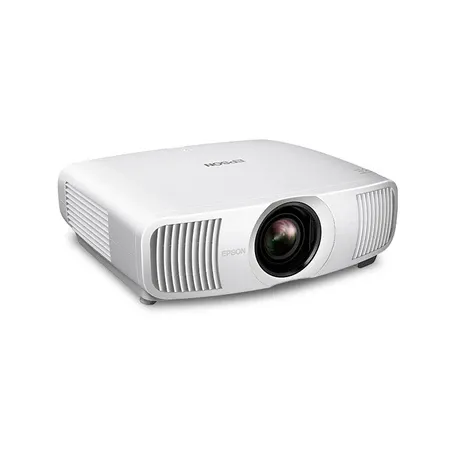
Best upgrade
Epson Home Cinema LS11000
A premium laser projector with excellent contrast, accurate color, and motorized lens controls for a serious fixed theater.
A meaningful projector upgrade should improve the picture and the installation rather than simply add conveniences. The Epson Home Cinema LS11000, model V11HA48020, does both with a laser light source, a three-chip 3LCD imaging system, strong contrast and color, and unusually flexible lens controls in a chassis meant to stay aligned with a proper screen.
The LS11000 uses pixel shifting to place a 3840-by-2160 image onscreen. It does not use native 4K imaging panels, but it can still produce the detail expected from contemporary 4K sources. Its official 2,500-lumen rating applies to both color and white brightness, which is useful for preserving rich color rather than producing an impressive white measurement that does not translate to normal viewing.
Motorized focus, zoom, and lens positioning are central to the upgrade. They make it far easier to fill a screen cleanly from different mounting points and to save lens positions for different aspect ratios. That flexibility is valuable in a finished room, where moving a ceiling mount or rebuilding cabinetry is much harder than adjusting the projector.
Two HDMI 2.1 inputs support 4K at 120Hz, and input lag is rated below 20 milliseconds. Those capabilities let a premium theater handle current consoles without treating gaming as an afterthought. The machine has no built-in speakers or streaming platform, so a source device, receiver or sound system, and appropriate cabling need to be included in the total installation plan.
Epson backs the projector with a two-year limited warranty and full-unit replacement support, and the model continues to receive firmware updates. That support adds confidence to a substantial purchase. The tradeoffs remain substantial too: the chassis is large, the asking price is high, and there is no 3D support for anyone maintaining a compatible disc collection.
This is not the convenient choice for moving between rooms or projecting onto a blank wall on a whim. It pays off in a controlled-light space with a good screen, external audio, and time spent on alignment. Buyers making that commitment receive the most coherent dedicated-cinema package among these picks, while everyone else will get more daily convenience from an all-in-one model.
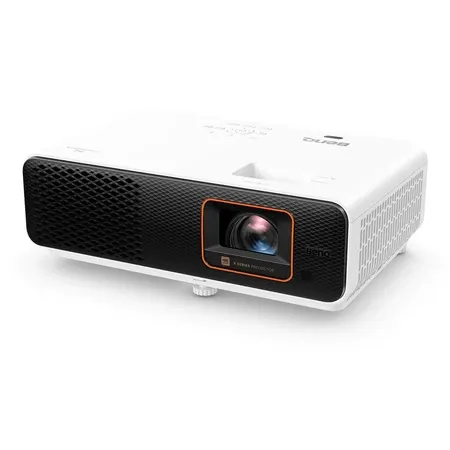
Best projector for gaming and small spaces
BenQ X500i
A short-throw 4K gaming projector with low latency, high-refresh modes, and enough movie performance to anchor a compact media room.
Limited floor space changes projector shopping because a conventional lens may need to sit behind the sofa to make a large picture. The BenQ X500i uses a 0.69-to-0.83 throw ratio to create that image from much closer to the screen. This short-throw geometry, paired with responsive gaming modes, makes it particularly well suited to a compact den, apartment, or dedicated game room.
Its four-LED light engine is rated at 2,200 ANSI lumens, and the DLP system uses pixel shifting for a 4K onscreen image. Color is a strength within this class, with stated coverage of 95 percent of Rec.709 and 84 percent of DCI-P3. Black levels remain more limited than on a premium theater projector, but movie performance is credible enough that the X500i does not need to be reserved for games.
BenQ rates input lag at 16.7 milliseconds for 4K at 60Hz, 8.3 milliseconds for 1080p at 120Hz, and 4.2 milliseconds for 1080p at 240Hz. The faster figures require dropping to 1080p, so there is no promise of 4K at 120Hz here. That is a reasonable exchange for competitive play, while cinematic games can favor the sharper 4K presentation at 60Hz.
Placement requires more care than the short-throw label might suggest. A 1.2x zoom offers only a narrow adjustment range, and there is no optical lens shift. Small changes in height or angle can therefore matter, while automatic keystone should be a last resort because digital geometry correction gives up some image detail.
Two 5-watt speakers and an internal connection for the included streaming hardware make the projector usable without a full component system. Two external HDMI 2.0b inputs serve consoles and other sources. The rated LED life reaches 20,000 hours in the normal mode and 30,000 in Eco, while the standard US projector warranty extends to three years.
Potential rainbow artifacts remain part of the single-chip DLP design, and dark-room contrast will not satisfy someone shopping primarily for serious cinema. The X500i earns its place by solving a physical problem as much as a performance one. It is the pick for players who want a big, responsive image in a room where a long throw is impossible and who are willing to measure placement carefully before mounting anything.
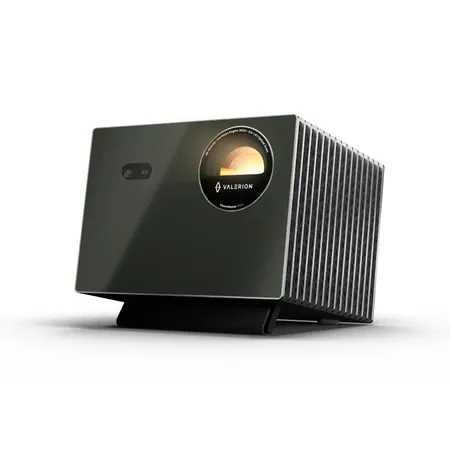
Best premium All-in-One
Valerion VisionMaster Pro 2
A triple-laser 4K projector with optical zoom, Google TV, broad HDR, and gaming features.
The Valerion VisionMaster Pro 2 is for someone who wants much of a serious theater’s ambition without giving up the convenience of an all-in-one projector. Its RGB triple-laser light engine, pixel-shifted 4K DLP image, wide optical zoom, Google TV, and built-in speakers form a more complete system than a traditional fixed-installation chassis.
Color breadth and fine detail are the clearest reasons to pay the premium. Valerion claims 3,000 ISO lumens, but the brightest selectable behavior is not necessarily the most color accurate or pleasant to watch. A balanced picture mode is the meaningful benchmark for daily use, and buyers should not compare that ISO figure directly with ANSI ratings produced under a different method.
The 0.9-to-1.5 optical zoom range creates far more placement freedom than the small zoom found on many lifestyle projectors. Resizing optically also avoids the detail loss caused by leaning on digital keystone correction. Focus and zoom adjustments are motorized, though the adjustment steps can feel coarse when trying to make a very fine change on a large screen.
Format and connection support are unusually complete. Dolby Vision, HDR10+, dynamic tone mapping, and Google TV cover a wide range of modern material, while three HDMI inputs include two full-bandwidth HDMI 2.1 connections. Very low gaming latency strengthens the case for using the Pro 2 as the center of a premium mixed-use room rather than as a movie-only display.
Some of its most ambitious processing needs restraint. The enhanced dynamic-black behavior can introduce color shifts or visible changes in brightness, and calibration can drift. DLP rainbow flashes and laser speckle may also bother sensitive viewers. These are not guaranteed problems for every owner or screen, but they are important reasons to buy from a seller with a useful return window.
The Pro 2 makes sense when optical placement range, broad HDR compatibility, strong color, streaming, and modern gaming inputs will all be used. It does not displace the Epson in a carefully built theater, where the fixed-installation design and more predictable image behavior are the point. It is instead the higher-performing self-contained option for a living room or media space, and its extra cost pays for capabilities that extend beyond a brighter headline number.
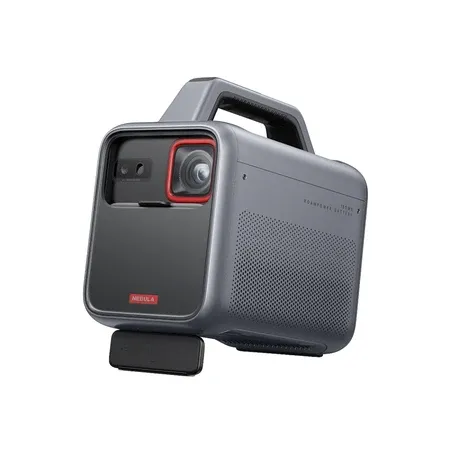
Best outdoor
Nebula Mars 3
A rugged battery projector with a bright 1080p image, integrated stand, powerful speakers, and practical features for backyard movie nights.
Most portable projectors are simply small indoor models with a battery. The Nebula Mars 3 is designed more deliberately for the backyard, with an integrated handle and stand, IPX3 water resistance, documented resistance to a half-meter drop, and a 40-watt speaker system. Those features make transport and setup less fragile without pretending that electronics belong outside permanently.
The native 1080p LED image is rated at 1,000 ANSI lumens, substantially more output on paper than many battery-powered alternatives. Darkness is still essential. Even a bright portable projector cannot compete with twilight or a nearby porch light, and a smooth, tensioned screen will look much better than a rippled sheet or textured wall.
An internal battery separates the Mars 3 from mains-powered models that are merely easy to carry. Playback is claimed at up to five hours in Eco mode, but lower-power settings reduce image brightness. For the strongest picture, plan around a shorter unplugged session or place the projector where a safe outdoor-rated extension can reach it.
The built-in handle doubles as part of an integrated stand, reducing the number of pieces that need to travel into the yard. A camp light helps with setup before the movie starts, and the substantial speakers are useful where a separate sound system would add cables and another battery. These conveniences make the projector feel like one transportable unit rather than a kit assembled from unrelated parts.
Outdoor-ready is not the same as weatherproof. IPX3 indicates limited resistance to water, there is no dust rating, and the projector should come inside when the night is over. The larger battery and speakers also make it heavy and bulky beside casual portable models, so this is better for carrying from the house to the patio than packing into a small travel bag.
Choose the Mars 3 when the recurring plan is a backyard movie, campsite screening, or another after-dark event where power and external audio would be inconvenient. A lighter portable is easier for frequent travel, and an indoor all-in-one delivers more picture for the money in a living room. In its intended setting, however, the Mars 3 offers the most purposeful combination of brightness, resilience, sound, and battery power.
Start with the room, then work backward to the projector. Measure the lens-to-screen distance, decide where power and source cables can run, and estimate the largest image that remains bright enough for the viewing conditions. Physical alignment and a sensible screen size will improve the result more than aggressive keystone correction or an unrealistic maximum-diagonal claim.
Be honest about how often the lights will stay on. A high-output all-in-one can tolerate some ambient light for casual viewing, but satisfying movies still reward darkness. A dedicated theater model asks more of the room and installation, while a portable projector exchanges absolute picture quality for the freedom to set up where outlets and permanent mounts are impractical.
Finally, verify the exact model, regional software, ports, warranty, and included accessories before ordering. Similar product names can conceal different platforms or bundles, and brightness numbers are not always measured the same way. The best purchase is the projector whose compromises fit the way you will actually watch, not the one with the longest feature list.