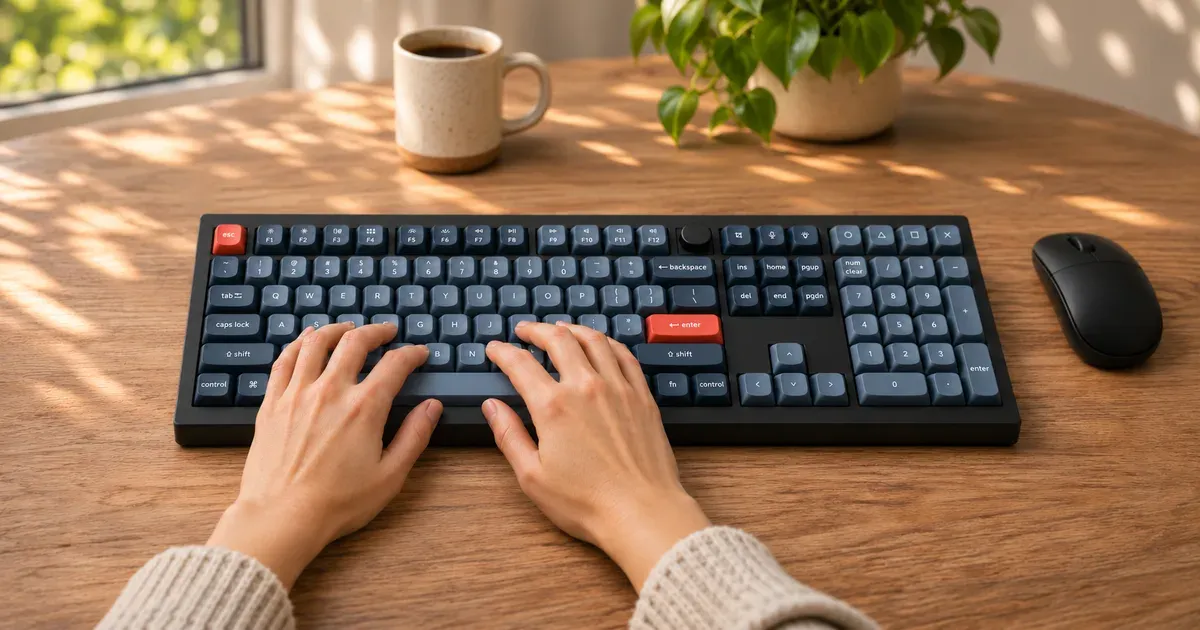
The Keychron V6 Max is the keyboard I type on every day. Mine has Gateron Jupiter Brown switches, and I use it wired to my Mac through my monitor’s USB hub. I love how it feels and sounds.
The short answer: at about $120, the V6 Max is one of the best-value full-size mechanical keyboards for a Mac. It comes with Mac keycaps, has a real volume knob and feels far more expensive than it is. If you don’t need the number pad, the smaller V5 Max saves a little desk space.
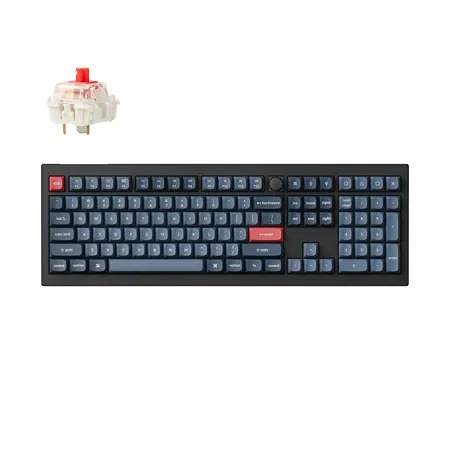
Best Full-Size mechanical keyboard for a mac
Keychron V6 Max
A full-size mechanical keyboard with a volume knob, Mac keycaps and hot-swappable switches that I use every day.
Keychron V6 Max Review: Quick Verdict
I picked the V6 Max for three reasons: the volume knob, the Mac layout and the price. It delivered on all three. The knob puts volume under one finger, the Command and Option keys are where a Mac user expects them, and it costs less than Apple’s own keyboard with a number pad.
The best part, though, is typing on it. The brown switches have a soft bump without a loud click, and I love both the feel and the sound.
Keychron V6 Max specs
| Spec | Value | Note |
|---|---|---|
| Price | $119.99 | At Amazon, Brown switches |
| Layout | Full-size (100%) with number pad and knob | |
| Switches | Gateron Jupiter Red, Brown or Banana | Hot-swappable |
| Keycaps | Double-shot PBT, OSA profile | |
| Mounting | Gasket mount | |
| Connection | USB-C wired, 2.4GHz and Bluetooth | |
| Polling rate | 1,000Hz wired and 2.4GHz | |
| Battery | 4,000mAh | |
| Software | Keychron Launcher, QMK and VIA | |
| Case | Plastic | |
| Weight | 1,110g (about 2.45 lb) | |
| Size | 17.6 x 5.9 in | |
| Compatibility | macOS and Windows | Mac and Windows keycaps included |
How It Feels and Sounds
The V6 Max is gasket mounted, which means the plate that holds the switches sits on soft gaskets instead of being screwed rigidly to the case. Combined with the foam layers inside, that gives each keystroke a slightly cushioned bottom-out and keeps the sound low and rounded. The stabilizers on the space bar and other long keys are screw-in, and they don’t rattle.
The Gateron Jupiter Brown switches are tactile: you feel a small bump partway down that tells you the key has registered, but there’s no click. That makes them a good middle ground for an office or a shared room. If you want smooth, linear keys, choose Red, and if you want a stronger bump, choose Banana.
The double-shot PBT keycaps have a lightly textured feel and shouldn’t wear shiny the way cheaper ABS keycaps do. The legends are molded in, so they won’t rub off.
The Volume Knob and Mac Layout
The knob in the top-right corner controls volume by default. Turn it to change the volume, and press it to mute. It’s quicker than reaching for function keys, and it was one of the reasons I chose this keyboard.
Keychron ships the V6 Max with Mac keycaps and a switch on the back to change between macOS and Windows modes. On a Mac, the bottom row reads Control, Option and Command, and the function row handles brightness, Mission Control and media keys as you’d expect. Windows keycaps come in the box if you ever need them.
Wired, Wireless and Software
I use the V6 Max wired, plugged into my monitor’s USB hub, so it never needs charging. It can also connect over 2.4GHz with the included receiver or over Bluetooth 5.1 to up to three devices. Wired and 2.4GHz run at a 1,000Hz polling rate, while Bluetooth runs at 90Hz, which is fine for typing. Keychron rates the 4,000mAh battery at up to 190 hours with the backlight off and up to 100 hours with the RGB at its lowest brightness.
You can remap every key, set up layers and macros, and change what the knob does in Keychron Launcher, which runs in Chrome, Edge or Opera while the keyboard is connected by cable, or in VIA.
What to Know Before You Buy
It’s big. A full-size layout with a number pad is close to 18 inches wide, which pushes your mouse farther out. If you rarely use the number pad, a smaller board keeps your mouse closer.
It’s tall. Like most mechanical keyboards, the front edge sits higher than a laptop keyboard. Some people type comfortably without support, and others will want a wrist rest.
There’s a newer V6 Ultra 8K. Keychron now sells the V6 Ultra 8K for the same $119.99, with an 8,000Hz polling rate, its own Silk POM switches and a much longer rated battery life. The V6 Max is still a great keyboard, and the faster polling mostly matters for competitive gaming, but compare the two before you buy.
The switches are replaceable. The hot-swap sockets accept most MX-style switches, so if you decide you want a different feel later, you can change switches without soldering.
Keychron V6 Max vs. V5 Max
Keychron V6 Max vs. V5 Max
| Spec | V6 Max | V5 Max |
|---|---|---|
| Layout | Full-size (100%) | 96%, compact with number pad |
| Number pad | Yes | Yes |
| Volume knob | Yes | Yes |
| Desk space | More | Less |
| Best for | Standard layout, separate arrow and navigation keys | Number pad in less space |
The V5 Max squeezes a number pad into a compact layout by removing the gaps between key groups. It saves space, but the arrow and navigation keys end up in less familiar spots. If you want a standard full-size layout, get the V6 Max. Both are in our guide to the best mechanical keyboards.
Is the Keychron V6 Max Worth It?
For me, absolutely. I love how it feels and sounds, the knob and Mac layout were exactly what I wanted, and it costs about $120. I’d buy it again.
Buy it if you want a full-size mechanical keyboard with a number pad, a volume knob and a proper Mac layout without spending much.
Skip it if you’re short on desk space, you want an aluminum case, or you prefer a low-profile keyboard that feels closer to a laptop’s.
Keychron V6 Max FAQ
Does the Keychron V6 Max work with a Mac?
Yes. It ships with Mac keycaps and has a switch for macOS mode, so the Command, Option and media keys work as expected.
Which Keychron V6 Max switch should I get?
I use Brown, which has a soft tactile bump without a click. Red is smooth and linear, and Banana has a stronger bump.
Is the Keychron V6 Max wireless?
Yes. It works wired over USB-C, over 2.4GHz with the included receiver and over Bluetooth. I use mine wired.
What does the knob on the Keychron V6 Max do?
By default, it controls volume, and pressing it mutes. You can reassign it in Keychron Launcher or VIA.
How much does the Keychron V6 Max cost?
It’s about $120 on Amazon with Brown switches.