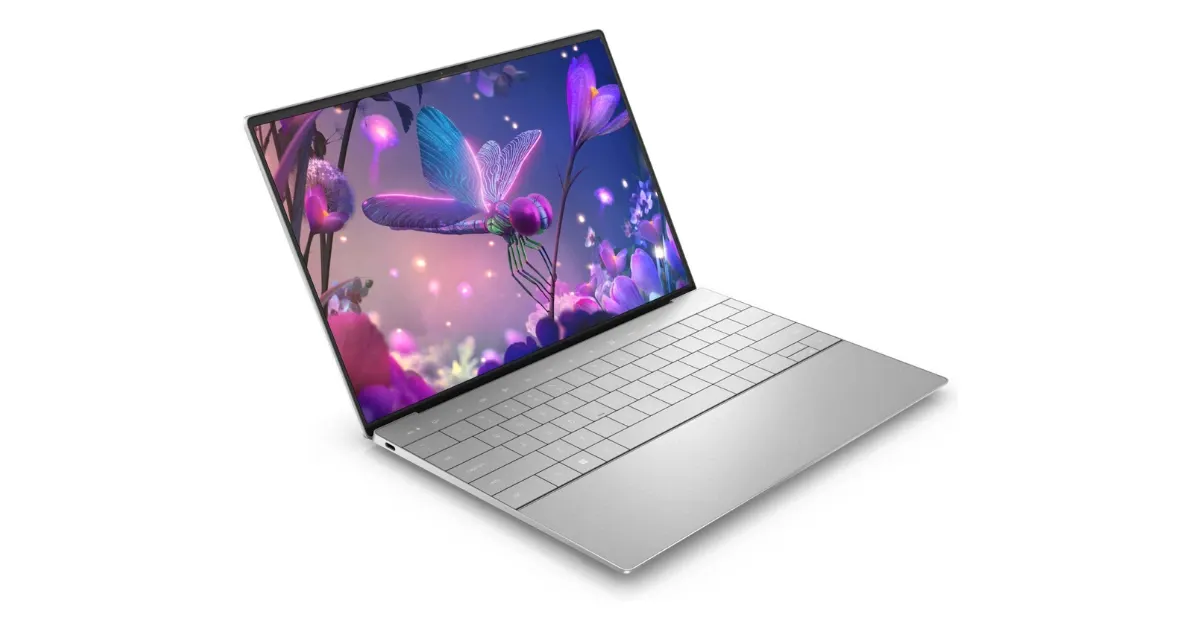
Dell XPS 13 (9345)
A 2.6-pound Snapdragon X Elite ultrabook with a 120Hz display and around 20 hours of battery life in testing.
The Dell XPS 13 9345 is the version of Dell’s flagship ultrabook built around Qualcomm’s Snapdragon X Elite instead of an Intel chip. That switch changes what the XPS 13 is best at. It is still a thin, premium 13-inch laptop, but its standout feature is now battery life: in independent testing, it ran for roughly 19 to 21 hours on a charge, which puts it among the longest-lasting Windows laptops you can buy.
It is also a laptop with real tradeoffs. There are only two ports, the keyboard and touchpad favor clean looks over familiarity, and because it runs Windows on Arm, a small but important set of apps and games will not work. If those limits do not affect you, the XPS 13 9345 is one of the best ultraportables available.
Quick Verdict
Buy the XPS 13 9345 if battery life is your top priority, you want a premium, light 13-inch Windows laptop, and the apps you depend on run on Windows on Arm. It’s fast and quiet for everyday work and can last most of two days of light use.
Skip it if you game, rely on x86-only software or drivers, or want a headphone jack and USB-A ports. And check prices against the 2026 XPS 13, which starts far lower with an Intel chip; it’s slower, but it may be all the laptop you need.
Dell XPS 13 9345 specs (linked configuration)
| Spec | Value | Note |
|---|---|---|
| Processor | Snapdragon X Elite X1E-80-100 | 12 cores, 45 TOPS NPU |
| Memory | 16GB LPDDR5X | Soldered; 32GB and 64GB offered |
| Storage | 512GB NVMe SSD | |
| Display | 13.4-inch, 1920 x 1200, 120 Hz | QHD+ touch and 3K OLED options |
| Ports | 2x USB-C (USB4, 40Gbps) | No headphone jack or USB-A |
| Webcam | 1080p with Windows Hello | |
| Wireless | Wi-Fi 7, Bluetooth 5.4 | |
| Battery | 55Wh | About 19 to 21 hours in browsing tests |
| Weight | 2.6 lb | |
| Price | About $1,300 | Amazon |
Design and Build
The XPS 13 is machined from aluminum with a glass palm rest, and it feels as expensive as it looks. At 2.6 pounds and about 0.6 inches thick, it is light enough to forget in a backpack and small enough for a tray table.
The chassis does run warm under sustained load. The area near the hinge can get hot enough that it is more comfortable on a desk than on bare legs during long, demanding tasks.
Display
The configuration we link to uses the base 13.4-inch, 1920 by 1200 panel with a 120Hz refresh rate. The higher refresh rate makes scrolling and window animations look smooth, and at around 455 nits, it is bright enough for most rooms. Its weakness is color: it covers a noticeably narrower color range than the screens on most premium laptops, so photo and video editors should look elsewhere.
Dell also sells the 9345 with a sharper 2560 by 1600 120Hz touchscreen and a 2880 by 1800 OLED touchscreen. The OLED looks richer, but it runs at 60Hz and costs more battery life. The base screen is the better match for anyone buying this laptop primarily for endurance.
Performance
The Snapdragon X Elite X1E-80-100 is a 12-core Arm processor, and it is fast. In everyday work, including dozens of browser tabs, Office apps, video calls, and light photo editing, the XPS 13 feels quick and stays quiet. Our linked model pairs it with 16GB of memory and a 512GB SSD, which is enough for most people. Memory is soldered, so choose a 32GB configuration up front if you run virtual machines or large creative projects.
The integrated Adreno graphics are the weak point. Games and 3D apps run poorly compared with laptops that have stronger integrated or dedicated graphics. This is a work laptop first.
Windows on Arm Compatibility
Because the Snapdragon chip uses an Arm architecture, Windows runs many older apps through an emulation layer called Prism. Most mainstream software, including Microsoft Office, Chrome, Edge, Zoom, Slack, Spotify, and Adobe Photoshop and Lightroom, now runs natively or works well under emulation.
The exceptions matter, though. Many games with anti-cheat software will not run. Some VPN clients, printer and scanner drivers, specialized engineering or lab software, and older utilities that depend on custom drivers may not work at all. If your job or coursework depends on a specific Windows program, confirm that it supports Windows on Arm before buying.
Battery Life
This is the reason to buy the XPS 13 9345. Its 55Wh battery and efficient Snapdragon chip lasted about 19 hours in independent continuous web-browsing testing, and over 20 hours after a firmware update. Dell’s own rating is up to 27 hours of video playback on the base screen. In practice, that means a full day of work or classes with plenty left over, and often two lighter days between charges.
Keyboard and Touchpad
The XPS 13 uses Dell’s edge-to-edge, zero-lattice keyboard with large keycaps and very little space between them. It looks striking, but many people find it cramped at first. The function row is a strip of capacitive touch keys rather than physical buttons, which is awkward if you rely on function-key shortcuts.
The touchpad is invisible, a seamless section of the glass palm rest with haptic feedback instead of a physical click. It tracks accurately, but because there are no visible edges, it takes some getting used to.
Ports and Connectivity
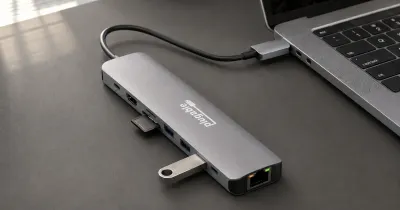
Port selection is the XPS 13’s biggest practical limitation. You get two USB-C ports, one on each side, with fast 40Gbps data transfer, display output, and charging. There is no headphone jack, no USB-A port, and no card reader, so plan on Bluetooth headphones or a small USB-C hub if you use wired accessories. Wireless connectivity is excellent, with Wi-Fi 7 and Bluetooth 5.4.
Webcam
The 1080p webcam is sharper than the 720p cameras on many thin laptops and works well for video calls. It also supports Windows Hello face login.
XPS 13 9345 vs. the 2026 XPS 13
Dell released a new XPS 13 for 2026 (model DX13260) that takes the line in a different direction. Instead of a Snapdragon chip, it uses Intel’s low-power Core 5 320 and starts at about $699 with 8GB of memory and 512GB of storage, or about $899 with 16GB. It’s lighter, at roughly 2.2 pounds, and it runs every Windows app because it’s Intel.
The trade-off is speed. The Core 5 320 has far fewer performance cores than the Snapdragon X Elite, so the 9345 is much faster in multi-core work, and the 2026 model’s two USB-C ports run at 10Gbps rather than 40Gbps. The 8GB base model is also tight for heavy multitasking, since memory is soldered.
| XPS 13 9345 | XPS 13 (2026) | |
|---|---|---|
| Processor | Snapdragon X Elite (Arm) | Intel Core 5 320 |
| Memory | 16 to 64GB | 8 or 16GB |
| App compatibility | Windows on Arm | All Windows apps |
| USB-C | 2x 40Gbps | 2x 10Gbps |
| Weight | 2.6 lb | About 2.2 lb |
| Starting price | About $1,300 (Amazon) | About $699 (Dell) |
Choose the 9345 for performance and the longest battery life. Choose the 2026 XPS 13 if you want the lowest price on a premium-feeling XPS, need full x86 compatibility, and your work is mostly browsing and Office apps. For more options, see our best laptops guide and our MacBook Air M4 review.
Who Should Buy It, and Who Should Skip It
Buy it if you want a light, premium Windows laptop with exceptional battery life, and your software runs on Windows on Arm.
Skip it if you play games, depend on x86-only apps or drivers, need built-in USB-A or a headphone jack, or want the lowest price on an XPS.
Final Verdict
The Dell XPS 13 9345 is the ultraportable to buy if battery life is your top priority and your software runs on Windows on Arm. It is light, fast, quiet, and capable of running for most of two days on a charge.
Skip it if you game, need specialized x86-only software, or depend on wired accessories and want ports built into the laptop. For travelers, students, and writers who live in a browser and Office apps, though, it is one of the best Windows laptops available.