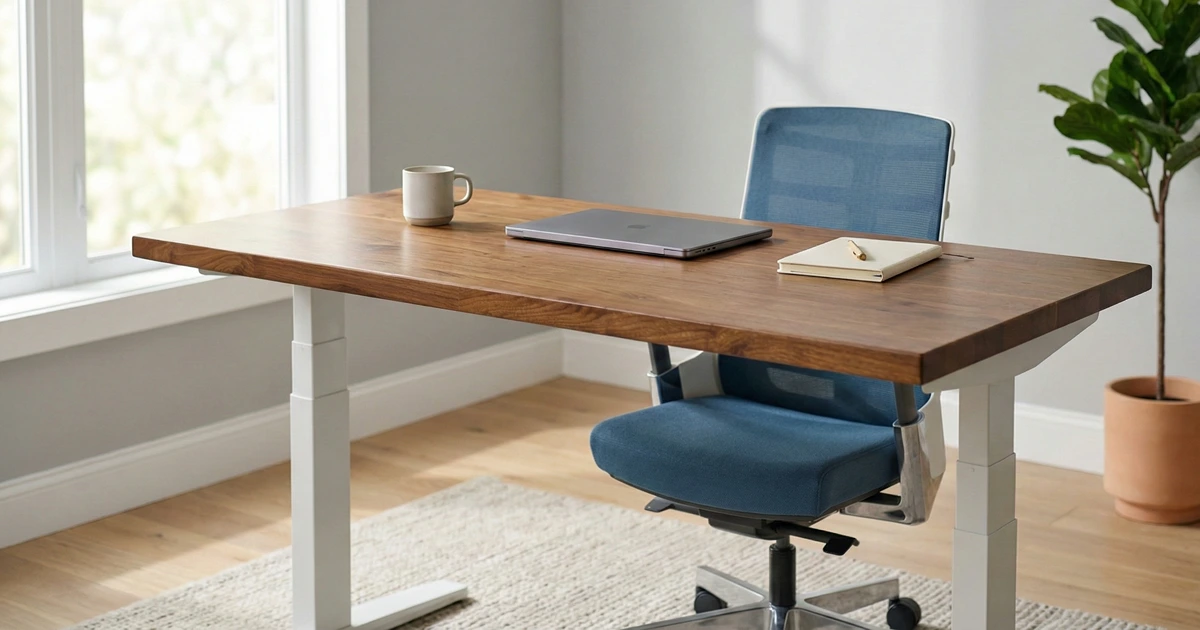

No matter how ergonomic or well-designed your office chair is, spending an entire day sitting still takes a toll on your body. But standing nonstop isn’t ideal either since your legs, feet, and lower back eventually start to complain. The real solution lies in finding a healthy balance between the two.
That’s where an electric, height-adjustable desk comes in. With a quick press of a button, you can switch from sitting to standing in seconds, keeping your body moving and your energy levels up throughout the day. This flexibility helps improve posture, circulation, and focus, letting you stay productive without the physical strain that comes from long hours in one position.
Modern standing desks also offer plenty of personalization options, including different desktop materials, cable management systems, and programmable height settings. The best models remain stable even at their tallest height, adjust smoothly, and fit naturally into your workspace so you can focus less on your setup and more on your work.
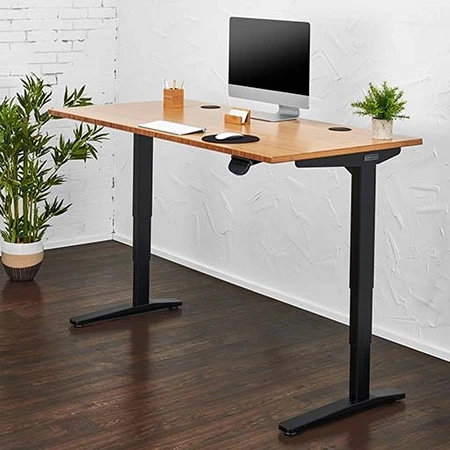
UPLIFT V3 Standing Desk
Best Overall Option
Smooth, quiet height adjustment paired with deep customization and dependable stability.
The UPLIFT V3 Standing Desk stands out as one of the strongest all around options for anyone seeking a balance of performance, build quality, and deep customization. It has earned the top spot in our guide thanks to a smooth, quiet lift, a frame that stays steady under a real workstation, and a configuration catalog that lets you make the desk feel like yours rather than a generic piece of office furniture. The dual-motor frame adjusts from 22.6 to 48.7 inches and carries a listed 355-pound capacity, which leaves plenty of headroom for a multi-monitor setup with speakers, a dock, and the usual desk clutter. While it is not the single most stable model available, it comes very close, making it a dependable choice for both sitting and standing workflows.
In our everyday use, the desk stays planted for normal typing, browsing, and writing, even with a laptop on a stand, a 32-inch display, and speakers on top. At taller standing heights it can show a touch more front to back movement than the most rigid desks in the category, particularly around 40 inches and above, but the difference is subtle and unlikely to stand out during regular work. Unless you type unusually hard or work in a vibration-prone room, the V3 stays sturdy enough not to interrupt your routine or concentration.
The height adjustment is one of the UPLIFT V3’s best qualities. Its motorized lift moves smoothly and quietly, with a higher pitched whir rather than the deeper hum of some competitors, though it never feels harsh. The desk travels between its lowest and highest settings at a controlled pace and settles into position cleanly, without the clumsy stop-start behavior or overshoot that cheaper desks can have. That makes dialing in an exact working height easy and consistent.
Its controls add to that sense of precision. The standard keypad handles simple up and down movement and is one of the better basic interfaces available, but the Advanced Keypad is the one we’d choose if you switch heights often, since it adds memory presets and one-touch adjustment so the desk returns to a saved height on its own. UPLIFT also sells a Bluetooth Adapter that connects the desk to its free app, which adds preset control, stand reminders, and usage tracking from your phone. None of it is essential, since the keypad presets already do the important work, but it is a nice layer of convenience.
Subscribe to Product Bible
Stay updated with the latest product reviews, buying guides, and expert recommendations. Fresh advice on the best things we've researched, tested, and reviewed, sent to your inbox weekly.
Want to know more about how we handle your data or opt out of marketing emails? Check out our Privacy Policy. If you have any questions, we're always here to help.
A large part of the UPLIFT V3’s appeal lies in its expansive customization catalog. The desk comes in dozens of desktop finishes, from attractive laminates to premium solid wood and butcher-block tops. The 1-inch walnut laminate we’d point most people toward looks and feels far better than laminate has any right to, resists smudges well, and holds up nicely in daily use. Options like a curved front edge add a subtle ergonomic contour, and the frame can be ordered in multiple colors so nearly every detail matches a particular aesthetic or workspace theme.
Two of the biggest improvements over the V2 are cable management and assembly. The V3 ships with UPLIFT’s FlexMount Cable Manager, a wide, adjustable tray that mounts in multiple positions and is far more useful than the thin trays on most desks, plus mounted cable wraps for routing cords, with room for a power strip, chargers, and a monitor brick. Assembly is more streamlined too, with parts that click into place or fasten with a single included tool. It still takes a couple of hours and larger tops are a two-person job, but the process is meaningfully less fiddly than before.
The Crestview Single Monitor Arm is one accessory we would prioritize for a single-display workstation. It supports monitors from 2.2 to 33 pounds, offers 13 inches of vertical adjustment, and routes cables through the arm, while the optional Crestview Wiring Kit adds two USB 3.0 ports plus microphone and headset jacks at the base. In our two-computer setup, the V3’s cable hardware kept the monitor, speakers, and several USB connections to the monitor’s rear KVM organized, though fitting that much wiring into a compact space was tight. A few well-placed zip ties made a tremendous difference by controlling the extra slack and keeping the finished setup tidy through the desk’s full range of motion.
Beyond surfaces, the accessory selection is where the V3 really separates itself. Powered grommets with USB and pop-up outlets, an 8-outlet under desk surge protector, casters, keyboard trays, and a mounted cup holder all attach cleanly to the frame, and the leg style can be specified as a standard T-frame or a C-frame that moves the columns slightly farther back to open up more space underneath. The surge protector and cup holder were standout quality-of-life upgrades in our testing, the kind of small additions that make a gadget-heavy setup noticeably tidier.
For those who demand a tailor-fit workspace, the UPLIFT V3 can be ordered with a made to measure desktop or paired with a matching side table. This level of customization is exceptionally rare among standing desks. Larger desk sizes open the door to even more creative add ons, including a full-size under desk hammock that attaches to the frame. It allows users to recline or sit underneath the raised desk, and although unusual, it offers a surprisingly comfortable break space.
Rocking boards, foot hammocks, USB hubs, desk mats, and organization sets round out the catalog. The smallest 42-inch configurations suit laptop-first and single-monitor setups, the 60- and 72-inch sizes are the sweet spot for most home offices, and the 80-inch tops fit wide multi-monitor or dual-zone workstations. The main catch is price, since the configurator makes it easy to spend well beyond what you planned, so we’d pick the size and surface first and add the accessories that solve a real daily annoyance. Backed by a 15-year warranty and that smooth, steady performance, the UPLIFT V3 Standing Desk remains one of the most versatile and well rounded standing desks available today.
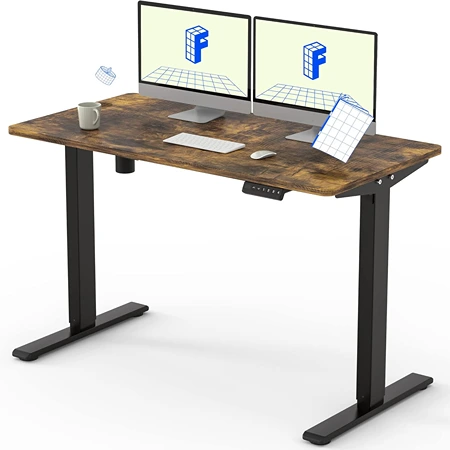
FlexiSpot EN1 Standing Desk
Best Budget Option
The FlexiSpot EN1 offers solid build quality, smooth height adjustments, and great value for those seeking an affordable electric standing desk.
The FlexiSpot EN1 is a budget-friendly electric standing desk that offers an impressive balance of quality, performance, and simplicity for its price. Starting at around $199 and often available for less during sales, it provides an affordable entry point into the world of sit-stand workstations. Despite its low cost, the EN1 looks and feels more premium than expected, with a one-piece desktop design that gives it a clean, seamless appearance. For anyone looking to improve ergonomics without spending a fortune, it stands out as one of the best value options on the market.
Crafted from FSC-certified wood, the one-inch-thick desktop of the FlexiSpot EN1 is both sturdy and attractive. The one-piece construction eliminates seams, offering a smoother, more polished surface that is also more stable than spliced alternatives. The desk is available in multiple sizes, allowing users to choose a fit that matches their workspace, whether they need a compact option for a small office or a wider surface for multiple monitors. The desktop pairs with a durable steel frame that provides reliable support and a professional look suitable for any home or office setting.
The electric lift system is simple and convenient to use. With a height range of 28.1 to 45.7 inches, it accommodates most users comfortably, though it may not be ideal for those significantly shorter or taller than average. Adjustments are made through a built-in controller that allows for smooth transitions between sitting and standing positions. While the motor is louder and slower than that of higher-end models, taking about 30 seconds to reach its maximum height, it remains functional and dependable for daily use.
The FlexiSpot EN1 also includes a four-memory preset system, allowing users to store preferred height settings for quick access. This feature makes it easy to alternate between sitting and standing positions throughout the day, helping to reduce strain on the back and neck caused by prolonged sitting. The control panel is straightforward, responsive, and easy to program, making the adjustment process seamless for both first-time and experienced standing desk users.
In terms of construction, the EN1 is built with an industrial-grade steel frame that delivers good stability for its price class. It supports up to 176 pounds, which is more than sufficient for a standard office setup with monitors, laptops, and accessories. The combination of a solid frame and thick desktop ensures that the desk maintains balance even when fully extended. Although it lacks the rock-solid feel of more expensive models, it performs reliably for typical home office tasks.
Noise levels during operation are kept relatively low, below 50 decibels, allowing for quiet transitions that won’t disrupt your workflow. The motion is smooth enough for most users, and while not particularly fast, it provides consistent performance once set up. FlexiSpot also includes detailed assembly instructions and all the necessary tools, making installation simple and accessible even for beginners.
For those looking for a dependable, affordable standing desk, the FlexiSpot EN1 is an excellent entry-level choice. It combines functional design, decent stability, and ergonomic benefits in a sleek, minimalist package. While it doesn’t offer the customization, speed, or ultra-quiet operation of premium models, it provides everything most users need to create a healthier, more flexible workspace at a fraction of the cost. Its combination of value, quality, and ease of use makes it one of the best budget options available for anyone wanting to transition to an adjustable standing desk setup.
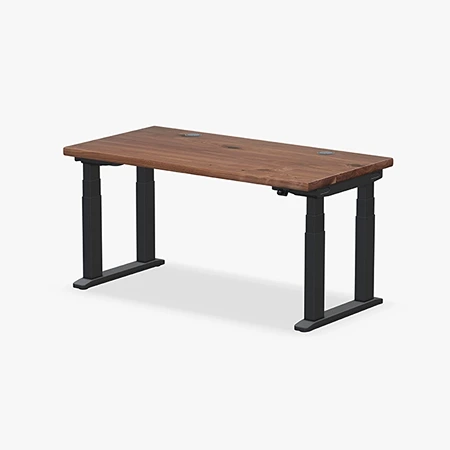
UPLIFT V3 4-Leg Standing Desk
Most Stable Option
Four synchronized lifting columns create a planted platform for wide and equipment-heavy workstations.
Stability is the reason to choose the UPLIFT V3 4-Leg Standing Desk over a conventional two-column model. In use, it feels extremely planted and more substantial than any other standing desk we have tried. That difference is especially noticeable with a wide desktop, multiple displays, monitor arms, and a desktop computer sharing the same surface.
Each lifting column slots tightly into a defined corner receiver, while the large feet connect the front and rear columns. The resulting structure resists the front-to-back movement that becomes more apparent on two-leg desks at standing height. Monitor shake is not eliminated completely, but typing, leaning, and changing positions disturb the screens far less than they do on a typical two-column frame.
Four synchronized motors give the desk a listed 535-pound lifting capacity, compared with 355 pounds for the regular V3. That extra capacity provides useful headroom for large solid-wood tops, several monitors, heavy monitor arms, speakers, desktop computers, or production equipment. Most offices will never reach the limit, but the frame does not feel like the weak point in an equipment-heavy setup.
Assembly is easier than the desk’s size and leg count suggest. The redesigned connections guide each leg into its corner receiver, the fasteners line up cleanly, and the packaging separates the components logically. Building it is repetitive and physically heavy rather than confusing or unusually technical, though two people should still flip and position the completed desk.
The best qualities of the regular V3 carry over without needing a separate learning curve. With a one-inch desktop, the four-leg model spans approximately 22.6 to 48.7 inches, travels at two inches per second, and is rated below 48 dB while moving. The Advanced Keypad also retains one-touch movement, four saved positions, keypad locking, and minimum and maximum height controls. Despite having twice as many motors, movement remains coordinated and quiet.
UPLIFT’s extensive choice of desktop materials, sizes, keypads, casters, storage, power accessories, and monitor arms carries over as well. The V3 frame adds a 40-point accessory-mounting system, an included FlexMount cable pouch, and ten cable wraps. Those cable-management pieces are particularly useful here because four motor connections create more wiring beneath the surface.
The tradeoffs are cost, weight, and more structure beneath the desktop. A laptop-first workstation does not need this much frame, and the two-leg V3 remains less expensive, easier to move, and stable enough for most offices. The V3 4-Leg makes the strongest case for wide multi-monitor workstations, heavy equipment, and anyone who notices monitor movement at standing height. For those setups, it is the most stable option we have used.
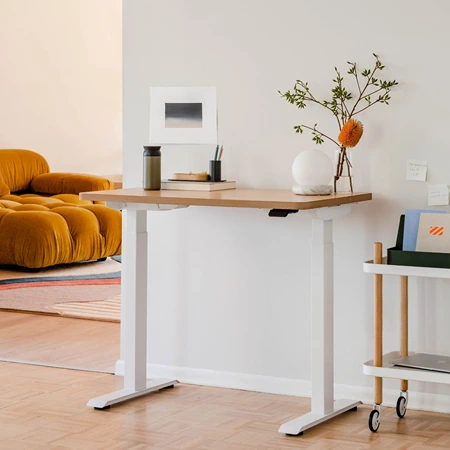
Branch Duo Standing Desk
Best for Taller People
The Branch Duo Standing Desk offers smooth dual-motor height adjustment, solid stability, and a sleek minimalist design at a competitive price.
The Branch Duo Standing Desk is a compact and thoughtfully designed option that caters well to people who need a reliable standing desk but have limited space. With a smaller footprint and straightforward setup, it’s an excellent choice for home offices, studio apartments, or secondary workspaces. Although it doesn’t offer the same level of customization as premium models, it provides solid performance, a clean aesthetic, and dependable construction at a reasonable price.
Built with stability and longevity in mind, the Branch Duo features a durable wood-grain laminate desktop that feels smooth and looks professional. Its two-tier lifting column allows for steady movement between sitting and standing positions, maintaining balance even when supporting heavier setups. With a lift capacity of up to 275 pounds and a 10-year warranty, it inspires confidence in its long-term durability. These features make it a practical and low-maintenance option for those seeking quality without excessive complexity.
One of the Branch Duo’s biggest advantages is its size flexibility. The desk is available in compact dimensions such as 36 by 24 inches, which fits easily into tight spaces without feeling cramped. A larger 48 by 24-inch version is also available for those who need extra surface area for monitors or accessories. Compared with other standing desks, it’s among the smallest recommended options, making it particularly well-suited to urban apartments or shared work areas where every inch matters.
The height adjustment range of 28 to 47.5 inches accommodates a wide spectrum of users, especially those between 5-foot-8 and 6-foot-5. This makes the desk ideal for taller individuals who often find other models too short at their maximum setting. However, the Branch Duo also proves adaptable, as people of varying heights have been able to find comfortable sitting and standing positions. The generous adjustment range even makes it usable for those in electric wheelchairs, offering enough flexibility for multiple seating configurations.
While the overall design is sleek and reliable, the control system leaves room for improvement. The Branch Duo replaces the traditional arrow-style keypad with a control paddle that lifts or presses down to adjust height. Some users appreciate the simplicity of this approach, but others find the on-screen menu unintuitive and somewhat tedious to navigate. The side buttons cycle through preset options and reminders, but they lack a back button, meaning you must scroll through the entire menu if you skip past your intended setting.
The desk’s memory function also has limitations. It allows for only two programmable height presets, which can be restrictive if multiple people plan to share the desk or if you prefer having different height settings for various tasks. Competing models typically offer four or more presets, which can better accommodate shared workspaces or varied workflows. For individual users, however, the two presets may be perfectly sufficient once configured to preferred sitting and standing positions.
Another area worth noting is the Branch Duo’s safety system. Its anti-collision feature functions as intended, automatically stopping movement when it encounters resistance. However, because the desk cannot lower below 28 inches, the sensor doesn’t activate for objects or limbs below that threshold. Additionally, the desk may continue descending slightly after detecting contact, applying minor pressure to the surface beneath it. Although this isn’t a major issue during normal operation, it does mean the desk should be used with some caution in homes with small children or pets.
Overall, the Branch Duo Standing Desk offers a thoughtful balance of simplicity, functionality, and design. It’s ideal for individuals who want a compact, well-built desk with smooth motion and a modern look, without paying extra for advanced keypads or excessive customization. While it has a few limitations in terms of presets and sensor sensitivity, it remains a solid, dependable choice for those seeking a minimalist and space-efficient standing desk that performs consistently day after day.
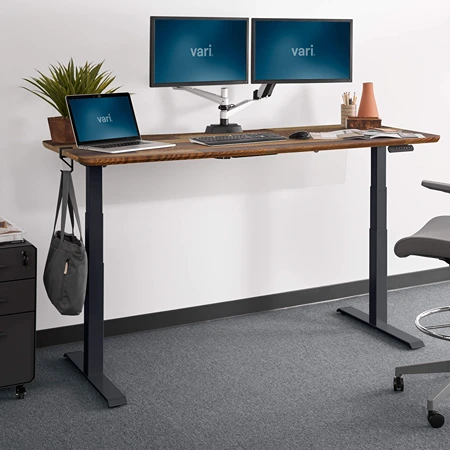
Vari Electric Standing Desk
Easiest to Assemble
A preinstalled frame and slide-and-lock legs make a substantial desk quick to assemble.
Few electric desks do more to shorten the distance between delivery and a usable workspace than the Vari Electric Standing Desk. Its solid one-piece frame arrives preinstalled beneath the desktop, and the legs use a slide-and-lock connection instead of asking the buyer to build the entire support structure from loose rails and brackets. The result is the easiest assembly process among the full-size desks in this guide.
That convenience does not come from making the desk flimsy. The powder-coated steel T-style legs connect to a 1.25-inch one-piece desktop, giving the finished workstation a substantial feel for typing, writing, and general office work. The thick laminate surface also avoids the center seam found on some flat-pack desks and is easier to clean than an unfinished wood top.
Once assembled, the two-motor frame travels from 25 to 50.5 inches, covering a useful range for both seated and standing work. Movement is smooth and quiet enough for a shared room, and the desk remains steady under an ordinary workstation. The UPLIFT four-leg frame now takes our stability designation, but the Vari is still considerably more planted than its quick assembly might suggest.
The LED control panel stores four programmable heights, enough for two people to save a seated and standing position or for one person to keep several task-specific settings. A Drop-Stop sensor halts downward movement when the desk encounters an obstruction. As with any motorized desk, cables and nearby furniture still need enough clearance through the full adjustment range.
Subscribe to Product Bible
Stay updated with the latest product reviews, buying guides, and expert recommendations. Fresh advice on the best things we've researched, tested, and reviewed, sent to your inbox weekly.
Want to know more about how we handle your data or opt out of marketing emails? Check out our Privacy Policy. If you have any questions, we're always here to help.
Vari currently offers the line in several footprints, including compact 40-by-26-inch and 48-by-30-inch versions as well as 54-, 60-, and 72-inch widths. Availability and finishes vary by size, and ComfortEdge versions add a curved front edge for softer forearm contact. The catalog is still much narrower than UPLIFT’s, but it now covers more rooms than the large 60- and 72-inch models alone.
The compromise is that a preassembled frame gives you less control over the finished desk. Surface materials, desktop shapes, frame styles, grommets, and accessory mounting options are limited beside a configurable system such as the UPLIFT V3. The large one-piece desktop and attached frame are also heavy even if they are easy to put together, so delivery and final positioning may still require another person.
Vari covers the Electric Standing Desk with a lifetime warranty, which strengthens its appeal as the uncomplicated choice. Pick it when you want a thick one-piece surface, useful memory controls, and a sturdy frame without turning assembly into an afternoon project. Buyers who enjoy selecting every finish and accessory should look elsewhere, but anyone who wants to start using a full-size standing desk quickly will appreciate how much work Vari completes before the boxes arrive.
A good standing desk should make it easy to move naturally throughout the day, encouraging better posture and reducing the fatigue that comes from sitting or standing too long. The best designs combine function and comfort, offering smooth height adjustments, sturdy construction, and thoughtful ergonomics that support long hours of focused work. Whether it’s for a home office or a shared workspace, a well-built standing desk can transform the way you work by promoting balance and movement instead of stillness.
When choosing the right desk, it’s important to focus on the features that matter most for your workflow, such as stability, noise level, speed of adjustment, and available height range. Our desk height calculator works out your sitting and standing heights and shows which of these desks reaches both. The ideal setup depends on your space, body type, and work habits, but all great standing desks share one thing in common: they adapt to you. Investing in a quality adjustable desk is ultimately an investment in comfort, productivity, and long-term health.