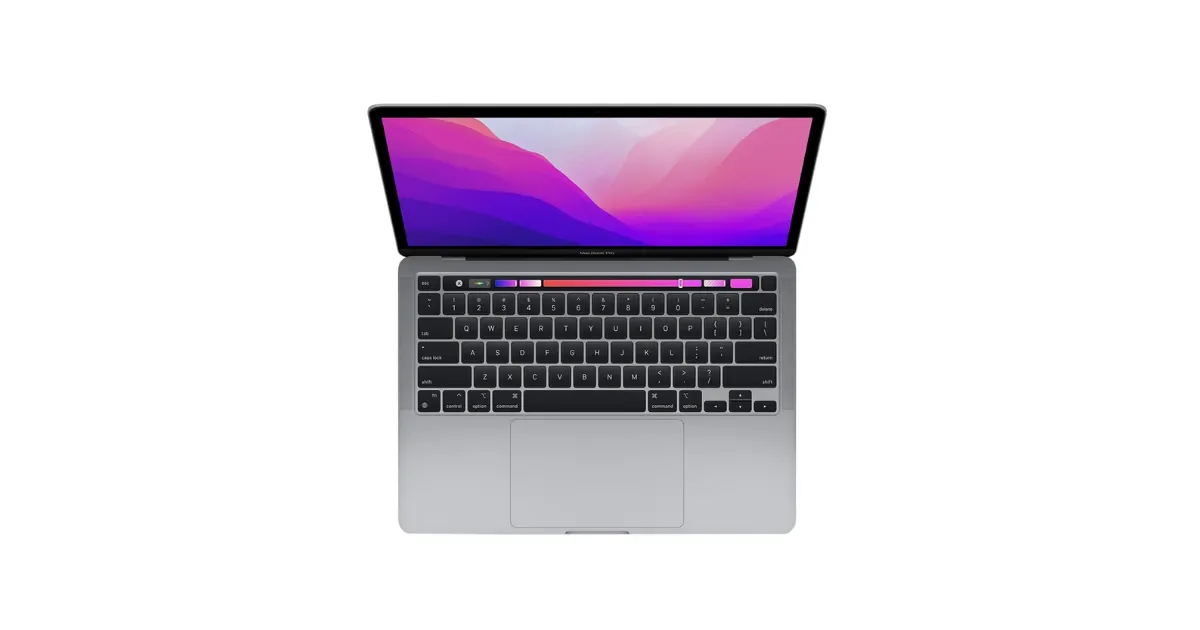
Apple MacBook Pro M4 Laptop
M4-family MacBook Pro with a 120Hz Liquid Retina XDR display, up to 24 hours of rated battery life, HDMI, and an SD card slot.
The Apple MacBook Pro M4 is the late-2024 MacBook Pro, sold in a 14-inch size with the M4, M4 Pro, or M4 Max chip, and a 16-inch size with the M4 Pro or M4 Max. Apple launched it at $1,599 for the 14-inch M4, $1,999 for the 14-inch M4 Pro, and $2,499 for the 16-inch model. Every version has a 120Hz Liquid Retina XDR display, which is mini-LED, not OLED.
It is no longer Apple’s newest MacBook Pro. Apple replaced the 14-inch M4 model with an M5 version in October 2025, and replaced the M4 Pro and M4 Max models with M5 Pro and M5 Max versions in March 2026. The M4 models are still capable laptops, so the question now is price: they make sense when they cost clearly less than the M5 models.
MacBook Pro M4 Review: Quick Verdict
The MacBook Pro M4 is worth buying if you need what the MacBook Air lacks: a brighter, higher-contrast 120Hz display, a fan for long exports and builds, HDMI and SD card ports, and a bigger battery. The base 14-inch M4 is the easiest one to justify for most buyers, with Apple’s longest rated battery life in the 14-inch line at up to 24 hours.
The M4 Pro is for heavier work: large code bases, multi-track video, or big photo libraries that need more memory and GPU cores. The M4 Max is for professional video, 3D, and machine learning work that can use up to 128GB of unified memory. If your work is mostly browsing, documents, and video calls, the MacBook Air M4 costs less and is lighter.
MacBook Pro M4 (2024) specs at a glance
| Spec | Value | Note |
|---|---|---|
| Chips | M4, M4 Pro, or M4 Max | M4 on 14-inch only |
| Display | 14.2" 3024 x 1964 or 16.2" 3456 x 2234 | Liquid Retina XDR, 254 ppi |
| Brightness | 1,000 nits SDR, 1,600 nits HDR peak | 1,000,000:1 contrast |
| Refresh rate | ProMotion up to 120Hz | All models |
| Memory | 16GB to 128GB unified memory | Depends on chip |
| Storage | 512GB to 8TB SSD | 8TB with M4 Max |
| Ports | 3 Thunderbolt, HDMI, SDXC, MagSafe 3, 3.5 mm | Thunderbolt 4 on M4, Thunderbolt 5 on Pro/Max |
| Battery life | Up to 24 hours video streaming | 14-inch M4 and 16-inch M4 Pro |
| Weight | 3.4 lb (14" M4) to 4.7 lb (16") | Per Apple |
| Wireless | Wi-Fi 6E, Bluetooth 5.3 | All models |
Blazing Fast M4 Performance
The M4 family is built on Apple’s second-generation 3-nanometer process, and the three chips cover very different needs.
- M4 (14-inch only): 10-core CPU, 10-core GPU, 120GB/s memory bandwidth, and 16GB, 24GB, or 32GB of unified memory. This is plenty for coding, photo editing, office work, and light video editing.
- M4 Pro: a 12-core or 14-core CPU, a 16-core or 20-core GPU, 273GB/s memory bandwidth, and 24GB to 64GB of memory. Apple says it has 75% more memory bandwidth than the previous generation. It’s the right chip for large software builds, 4K and 6K video timelines, and heavy multitasking.
- M4 Max: a 14-core or 16-core CPU, a 32-core or 40-core GPU, up to 546GB/s memory bandwidth, and 36GB to 128GB of memory. It’s built for 8K video, 3D rendering, and running large local AI models.
All three chips have a 16-core Neural Engine and support Apple Intelligence. The base models are already fast, but memory is the setting to think hardest about. Apple’s unified memory can’t be upgraded later, so if you keep laptops for five years or more, 24GB on the M4, or 48GB on the M4 Pro for heavy creative work, gives you more headroom.
Unlike the fanless MacBook Air, every MacBook Pro has active cooling. That matters for sustained workloads such as long exports or compiles, where a fanless laptop slows down as it heats up.
Liquid Retina XDR Display
The MacBook Pro M4 doesn’t have an OLED panel. Every model uses Apple’s Liquid Retina XDR display, which is an LCD lit by thousands of mini-LEDs that dim and brighten in zones. It gets close to OLED-style contrast, rated at 1,000,000:1, and blacks look very deep in a dark room. Very bright objects on a black background can show a faint glow around them, which is a common trait of mini-LED screens.
Apple rates it at 1,000 nits sustained full-screen for HDR, 1,600 nits peak for HDR content, and up to 1,000 nits for normal SDR content outdoors. That’s twice the MacBook Air’s 500 nits, which makes the Pro much easier to use in a sunny room or outside. The 14-inch screen is 14.2 inches at 3024 x 1964, and the 16-inch is 16.2 inches at 3456 x 2234, both at 254 pixels per inch.
ProMotion adjusts the refresh rate up to 120Hz, which makes scrolling and animations feel smoother. You can also set fixed refresh rates from 47.95Hz to 60Hz to match the frame rate of video you’re editing.
Nano-Texture Display Option
For the first time on a MacBook Pro, the M4 generation offers an optional nano-texture display on every chip and size. It’s a matte finish etched into the glass that reduces glare and reflections. TechRadar listed the upgrade at $150.
It’s worth it if you work near windows, under bright office lights, or outdoors. The trade-off is that a matte surface spreads light slightly, so in a dim room without reflections the standard glossy screen looks a little sharper and more contrasty. Apple recommends cleaning nano-texture glass with its polishing cloth rather than an ordinary cloth.
Incredible Battery Life
Battery life varies by chip and size, so the “up to” number depends on the configuration. Apple’s ratings for video streaming and wireless web browsing are:
| Model | Battery | Video streaming | Wireless web |
|---|---|---|---|
| 14-inch M4 | 72.4 Wh | Up to 24 hours | Up to 16 hours |
| 14-inch M4 Pro | 72.4 Wh | Up to 22 hours | Up to 14 hours |
| 14-inch M4 Max | 72.4 Wh | Up to 18 hours | Up to 13 hours |
| 16-inch M4 Pro | 99.6 Wh | Up to 24 hours | Up to 17 hours |
| 16-inch M4 Max | 99.6 Wh | Up to 21 hours | Up to 14 hours |
Even the shortest of these ratings is long for a laptop this powerful. Heavy work like video exports or gaming drains the battery much faster than Apple’s tests, but light work on the base 14-inch model can comfortably last a full workday.
Apple includes a 70W charger with the 14-inch M4 and the 12-core M4 Pro, a 96W charger with the 14-core M4 Pro and the M4 Max, and a 140W charger with the 16-inch model. Fast charging needs the 96W adapter or higher.
Premium Design and Build
Apple kept the aluminum unibody design from earlier Apple silicon MacBook Pros, in Space Black or Silver. The keyboard is a backlit Magic Keyboard with Touch ID, and the Force Touch trackpad is large and precise. The fans stay quiet under most workloads.
The ports are the biggest practical difference from a MacBook Air. Every model has three Thunderbolt ports, an HDMI port, an SDXC card slot, MagSafe 3 charging, and a 3.5 mm headphone jack, so most people won’t need a dongle. The base M4 uses Thunderbolt 4. The M4 Pro and M4 Max models have Thunderbolt 5, with transfer speeds of up to 120Gb/s, which matters for fast external SSDs and docks. HDMI supports up to an 8K display.
The 12-megapixel Center Stage camera keeps you framed during calls and supports Desk View. Apple says it improves video quality in low light compared with older models.
The 14-inch M4 weighs 3.4 pounds, the 14-inch M4 Pro and M4 Max weigh 3.5 to 3.6 pounds, and the 16-inch weighs 4.7 pounds. The 14-inch is 0.61 inch thick, and the 16-inch is 0.66 inch.
14-inch vs. 16-inch MacBook Pro M4
Choose the 14-inch if you carry your laptop daily. It’s the only size with the base M4 chip, it costs less, and it fits in most bags and on airplane tray tables.
Choose the 16-inch if you mainly work at a desk, edit video or photos, or want the biggest screen on a Mac laptop. Its 100-watt-hour battery gives the M4 Pro version the same 24-hour rating as the 14-inch M4, and its larger chassis has more room for cooling. It starts with the M4 Pro, so there’s no budget M4 version.
MacBook Pro M4 vs. MacBook Air M4
The MacBook Air M4 uses the same M4 chip as the base MacBook Pro, so everyday speed feels similar. The differences are the screen, cooling, ports, and battery.
| MacBook Pro 14” (M4) | MacBook Air 15” (M4) | MacBook Air 13” (M4) | |
|---|---|---|---|
| Launch price | $1,599 | $1,199 | $999 |
| Display | 14.2” Liquid Retina XDR, 120Hz | 15.3” Liquid Retina | 13.6” Liquid Retina |
| Brightness (SDR) | Up to 1,000 nits | 500 nits | 500 nits |
| Cooling | Fan | Fanless | Fanless |
| Base storage | 512GB | 256GB | 256GB |
| Ports | 3 Thunderbolt 4, HDMI, SDXC, MagSafe 3, 3.5 mm | 2 Thunderbolt 4, MagSafe 3, 3.5 mm | 2 Thunderbolt 4, MagSafe 3, 3.5 mm |
| Battery (video) | Up to 24 hours | Up to 18 hours | Up to 18 hours |
| Weight | 3.4 lb | 3.3 lb | 2.7 lb |
Choose the MacBook Air if your work is writing, browsing, school, office apps, and light photo editing. It’s $400 to $600 cheaper at launch prices, it’s silent, and the 13-inch model is much lighter. Our MacBook Air M4 review covers it in detail.
Choose the MacBook Pro if you need a brighter, smoother display, plan long exports or compiles that would slow a fanless laptop, want HDMI and an SD card slot without adapters, or want the longest battery life. Notice that the 14-inch Pro weighs only a tenth of a pound more than the 15-inch Air.
If you work mostly at a desk with your own monitor, the Mac mini M4 gives you the same M4 chip for far less.
What Changed With the M5 MacBook Pro
Apple has replaced every M4 MacBook Pro.
- 14-inch M5 (October 2025): Apple launched it at the same $1,599 starting price as the M4 model. Apple claims up to 3.5 times the AI performance, up to 1.6 times the graphics performance, and up to 20% faster multithreaded CPU performance compared with the M4, plus an SSD up to twice as fast. Each GPU core gets a Neural Accelerator. Battery life is still rated at up to 24 hours.
- M5 Pro and M5 Max (March 2026): Apple launched these at $2,199 for the 14-inch M5 Pro, $2,699 for the 16-inch M5 Pro, $3,599 for the 14-inch M5 Max, and $3,899 for the 16-inch M5 Max. Storage now starts at 1TB on the M5 Pro and 2TB on the M5 Max, and Apple’s N1 wireless chip adds Wi-Fi 7 and Bluetooth 6. At the same time, the 14-inch M5 moved to $1,699 with 1TB of storage.
The display, ports, and overall design carry over, so an M4 model gives you the same screen and connectivity. If you don’t run local AI models or GPU-heavy apps, a discounted M4 MacBook Pro is still a sensible buy. If the price gap is small, get the M5.
macOS: Fluid and Focused
macOS works especially well if you already use other Apple devices. You can use Sidecar to turn an iPad into a second display, AirDrop files to and from an iPhone, unlock the Mac with an Apple Watch, and take calls or texts from your phone on the laptop. The M4 models also support Apple Intelligence.
Who Should Buy the MacBook Pro M4?
Buy it if you’re a developer, photographer, video editor, or other professional who needs sustained performance, a display that’s usable in bright light, and built-in ports. Buy the base 14-inch M4 if you want the Pro’s screen and battery without paying for more performance than you need.
Skip it if you mainly browse, write, and stream video; the MacBook Air does that for less money and weight. Also skip it if the M5 version costs only slightly more, since the newer chip will age better. And if you want a Windows laptop, see our guide to the best laptops.
Final Verdict
The MacBook Pro M4 remains one of the most powerful and efficient laptops you can buy, even though the M5 models have replaced it. You get a bright 120Hz mini-LED display, up to 24 hours of rated battery life, and a full set of ports in every configuration.
It’s not cheap, and it’s no longer the newest MacBook Pro. But at a solid discount, it’s an excellent machine for creative work, software development, and anyone who needs a laptop that stays fast under sustained load.
Powerful, polished, and built to last, this is still Apple at its best.