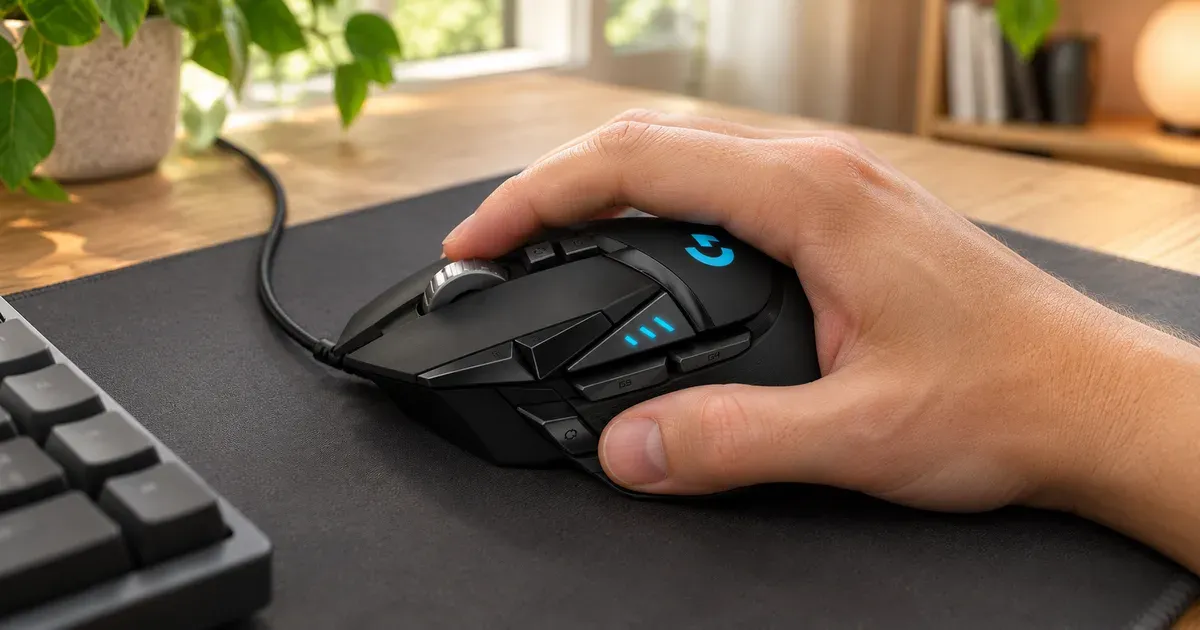
The Logitech G502 HERO is the mouse on my desk. It’s plugged into my Mac through my monitor’s USB hub, and I use it for both gaming and work, which for me mostly means writing and coding. Its shape is comfortable, and I like how heavy it is.
The short answer: at about $38, the wired G502 HERO is still one of the best-value mice you can buy, especially if you like a heavy mouse with a thumb rest. If you want something lighter or wireless, look at the newer G502 X family instead.
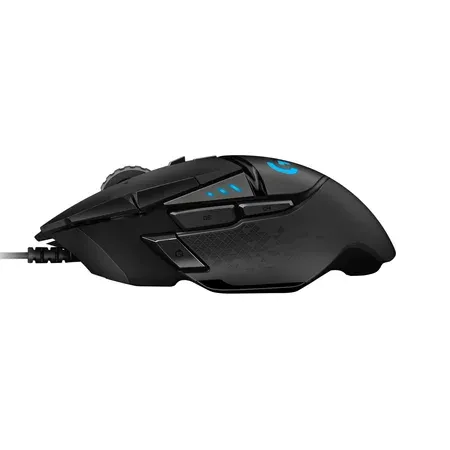
Best value mouse for gaming and work
Logitech G502 HERO
A heavy, comfortable wired mouse with a thumb rest, 11 buttons and adjustable weights that I use for games and work.
Logitech G502 HERO Review: Quick Verdict
I use the same mouse for everything, so it has to work in a game and in a code editor. The G502 does. The shape supports my whole hand, the thumb rest gives my thumb somewhere to sit, and the weight makes it feel solid.
I haven’t installed any software for it. Plugged into a Mac, it works as a normal mouse with sensible defaults, and that’s been all I need.
Logitech G502 HERO specs
| Spec | Value | Note |
|---|---|---|
| Price | $37.99 | At Amazon |
| Connection | Wired USB-A | |
| Sensor | HERO 25K | |
| Sensitivity | 100 to 25,600 DPI | |
| Polling rate | 1,000Hz | |
| Buttons | 11 programmable | |
| Weight | 121g | Plus up to 18g in optional weights |
| Size | 132 x 75 x 40mm | |
| Scroll wheel | Clicky or free-spinning, with side tilt | |
| Onboard memory | Up to 5 profiles | |
| Lighting | LIGHTSYNC RGB, 1 zone | |
| Cable | 2.1m | |
| Warranty | 2 years | |
| Software | Logitech G HUB | Optional |
Shape and Weight
The G502 is a large, right-handed mouse with a sculpted body. Your thumb rests on a wide ledge, and the right side flares out slightly for your ring finger. I find it comfortable, and it’s the main reason I’ve kept using it.
It weighs 121 grams, which is heavy by today’s standards. Many gaming mice now weigh 60 to 80 grams. Logitech includes five 3.6-gram weights that slot into the base, so you can add up to 18 grams more. I like the heft, and I keep the weights in. It feels planted on the desk.
If you play fast shooters and flick the mouse across the pad, the weight can feel slow. That’s the main reason competitive players have moved to lighter mice, including Logitech’s own lighter G502 X.
Gaming and Work
For gaming, the HERO 25K sensor tracks accurately at any normal speed, and the mouse polls at 1,000Hz. The DPI buttons next to the left click let you switch sensitivity on the fly, and a sniper button under your thumb drops the sensitivity while you hold it.
For work, the extra buttons are just as useful. The two thumb buttons act as back and forward in many browsers, including Chrome, without any setup. The scroll wheel also helps. Press the button behind it, and the wheel switches from clicky, notched scrolling to free-spin, which is handy for flying through long files or documents.
Using It on a Mac Without Software
Logitech’s G HUB software lets you remap all 11 buttons, change the DPI steps, set lighting and save a profile to the mouse. I don’t use it. Out of the box, the G502 works like any Mac mouse: left and right click, scrolling and middle click all work, and so does the free-spin wheel, which is mechanical.
If you want to remap buttons, G HUB runs on macOS. The mouse also stores up to five profiles in its onboard memory, so settings you save travel with it to another computer.
What to Know Before You Buy
It’s wired. Mine is plugged into my monitor’s USB hub, which keeps the cable short and tidy. If you’d rather not have a cable on your desk at all, you’ll need a wireless model.
There’s a newer G502 X. Logitech’s G502 X family keeps the same general shape but weighs far less and uses hybrid optical-mechanical LIGHTFORCE switches. It also comes in wireless versions. The HERO is the older, cheaper model, and Logitech’s own store now lists it as temporarily sold out, so Amazon is the easiest place to buy it.
Right-handed only. The thumb rest and button layout don’t work for left-handed use.
Logitech G502 HERO vs. G502 X
Logitech G502 HERO vs. G502 X
| Spec | G502 HERO | G502 X |
|---|---|---|
| Price | About $38 | About $80 |
| Connection | Wired | Wired (wireless versions cost more) |
| Weight | 121g, up to 139g with weights | 89g |
| Switches | Mechanical | LIGHTFORCE optical-mechanical |
| Sensor | HERO 25K | HERO 25K |
| Best for | Value, heavy feel | Lighter, faster gaming |
If you like a heavy mouse, the HERO is the better buy at less than half the price. If you want a lighter G502, the G502 X is where to look. For wireless, Logitech sells the original-shape G502 LIGHTSPEED for $119.99 and the G502 X LIGHTSPEED for $159.99.
Is the Logitech G502 HERO Worth It?
For me, yes. It’s comfortable, I like the weight, and it handles games and work without any setup. At about $38, it’s hard to beat.
Buy it if you want one comfortable mouse for gaming and work, you like a heavier mouse, or you want plenty of buttons for a low price.
Skip it if you play competitive shooters and want a light mouse, you want wireless, or you’re left-handed.
Logitech G502 HERO FAQ
Does the Logitech G502 HERO work on a Mac?
Yes. It works as a plug-and-play mouse on macOS. Logitech G HUB, its optional software, also runs on macOS if you want to remap buttons.
Is the G502 HERO good for work?
It is for me. I use it for writing and coding as well as gaming. The thumb buttons and free-spinning scroll wheel are useful in everyday apps.
How heavy is the Logitech G502 HERO?
It weighs 121 grams without its optional weights. Five 3.6-gram weights can add up to 18 grams more.
Is the G502 HERO wireless?
No. The G502 HERO is wired. Logitech’s wireless versions are the G502 LIGHTSPEED, at $119.99, and the G502 X LIGHTSPEED, at $159.99.
Do you need G HUB for the G502?
No. You only need G HUB to remap buttons, change DPI settings or adjust lighting. I use mine with the default settings.