
The short answer: yes, but only high-end laptops do it well, and only with DLSS upscaling and frame generation turned on. CD Projekt Red recommends RT Overdrive (the path-traced mode) on RTX 40-series desktop cards from the RTX 4070 Ti up, and its 4K/60 fps Overdrive target assumes a desktop RTX 4080 with 16 GB of video memory and DLSS Frame Generation. Among 2026 laptops, that points to the RTX 5070 Ti (12 GB), RTX 5080 (16 GB) and RTX 5090 (24 GB), at 1440p or 1600p with DLSS. RTX 5060 and 8 GB RTX 5070 laptops can switch it on at 1080p with aggressive DLSS, but video memory is the limit.
What CD Projekt Red Says
| Mode | Resolution / target | CDPR’s GPU | VRAM | RAM |
|---|---|---|---|---|
| Ray tracing Ultra (recommended) | 1080p, 60 fps | RTX 3080 Ti or RX 7900 XTX | 12 GB | 20 GB |
| Ray tracing Overdrive (path tracing) | 2160p, 60 fps, with DLSS Frame Generation on | RTX 4080 | 16 GB | 24 GB |
| Overdrive, original guidance | 1080p, 30 fps | RTX 3090 | — | — |
CDPR’s support page says Overdrive is “currently recommended” on RTX 40-series cards from the 4070 Ti up, plus the RTX 3090 at 1080p/30 fps. For path-traced Photo Mode screenshots it lists minimum VRAM of 8 GB at 1080p, 10 GB at 1440p and 12 GB at 2160p, a useful guide to how much memory path tracing wants.
How 2026 Laptop GPUs Line Up
| Laptop GPU | CUDA cores | VRAM | Max GPU power (plus Dynamic Boost) | Our path-tracing guidance |
|---|---|---|---|---|
| RTX 5090 Laptop | 10,496 | 24 GB | up to 150 W (175 W with boost) | Best: 1440p–1600p with DLSS + frame generation |
| RTX 5080 Laptop | 7,680 | 16 GB | up to 150 W (175 W) | Yes, 1440p with DLSS + frame generation |
| RTX 5070 Ti Laptop | 5,888 | 12 GB | up to 115 W (140 W) | Yes, 1080p–1440p with DLSS + frame generation |
| RTX 5070 Laptop | 4,608 | 8 or 12 GB | up to 100 W (115 W) | 1080p with heavy DLSS; 12 GB versions do better |
| RTX 5060 Laptop | 3,328 | 8 GB | up to 100 W (115 W) | Technically, at 1080p with heavy DLSS; not a great experience |
| RTX 5050 Laptop | 2,560 | 8 GB | up to 100 W | No: use ray tracing Low or none |
Two things matter beyond the GPU name:
- GPU power. The same RTX 5080 runs much faster at 175 W in an 18-inch Strix Scar or Alienware Area-51 than in a thin laptop that caps it lower. Check the maker’s spec page for the wattage.
- Frame generation. CDPR measured its Overdrive target with Frame Generation on. RTX 50-series laptops support DLSS Multi Frame Generation, which generates several frames per rendered frame. It raises the frame-rate number a lot, but responsiveness still tracks the base frame rate, so aim for a solid base before turning it up.
Path Tracing Frame Rates on RTX 50 Laptops
Independent benchmarks of Cyberpunk 2077: Phantom Liberty at 3840x2160 with the Ray Tracing: Overdrive preset, on 16-inch laptops running each GPU at or near its maximum power, show how much DLSS and frame generation carry path tracing on a laptop (average fps):
| Laptop GPU | Native, no DLSS | DLSS 4 Quality | + Frame Gen 2x | + Multi Frame Gen 4x |
|---|---|---|---|---|
| RTX 5090 Laptop | 13.9 | 28.9 | 50.4 | 90.1 |
| RTX 5080 Laptop | 12.0 | 24.8 | 45.1 | 83.4 |
| RTX 5070 Ti Laptop | 3.7 | 19.4 | 34.0 | 61.8 |
| RTX 5070 Laptop (8 GB) | — | 9.7 | — | — |
At native 4K, even the RTX 5090 Laptop manages about 14 fps, and the RTX 5070 Ti drops to 3.7 fps, far below what its 19.4 fps with DLSS would suggest. With DLSS Quality and 4x Multi Frame Generation, the RTX 5070 Ti, 5080 and 5090 all pass 60 fps on the counter, but their base frame rates (19–29 fps) are what you feel in responsiveness. At 1440p or 1600p, where DLSS has fewer pixels to fill, base frame rates rise and the experience is much better. The 8 GB RTX 5070 at under 10 fps with DLSS Quality at 4K shows why it’s a 1080p path-tracing card at best.
Settings That Work on a Laptop
- Plug in and use the highest performance mode (Turbo, Performance, or Manual at max power).
- Use the dGPU-only / MUX mode (ASUS Ultimate, Lenovo dGPU Only) for a few more frames on the laptop screen.
- Preset: Ray Tracing: Overdrive, then set DLSS Super Resolution to Balanced or Performance at 1440p/1600p.
- Turn on DLSS Frame Generation and Nvidia Reflex.
- If it stutters, lower resolution or turn off path tracing and use Ray Tracing Ultra; it’s far lighter.
- Keep the laptop cool; long sessions at full power can throttle a thin chassis. See gaming laptop temperatures.
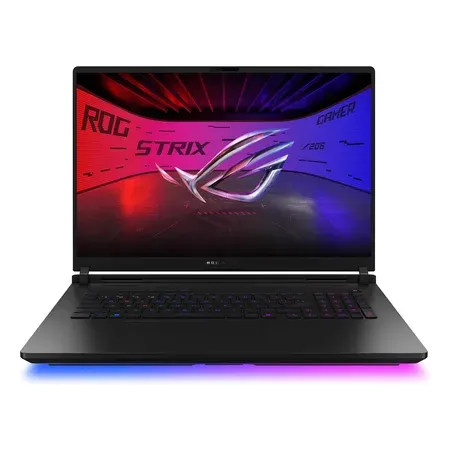
175 W RTX 5090 with 24 GB
ASUS ROG Strix Scar 18 (2026), RTX 5090
Core Ultra 9 290HX Plus, 175 W RTX 5090, 32 GB DDR5, 18-inch 4K 240 Hz mini-LED. $4,999.99 sold by Amazon on Nov 20.
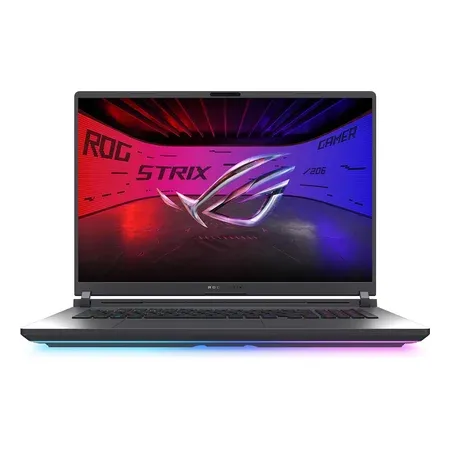
Cheaper path to path tracing
ASUS ROG Strix G18 (2026), RTX 5070 Ti
140 W RTX 5070 Ti with 12 GB, Core Ultra 9 290HX Plus, 32 GB DDR5, 18-inch 300 Hz. $3,199.99 sold by Amazon on Nov 20.
More picks in best RTX 5090 gaming laptops and best RTX 5080 gaming laptops. For memory needs, see how much VRAM do you need in a gaming laptop.
Cyberpunk Path Tracing FAQ
Can a gaming laptop run Cyberpunk 2077 with path tracing?
Yes, with an RTX 5070 Ti, 5080 or 5090 laptop and DLSS plus frame generation turned on. At 4K Overdrive with DLSS 4 Quality and 4x Multi Frame Generation, independent benchmarks put these laptop GPUs at about 62, 83 and 90 fps. At native resolution without DLSS, no laptop GPU is playable at 4K.
What laptop GPU do I need for Cyberpunk path tracing?
For a good experience, an RTX 5070 Ti (12 GB) or better, with DLSS and frame generation. An RTX 5080 or 5090 laptop is the comfortable choice at 1440p.
Can an RTX 5060 laptop run Cyberpunk path tracing?
It can enable it at 1080p with aggressive DLSS, but 8 GB of video memory and the GPU’s size make it a poor experience. Ray tracing Low to Medium suits it better.
Is a laptop RTX 5090 as good as a desktop RTX 4080 for path tracing?
They’re different chips. The laptop RTX 5090 has more CUDA cores (10,496 vs. 9,728) and more memory (24 GB vs. 16 GB) than the desktop RTX 4080 that CDPR uses for its 4K target, but it runs at a fraction of the desktop card’s power. How close it gets depends on the laptop’s GPU wattage and cooling, which is why we suggest 1440p rather than 4K.
Does Cyberpunk path tracing need frame generation?
CDPR measured its Overdrive requirements with DLSS Frame Generation on. On a laptop, plan to use it.
How much RAM do I need for Cyberpunk path tracing?
CDPR lists 24 GB of system RAM for the Overdrive tier, so a 32 GB laptop is the practical choice.




