
The short answer: the Katana 15 HX is the better gaming laptop, because MSI runs its GPU at more power. Every Katana 15 HX (B14W) runs its RTX 5050, 5060 or 5070 at up to 115 W. The Cyborg 15 comes in versions that run the same RTX 5060 at 55 W to 100 W, and the Cyborg A15 AI’s RTX 5050 runs at 45 W. The Cyborg is lighter and cheaper. If you want one, buy the Cyborg 15 MAX (100 W), not the regular Cyborg 15.
Specs from MSI spec pages; prices checked November 20, 2026.
Side by Side
| Katana 15 HX (B14W) | Cyborg 15 MAX (C2WX) | Cyborg 15 (B2RW) | Cyborg A15 AI (B2HW) | |
|---|---|---|---|---|
| CPU | Core i7-14650HX (16 cores) or i9-14900HX | Core 7 240H (10 cores) | Core 7 240H or Core 5 210H | Ryzen 7 260 or Ryzen 5 240 |
| GPU | RTX 5050, 5060 or 5070 | RTX 5060 or 5070 | RTX 5050, 5060 or 5070 | RTX 5050 or 5060 |
| Max GPU power | 115 W (all GPUs) | 100 W | 55 W (RTX 5060) | 45 W (RTX 5050), 55 W (RTX 5060) |
| Display | 15.6” 1080p 144 Hz, or 2560×1440 165 Hz, 100% DCI-P3 | 15.6” 1080p 144 Hz | 15.6” 1080p 144 Hz | 15.6” 1080p 144 Hz or QHD |
| RAM | DDR5-5600, 2 slots | DDR5, 2 slots | DDR5-5600, 2 slots | DDR5-5600, 2 slots, up to 96 GB |
| Battery | 75 Wh | 60 Wh | 55.2 Wh | 55.2 Wh |
| Adapter | — | 180 W | 120 W or 180 W | 120 W |
| Weight | 5.29 lb | 4.41 lb | 4.29–4.63 lb by SKU | 4.29–4.63 lb by SKU |
| MUX switch | Not listed | Not listed | Not listed | Not listed |
| Warranty (US) | 1 year limited (some builds 3 years) | 1 year limited | 1 year limited | 1 year limited |
Max GPU power is MSI’s “Maximum Graphics Power with Dynamic Boost”. All four have 15.6-inch screens and 4-zone RGB keyboards.
The Real Difference: Same RTX 5060, 55 W to 115 W
Nvidia lets laptop makers set the GPU’s power limit, and MSI uses the whole range. An RTX 5060 Katana 15 HX gets up to 115 W; an RTX 5060 Cyborg 15 (B2RW) gets 55 W, less than half. Frame rates don’t double with watts, but a gap that size shows up in demanding games. The Cyborg 15 MAX, at 100 W, closes most of it. See what TGP means.
| RTX 5060 laptop | Max GPU power | Share of the Katana’s |
|---|---|---|
| Katana 15 HX (B14W) | 115 W | 100% |
| Cyborg 15 MAX (C2WX) | 100 W | 87% |
| Cyborg 15 (B2RW) | 55 W | 48% |
| Cyborg A15 AI (B2HW) | 55 W | 48% |
How to Tell Them Apart on Amazon
Listings often just say “MSI Cyborg” or “MSI Katana”. Check the model code in the title or specs:
- B14W (B14WEK, B14WFK, B14WGK): Katana 15 HX, 115 W.
- C2WX with “MAX” in the name: Cyborg 15 MAX, 100 W.
- B2RW (B2RWEKG, B2RWFKG): Cyborg 15, 55 W with an RTX 5060.
- B2HW: Cyborg A15 AI (AMD), 45 W with an RTX 5050.
No model code? The processor tells you: an i7-14650HX or i9-14900HX is a Katana 15 HX, a Core 5 210H is a Cyborg B2RW.
Where the Katana Wins
- GPU power. 115 W on every GPU, the most of any MSI 15-inch budget laptop here.
- CPU. The i7-14650HX has 16 cores to the Core 7 240H’s 10. It matters most in CPU-bound games, streaming and video exports.
- Screen. The optional 2560×1440 165 Hz panel covers 100% of DCI-P3. The base 1080p panels cover 45% of NTSC and look washed out next to it.
- Battery. 75 Wh vs. 55.2–60 Wh.
Where the Cyborg Wins
- Weight and size. About a pound lighter, with a smaller adapter that’s easier to pack.
- Price. The Cyborg A15 AI with an RTX 5050 was $1,299 sold by Amazon, and a Cyborg 15 with a Core i5-13420H and RTX 5050 was $949.99 from a third-party seller.
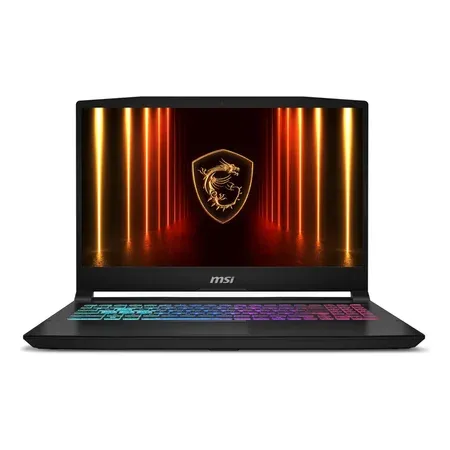
Better for gaming: 115 W GPU, HX CPU, QHD screen
MSI Katana 15 HX, RTX 5070
Core i9-14900HX, RTX 5070, 32 GB DDR5, 1 TB, 15.6-inch QHD 165 Hz. $2,119–$2,138 on Amazon on Nov 20.
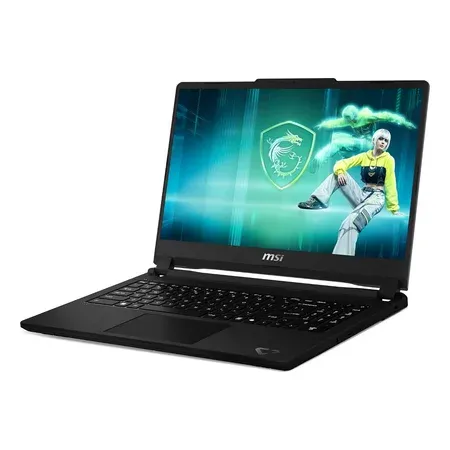
Lighter and cheaper, but a 45 W RTX 5050
MSI Cyborg A15 AI, RTX 5050
Ryzen 7 260, RTX 5050, 16 GB DDR5, 1 TB, 15.6-inch 1080p 144 Hz. $1,299 sold by Amazon on Nov 20.
Which Should You Buy?
| If you… | Buy |
|---|---|
| Want the most frames from an RTX 5060 or 5070 | Katana 15 HX with the QHD 165 Hz screen |
| Play at a desk and stream or edit video | Katana 15 HX (16-core HX CPU) |
| Carry it every day and still play AAA games | Cyborg 15 MAX (100 W, 4.41 lb) |
| Mostly play esports games at 1080p on a tight budget | Cyborg A15 AI or Cyborg 15 |
At the same price, skip any Cyborg with a 45–55 W GPU and buy a laptop that runs the same chip near full power.
At these prices, also compare the 2025 ASUS ROG Strix G16, which Amazon had with an RTX 5060 for $1,179.99 (see ASUS TUF vs. ROG), and Acer Nitro V vs. Lenovo LOQ.
MSI Katana vs. Cyborg FAQ
Is the MSI Katana better than the Cyborg?
For gaming performance, yes: it has a 16-core HX processor, an optional QHD 165 Hz screen and a bigger battery. The Cyborg is lighter and thinner.
Do the Katana and Cyborg have the same GPUs?
The same names, but not the same power. The Katana 15 HX runs the RTX 5050, 5060 and 5070 at up to 115 W. Cyborg versions run them at 45 W to 100 W.
Is the Cyborg 15 MAX different from the Cyborg 15?
Yes. The Cyborg 15 MAX (C2WX) runs its GPU at up to 100 W with a 60 Wh battery and a 180 W adapter. The regular Cyborg 15 (B2RW) runs an RTX 5060 at 55 W.
Is the Katana good for Blender or video editing?
It’s the better of the two: a 16-core HX processor, the higher GPU power and the 100% DCI-P3 QHD screen option.
Can you upgrade the RAM?
Yes. All of them have two DDR5 slots. Most ship with two 8 GB modules, so upgrading means replacing both with larger ones.
Which is lighter?
The Cyborg. MSI lists 4.29–4.63 lb for the Cyborg 15 and Cyborg A15 AI (by SKU) and 4.41 lb for the Cyborg 15 MAX, vs. 5.29 lb for the Katana 15 HX.
What warranty do they have?
1 year limited in the US. MSI lists 3 years on some Katana builds. See gaming laptop warranties.




