
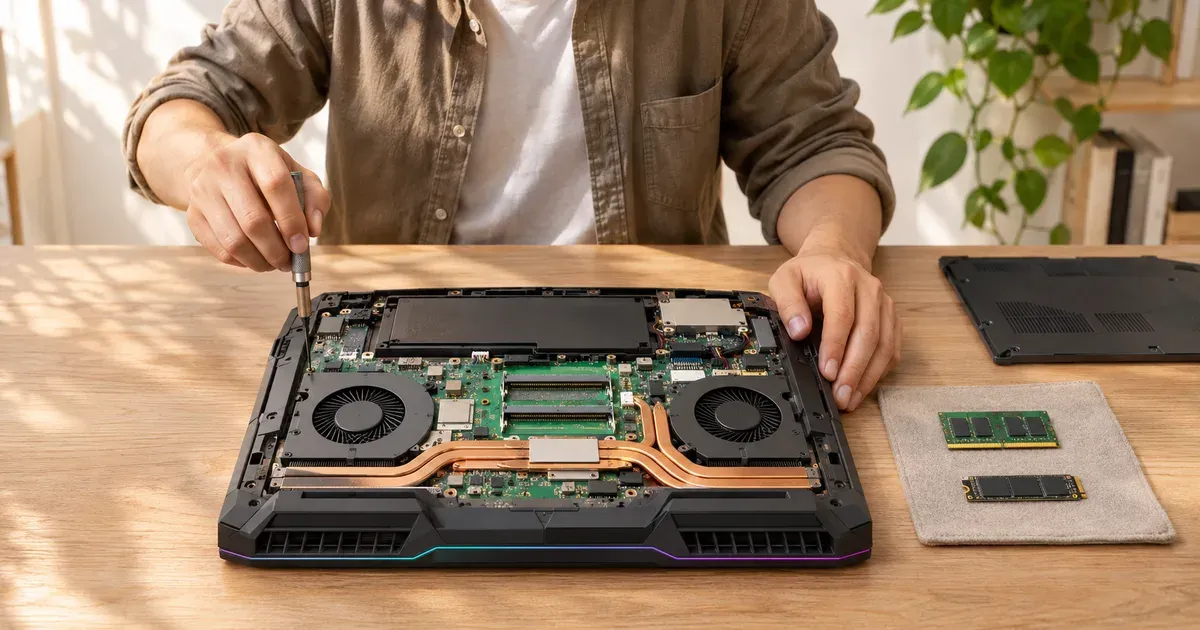
The short answer: you can almost always add or swap the SSD, you can upgrade the RAM only if the laptop uses slots instead of soldered memory, and you can’t upgrade the GPU or CPU. Laptop graphics chips are soldered to the motherboard. The one exception is the Framework Laptop 16, whose graphics card is a swappable module, and you can add an external GPU over Thunderbolt or USB4. Thin 2026 models increasingly solder their memory, so check before you buy if you plan to add RAM later.
What’s Upgradeable in 2026 Gaming Laptops
| Laptop | RAM | Max RAM | SSD slots |
|---|---|---|---|
| ASUS ROG Strix G16 (2026) | 2× DDR5-5600 SO-DIMM | 64 GB | 2× M.2 |
| ASUS ROG Strix G18 (2026) | 2× DDR5-5600 SO-DIMM | — | 2× M.2 |
| ASUS ROG Strix Scar 18 (2026) | 2× DDR5-6400 SO-DIMM | 128 GB configs | 2× M.2 (PCIe 5.0) |
| ASUS TUF Gaming F16 / TUF Gaming 16 (2026) | 2× DDR5-5600 SO-DIMM | 64 GB | — |
| Lenovo Legion Pro 7i Gen 10 | 2× DDR5-6400 CSODIMM | 64 GB offered | 2× M.2 2280 (one PCIe 5.0) |
| Alienware 18 Area-51 | DDR5-6400 CSODIMM | — | — |
| Razer Blade 18 (2026) | 2 slots, DDR5-6400 | 128 GB | — |
| Framework Laptop 16 | 2× DDR5-5600 SO-DIMM | — | — |
| ASUS ROG Zephyrus G14 (2026) | Soldered LPDDR5X | 32 or 64 GB fixed | 1× M.2 |
| ASUS ROG Zephyrus G16 (2026) | Soldered LPDDR5X | 32 or 64 GB fixed | 2× M.2 |
| Razer Blade 16 (2026) | Soldered LPDDR5X | up to 64 GB fixed | — |
| ASUS ROG Flow Z13 (2025) | Soldered LPDDR5X | up to 128 GB fixed | 1× M.2 2230 |
ASUS notes its Zephyrus and TUF M.2 slots take single-sided SSDs only. CSODIMM (clocked SO-DIMM) modules are a newer, faster type; buy ones listed as compatible with your model.
Upgrading the SSD
The easiest and most useful upgrade. Most 16- and 18-inch gaming laptops have two M.2 slots, so you can add a second drive without cloning anything. Check three things first:
- Length: most slots take 2280 drives; some Lenovo models use shorter 2242, and the Flow Z13 uses 2230.
- Thickness: single-sided drives fit everywhere; double-sided ones don’t fit some thin laptops.
- Speed: PCIe 4.0 drives work in PCIe 5.0 slots and vice versa (at the slower speed).
Upgrading the RAM
If your laptop has slots, adding memory takes a screwdriver and a few minutes. Match the type (DDR5 SO-DIMM vs. CSODIMM), and install a matched pair for dual-channel speed. For gaming, 16 GB is the minimum and 32 GB is the comfortable amount in 2026; see 16 GB vs. 32 GB RAM.
If the memory is soldered, as on the 2026 Zephyrus G14 and G16 and Razer Blade 16, buy the amount you’ll need for the laptop’s whole life. Memory prices rose sharply in 2026 (see why gaming laptop prices went up), so upgrading later isn’t cheaper either.
Can You Upgrade the GPU?
Not on a normal gaming laptop. The GPU is a chip soldered to the motherboard, along with its video memory, and it shares a cooler designed for it. The options:
- Framework Laptop 16. Its Expansion Bay takes swappable graphics modules: currently an RTX 5070 with 8 GB or 12 GB, or a Radeon RX 7700S. The RTX 5070 module runs at up to 100 W on AC power.
- External GPU (eGPU). A desktop graphics card in an enclosure connected over Thunderbolt or USB4. Bandwidth is lower than an internal slot, so you won’t get a desktop card’s full performance, and it only helps at a desk. Laptops with Thunderbolt 5 (the 2026 ROG Strix G16 has two ports, up to 120 Gbps) have the most headroom.
- Sell and replace. For most people, the cheapest real GPU upgrade is a newer laptop.
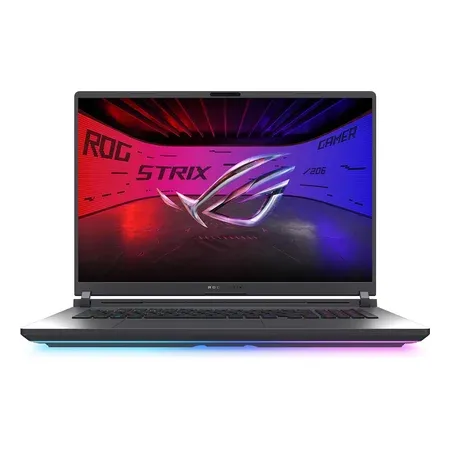
2 RAM slots, 2 SSD slots
ASUS ROG Strix G18 (2026), RTX 5070 Ti
32 GB DDR5 in 2 SO-DIMM slots, 2 M.2 slots, 140 W RTX 5070 Ti, 18-inch 300 Hz. $3,199.99 at Amazon on Nov 20.
Before You Open It
- Warranty: some makers treat memory and SSDs as customer-replaceable parts; others want service centers to do it. Check your model’s user guide and warranty terms.
- Static and screws: unplug the laptop, hold the power button for a few seconds, and keep track of different screw lengths.
- Bottom-panel clips on many gaming laptops are tight; use a plastic pry tool, not a screwdriver.
- Battery connector: many makers’ guides say to disconnect it before touching the board.
More on what keeps a laptop going in how long do gaming laptops last.
Upgrading a Gaming Laptop FAQ
Can I add more RAM to my gaming laptop?
Yes if it has SO-DIMM or CSODIMM slots (ROG Strix, TUF, Legion Pro 7i, Alienware Area-51, Razer Blade 18, Framework 16). No if the RAM is soldered (2026 Zephyrus G14/G16, Razer Blade 16, Flow Z13).
Can I upgrade my laptop’s graphics card?
Only on the Framework Laptop 16, or by adding an external GPU over Thunderbolt or USB4. Other laptop GPUs are soldered.
Can I add a second SSD to a gaming laptop?
Usually. Most 16- and 18-inch models have two M.2 slots. Thin 14-inch models often have one.
Does upgrading RAM void the warranty?
It depends on the maker and the model. Check the warranty terms and user guide before opening the case.
Can I upgrade the CPU in a gaming laptop?
No. Laptop processors are soldered to the motherboard.
Sources
- ASUS ROG Strix G16 (2026) specifications
- ASUS ROG Strix G18 (2026) specifications
- ASUS ROG Strix Scar 18 (2026) specifications
- ASUS ROG Zephyrus G14 (2026) specifications
- ASUS ROG Zephyrus G16 (2026) specifications
- ASUS ROG Flow Z13 (2025) specifications
- ASUS TUF Gaming F16 (2026) specifications
- Lenovo Legion Pro 7i Gen 10 PSREF (PDF)
- Alienware 18 Area-51
- Razer Blade 16 and Razer Blade 18
- Framework Laptop 16 configurator
- Framework: Laptop 16 with Nvidia RTX 5070




