The short answer: the ASUS ROG Zephyrus G14 (2026) is the best gaming laptop for travel. It’s 3.48 pounds, charges over USB-C, has a 73 Wh battery that flies without airline approval, and runs an RTX 5070 Ti at up to 130 W. ASUS’s store also includes a year of accidental-damage protection and an international warranty. If you want the lightest possible gaming PC, the 2.65-pound ROG Flow Z13 tablet ($1,979.99) is easier to carry but uses integrated graphics.
Prices checked November 20, 2026.
Travel Gaming Laptops Compared
| Zephyrus G14 (2026) | ROG Flow Z13 (2025) | Razer Blade 14 | TUF Gaming A14 | Razer Blade 16 (2026) | |
|---|---|---|---|---|---|
| Weight | 3.48 lb | 2.65 lb (tablet) | 3.59 lb | — | 4.6 lb |
| GPU | RTX 5070 Ti / 5080 | Radeon 8060S (integrated) | RTX 5060 / 5070 | Radeon 8060S (integrated) | RTX 5070 Ti–5090 |
| Battery | 73 Wh | 70 Wh | 72 Wh | — | — |
| USB-C charging | Yes (TB4 and USB-C) | Yes (2x USB4) | Yes | — | see Razer |
| Main charger | 250 W | 200 W | — | — | 280 W |
| Price (Nov 20) | $3,599.99 (ASUS) | $1,979.99 | razer.com | $1,829.99 | from $3,499.99 |
Best for Travel: ASUS ROG Zephyrus G14 (2026)
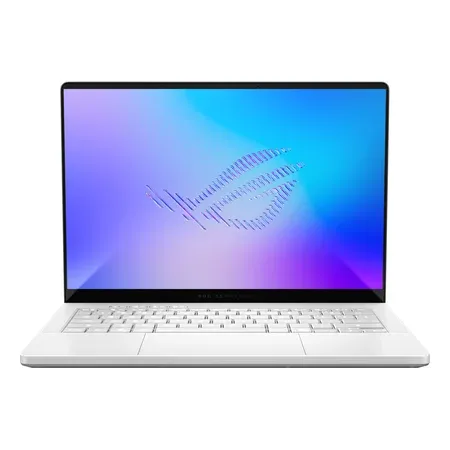
Best for travel
ASUS ROG Zephyrus G14 (2026) GU405AR
Core Ultra 9 386H, RTX 5070 Ti, 32 GB, 1 TB, 14-inch 3K 120 Hz OLED, 3.48 lb, USB-C charging. $3,599.99 at ASUS.
The G14 is the most gaming power you can carry under 3.5 pounds. Both its Thunderbolt 4 and USB-C ports accept power delivery, so a compact USB-C charger keeps it topped up on the road, and the 250 W barrel charger stays home or comes along for full-power gaming. The 73 Wh battery is well under the FAA’s 100 Wh carry-on threshold. ASUS’s US store lists a one-year international warranty plus one year of domestic accidental-damage protection when you register within 60 days. The trade-offs: memory is soldered, and it gets loud at full power.
Lightest: ASUS ROG Flow Z13 (2025)
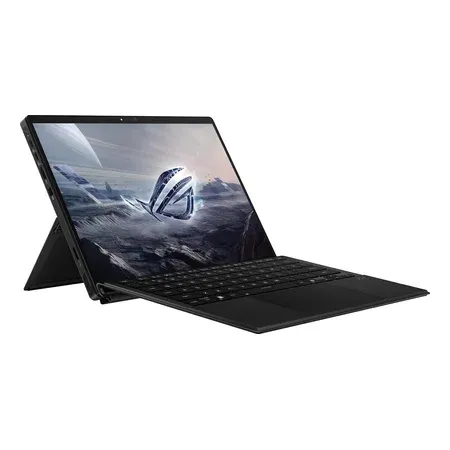
Lightest
ASUS ROG Flow Z13 (2025), Ryzen AI Max+ 395
Ryzen AI Max+ 395 with Radeon 8060S, 32 GB, 1 TB, 13.4-inch 2560x1600 180 Hz touch, 2.65 lb tablet. $1,979.99 sold by Amazon.
The Flow Z13 is a 13.4-inch tablet with a kickstand and a detachable keyboard, 2.65 pounds without the keyboard. AMD’s Ryzen AI Max+ 395 has integrated Radeon 8060S graphics that handle many games at 1080p-class settings without a separate GPU, and it charges from either of its two USB4 ports. It’s the best choice if you also want a tablet for flights and hotel beds, but it’s slower than an RTX 5070 laptop in demanding games and can’t use Nvidia’s DLSS.
Best Thin Alternative: Razer Blade 14
The Razer Blade 14 is 0.62 inch thick and 3.59 pounds, with an RTX 5070 at up to 115 W, a 3K 120 Hz OLED and a 72 Wh battery that charges over USB-C. It’s a little slower than the G14 with an RTX 5070 Ti. Razer’s warranty is one year plus two years on the battery, and accidental damage needs a RazerCare plan, so consider that for a laptop that travels.
Best Budget Travel Option: ASUS TUF Gaming A14
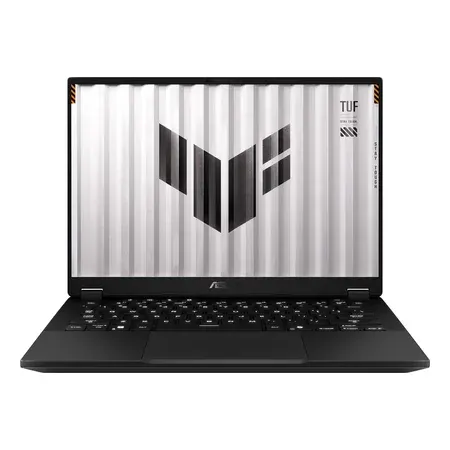
Best budget travel pick
ASUS TUF Gaming A14 (FA401, Ryzen AI Max+ 392)
Ryzen AI Max+ 392 with Radeon 8060S, 32 GB LPDDR5X, 1 TB, 14-inch 2560x1600 165 Hz. $1,829.99 sold by Amazon.
This TUF A14 uses the same class of AMD integrated graphics as the Flow Z13 in a conventional 14-inch clamshell, sold by Amazon for $1,829.99. Without a separate GPU drawing power, it’s a better fit for long days away from an outlet than an RTX laptop, though it’s slower in AAA games.
Bigger Screen: Razer Blade 16 (2026)
If you want a 16-inch screen on the road, the Razer Blade 16 (2026) is 0.59 inch thick and 4.6 pounds with an RTX 5070 Ti at up to 140 W, $3,499.99 on Amazon. Its main adapter is 280 W; Razer also sells 100 W and 130 W USB-C chargers for its laptops.
Traveling With a Gaming Laptop
- Batteries and flights. The FAA allows laptop batteries up to 100 Wh in carry-on bags with no airline approval. Every laptop here is under that; the largest gaming-laptop batteries are 99.9 Wh for the same reason. Keep the laptop in your carry-on. See can you bring a gaming laptop on a plane?
- Charging. Most gaming laptops accept about 100 W over USB-C, enough to charge and run light apps but not to game at full power. Pack the barrel charger if you’ll game.
- Power abroad. Laptop chargers are typically rated for 100–240 V, so you need only a plug adapter, not a voltage converter. Check the label on your charger.
- Warranty. Ask whether the warranty is international. ASUS’s US store lists an international warranty for the 2026 Zephyrus.
- Weight adds up. A 280–400 W gaming charger can weigh more than a pound on its own.
Gaming Laptops for Travel FAQ
What is the best gaming laptop for travel?
The ASUS ROG Zephyrus G14 (2026): 3.48 pounds, USB-C charging, a 73 Wh battery and an RTX 5070 Ti at up to 130 W, $3,599.99 at ASUS on November 20, 2026.
Can you bring a gaming laptop on a plane?
Yes. The FAA allows laptops with batteries up to 100 Wh in carry-on bags without airline approval; 101–160 Wh needs airline approval. Gaming laptops top out at 99.9 Wh.
Can you charge a gaming laptop with USB-C while traveling?
Most current gaming laptops, including the Zephyrus G14 and G16, Blade 14 and 16 and Flow Z13, accept USB-C power. A 100 W charger keeps them charged for light use, not full-power gaming.
Is a gaming laptop or a handheld better for travel?
A handheld is lighter for gaming alone; a gaming laptop doubles as your work computer. See gaming laptop vs. Steam Deck.