For most kids, a cheap Chromebook is the right first laptop, and the best value is the ASUS Chromebook CM14: a spill-resistant keyboard, a 14-inch 1080p screen and Google updates to June 2033 for $179.99 on ASUS’s store. The HP Chromebook 14a-nm000 ($259.99 at HP) gets updates until June 2036, longer than any other cheap Chromebook here. Younger kids who want a tablet too will like the Lenovo Chromebook Duet Gen 9, a detachable 11-inch, at $349.99 with a pen. Kids whose school or games need Windows should get the Acer Aspire Go 15 (8GB, 1080p) at $299.99 on Amazon.
Prices were checked on November 23, 2026. Before buying, check the Chromebook’s update date on Google’s list by its exact model number. Updates run 10 years from the platform’s release, not from your purchase.
Kids’ Laptops Compared
| Laptop | Type | Chip | RAM / storage | Screen | Google updates until | Price (Nov 23, 2026) |
|---|---|---|---|---|---|---|
| ASUS Chromebook CM14 (CM1402CM2A) | Chromebook | Kompanio 520 | 4GB / 64GB eMMC | 14” FHD | Jun 2033 | $179.99 (ASUS) |
| HP Chromebook 14a-nm000 | Chromebook | Kompanio 540 | 4GB / 64GB eMMC | 14” 1366x768, 250 nits | Jun 2036 | $259.99 (HP) |
| Lenovo Chromebook Duet Gen 9 | Detachable Chromebook | Kompanio 838 | 4GB / 64GB eMMC (8GB/128GB option) | 10.95” 1920x1200 touch, 400 nits | Jun 2034 (Google: Duet (11”, 9)) | $349.99 with pen; $399.99 for 8GB/128GB (Lenovo) |
| ASUS Chromebook Plus CX34 (CX3402CBA) | Chromebook Plus | Core i3-1215U | 8GB / 128GB UFS | 14” FHD touch | Jun 2032 | $299.99 (ASUS) |
| Acer Aspire Go 15 (AG15-32P-352Z) | Windows laptop | Core 3 N355 | 8GB / 128GB UFS | 15.6” 1920x1080 | Windows Update | $299.99 (Amazon) |
1. ASUS Chromebook CM14: Best Cheap Laptop for Kids
The ASUS Chromebook CM14 (CM1402CM2A) was $179.99 on ASUS’s store on November 23, down from $299.99. For a child’s laptop, its spill-resistant keyboard is the standout feature, and the 14-inch 1080p screen is sharper than the 1366x768 panels common at this price. Inside are a MediaTek Kompanio 520, 4GB of memory and 64GB of eMMC storage, which is enough for Google Classroom, Docs, YouTube and web games. Google lists the CM14 (CM1402C) through June 2033. ASUS charges a 15% restocking fee on opened returns that aren’t defective.
2. HP Chromebook 14a-nm000: Longest Updates
The HP Chromebook 14a-nm000 was $259.99 on HP’s store, and Google lists the 14a-nm0xxx through June 2036. A Chromebook bought for a second-grader today will still be getting security updates in middle school and beyond. It has a Kompanio 540, 4GB, 64GB eMMC and a 47Wh battery, and weighs 2.98 pounds. The screen is 1366x768 at 250 nits, which is soft but fine for a child. HP accepts returns within 30 days with no restocking fee, and holiday purchases can come back until January 15, 2027.
3. Lenovo Chromebook Duet Gen 9: Best Laptop-Tablet for Younger Kids
The Lenovo Chromebook Duet Gen 9 is a 10.95-inch touchscreen tablet with a detachable keyboard and kickstand cover. On November 23, Lenovo sold the 4GB/64GB model with a USI pen for $349.99, and the 8GB/128GB model was a $399.99 doorbuster with eCoupon EARLYBFDEALUS. It has a 400-nit 1920x1200 screen, a 29Wh battery Lenovo rates at 12 hours and a weight of 1.1 kg (2.4 pounds) with the keyboard. Google lists the Chromebook Duet (11”, 9) through June 2034. A small keyboard suits small hands but gets cramped for older kids typing essays.
4. ASUS Chromebook Plus CX34: Best for Older Kids
The ASUS Chromebook Plus CX34 (CX3402CBA) was $299.99 on ASUS’s store, down from $429.99. A Core i3-1215U and 8GB make it noticeably faster than the MediaTek Chromebooks above, which matters for a middle or high schooler running video calls and many tabs. It has a 14-inch 1080p touchscreen and up to 10 hours of battery per ASUS. Google lists the CX34 (CX3402CBA) through June 2032.
5. Acer Aspire Go 15: Best Windows Laptop for Kids
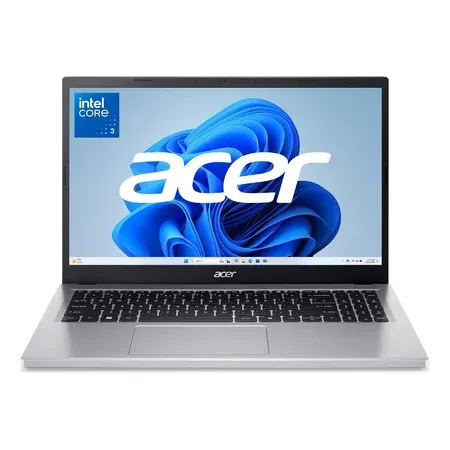
Best windows laptop for kids
Acer Aspire Go 15 (AG15-32P-352Z)
Core 3 N355, 8GB DDR5, 128GB UFS, 15.6-inch 1920x1080 IPS, Windows 11 Home in S mode. $299.99 sold by Amazon on Nov 23, 2026.
Some schools and coding clubs need Windows software, and the Aspire Go 15 is a cheap way to get it with 8GB and a 1080p screen. It ships in Windows 11 S mode, which only allows Microsoft Store apps. For a young child, that restriction can be a feature: leave it on until they need something outside the Store. Microsoft says leaving S mode is free but permanent. It isn’t a gaming laptop; for that, see best gaming laptops for kids.
What to Look For in a Kids’ Laptop
- A long Google update date. Many cheap refurbished Chromebooks, including the Lenovo 100e and 300e 2nd Gen and HP Chromebook 14 G6, stop getting updates in June 2029, and some end in June 2027. A new model bought today runs into the 2030s.
- Parental controls. ChromeOS supports supervised Google accounts for children, and Windows has Microsoft Family Safety. Set them up before handing it over.
- A sturdy, spill-resistant keyboard if the laptop lives on the kitchen table.
- Warranty and accident cover. Every maker gives one year. HP’s three-year accidental-damage Care Pack for Chromebooks and OmniBook 3 models was $103.99 on HP’s store on November 23 (35% off).
- Skip 4GB Windows laptops. 4GB is workable on ChromeOS but not on Windows 11.
For a Chromebook vs. Windows decision, see Chromebook vs. a cheap Windows laptop. More Chromebooks are in best budget Chromebooks and best Chromebooks; all budget picks are in the best budget laptops.
FAQ
What is the best cheap laptop for a kid?
The ASUS Chromebook CM14, $179.99 on ASUS’s store on November 23, 2026, with a spill-resistant keyboard and Google updates until June 2033.
Is a Chromebook or a Windows laptop better for kids?
A Chromebook, for most kids. It’s cheaper, updates itself, and runs Google Classroom and Docs. Choose Windows if the school or a specific program requires it.
How long will a kids’ Chromebook get updates?
Google gives 10 years from the platform’s release date. The HP Chromebook 14a-nm0xxx is listed through June 2036 and the ASUS CM14 (CM1402C) through June 2033. Check the exact model on Google’s list.
Is 4GB of RAM enough for a kid’s laptop?
On a Chromebook used for schoolwork, video and web games, yes. On Windows 11, no; get 8GB. For gaming, look at gaming laptops for kids.