The best budget laptop for most teachers is the HP OmniBook 3 14 with 16GB and a built-in HDMI 2.1 port for the classroom projector, at $499 sold by Amazon. If your district requires specific Windows security or testing software, get an Intel laptop instead: the Dell 15 (Core 3 100U, 8GB, 15.6-inch 1080p) is $399.99, and Lenovo’s IdeaPad Slim 3i Gen 10 (Core 5 210H, touchscreen) was $499.99 on lenovo.com before Lenovo’s 5% discount for school employees. Teachers in Google Classroom schools should look at the Acer Chromebook Plus 514 ($499.99), which gets updates until June 2033.
Prices were checked on November 23, 2026.
Teacher Laptops Compared
| Laptop | Chip | RAM | Storage | Screen | HDMI | Price (Nov 23, 2026) |
|---|---|---|---|---|---|---|
| HP OmniBook 3 14 (14-hz0588nr) | Snapdragon X (Arm) | 16GB | 256GB | 14” 1920x1200, 300 nits | HDMI 2.1 (HP 14-HZ000 spec) | $499 (Amazon) |
| Dell 15 (DC15250) | Core 3 100U (x86) | 8GB | SSD | 15.6” 1920x1080 | HDMI 1.4 (Dell DC15250 spec) | $399.99 (Amazon) |
| Lenovo IdeaPad Slim 3i Gen 10 (83K4000QUS) | Core 5 210H (x86) | 8GB + free slot (max 24GB) | 512GB | 15.3” 1920x1200 touch, 300 nits | HDMI 1.4 | $499.99 (Lenovo) |
| Acer Chromebook Plus 514 (CB514-5HT) | Core i3-1315U | 8GB | 256GB | 14” touch | Check listing | $499.99 (Amazon) |
| Apple MacBook Neo 256GB | A18 Pro | 8GB | 256GB | 13” 2408x1506, 500 nits | No (USB-C adapter) | $649 (Amazon) |
1. HP OmniBook 3 14 (16GB): Best Budget Laptop for Teachers
Best for teachers
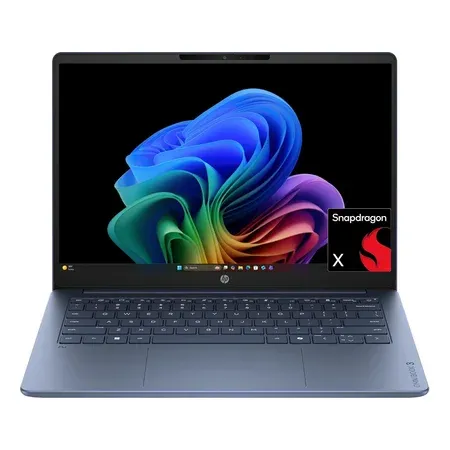
HP OmniBook 3 14 (14-hz0588nr)
Snapdragon X X1-26-100, 16GB RAM, 256GB SSD, 14-inch 1920x1200, 3.13 lb. $499 sold by Amazon on Nov 23, 2026.
A teacher’s laptop runs slides on the projector, a gradebook, email and a dozen tabs of lesson materials at once. 16GB covers that, and the HDMI 2.1 port plugs straight into most classroom projectors and panels without a dongle. HP’s spec page lists a 60Wh battery and 3.13 pounds, light enough to carry between rooms. The Snapdragon chip is efficient, but check with your district: Microsoft says some antivirus software can’t be installed on Arm, and drivers can’t be emulated. If IT installs its own security agent, ask whether it supports Windows on Arm.
2. Dell 15 (Core 3 100U): Best for District-Managed Software
Best for district software
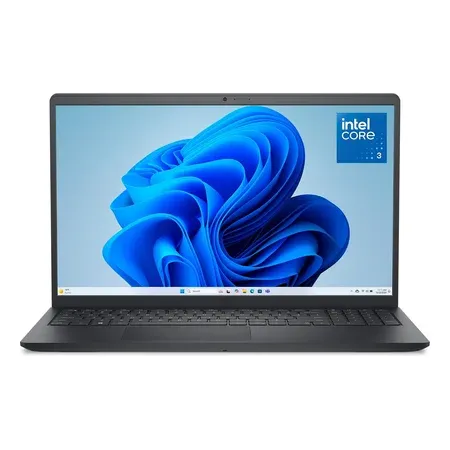
Dell 15 (DC15250, Core 3 100U)
Intel Core 3 100U, 8GB RAM, SSD, 15.6-inch 1920x1080, Windows 11 Home. $399.99 sold by Amazon on Nov 23, 2026.
An Intel x86 laptop runs any testing app, gradebook client or security agent a district uses. The Dell 15 has a 15.6-inch 1080p screen, regular Windows 11 Home and 8GB for $399.99. Dell’s DC15250 spec page lists HDMI 1.4, an SD card reader, USB-A and USB-C. The 8GB is its limit; keep tab counts sensible.
3. Lenovo IdeaPad Slim 3i Gen 10: Best With a Teacher Discount
Lenovo gives school employees 5% off sitewide with a verified Lenovo Education account (.edu email or ID.me). The IdeaPad Slim 3i Gen 10 (83K4000QUS) was $499.99 on November 23, which brings it under $475 with the discount. Lenovo’s PSREF lists a Core 5 210H, 8GB soldered plus a free SO-DIMM slot (up to 24GB), a 512GB SSD, a 15.3-inch 1920x1200 touchscreen at 300 nits, HDMI 1.4, two USB-A and a USB-C port with charging and DisplayPort. The free memory slot means you can add 16GB later. Lenovo’s “Est Value” strikethrough isn’t a list price, so don’t read the “50% off” literally. Holiday orders can be returned until January 27, 2027. More in is the Lenovo IdeaPad Slim 3 worth it?
4. Acer Chromebook Plus 514: Best for Google Classroom Schools
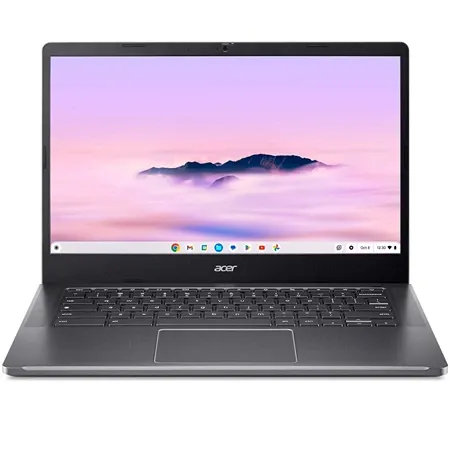
Best for google classroom
Acer Chromebook Plus 514 (CB514-5HT-33RD)
Core i3-1315U, 8GB LPDDR5, 256GB SSD, 14-inch touch, Wi-Fi 7. Google updates to June 2033. $499.99 sold by Amazon on Nov 23, 2026.
If your school runs on Google Workspace, a Chromebook matches what your students use, which makes it easier to demo and troubleshoot. This Chromebook Plus has a Core i3, 8GB, a 256GB SSD and a touchscreen. Google lists updates for the CB514-5HT until June 2033.
5. Apple MacBook Neo: Best Mac for Teachers
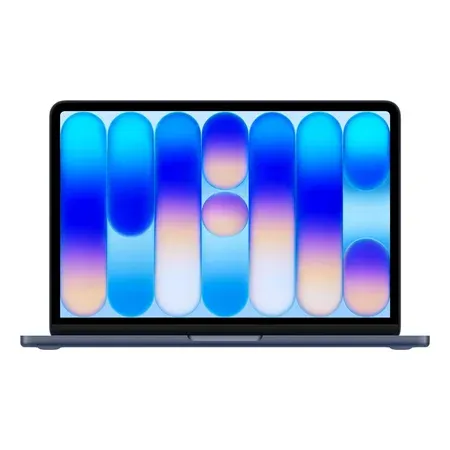
Best mac for teachers
Apple MacBook Neo 13-inch (256GB)
A18 Pro, 8GB unified memory, 256GB SSD, 13-inch 500-nit display, 2.7 lb. $649 sold by Amazon on Nov 23, 2026 ($699 at Apple).
Amazon’s $649 matches Apple’s education price for the Neo. Apple lists 16 hours of video playback and a 2.7-pound body. For the classroom, budget for a USB-C to HDMI adapter, because the Neo has only two USB-C ports (one at USB 2 speed) and drives one external display. The keyboard isn’t backlit.
Teacher Discounts by Maker
| Maker | Offer | Teacher eligibility (as stated) |
|---|---|---|
| Lenovo | 5% off sitewide | School employees with .edu email or ID.me |
| HP | “Up to 40%” through the HP Education Program, limit 2 PCs | US students, parents and teachers |
| Microsoft | “Up to 5%” (Surface configure pages) or “up to 10%” (Surface hub) | Faculty included |
| ASUS | Price shown after ID.me verification | Teachers included |
| Samsung | “Up to 30%,” varies by product | .edu email, StudentBeans/UNiDAYS or ID.me |
| Dell | Student discount only | Students; page said “valid until 11/2/26” |
Read on each maker’s site on November 23, 2026. During Black Friday, compare the education price with the public sale price.
What Teachers Should Check
- HDMI or a display-capable USB-C port for projectors and interactive panels.
- District software support. Ask IT whether its security agent, VPN or testing software runs on Windows on Arm or ChromeOS.
- Battery for a full school day. Look for 50Wh or more, or plan to plug in at your desk.
- Weight. Under 3.5 pounds is comfortable to carry between rooms.
More picks are in the best budget laptops and best budget laptops for work from home.
FAQ
What is the best budget laptop for teachers?
The HP OmniBook 3 14 with 16GB and HDMI 2.1, $499 from Amazon on November 23, 2026. For district software that must run on Intel, the Dell 15 at $399.99.
Do teachers get laptop discounts?
Yes. Lenovo gives school employees 5% off, HP’s Education Program includes teachers (“up to 40%”), Microsoft includes faculty, and ASUS verifies teachers through ID.me.
Is a Chromebook good for teachers?
Yes in Google Workspace schools, where it matches what students use. It won’t run Windows-only gradebook or testing software.
Can a MacBook connect to a classroom projector?
Yes, with a USB-C to HDMI adapter. The MacBook Neo has no HDMI port and supports one external display.