The best budget laptop with a backlit keyboard is the ASUS Vivobook 14 (X1407QA) at $499.99 on the ASUS eShop, with 16GB, a 512GB SSD and a 50 Wh battery. On Amazon, the HP OmniBook 3 17 ($499.99) is the cheapest backlit pick sold by Amazon, and the Acer Aspire 16 AI ($599.99) adds 16GB and a 120Hz screen. The Dell XPS 13 ($549.99 on dell.com) is the lightest. Many popular budget laptops have no backlight at all, including Apple’s MacBook Neo, the base Dell 14, 15 and 16, and HP’s $499 OmniBook 3 14 Snapdragon. Prices are from November 23, 2026.
Budget Laptops With a Backlit Keyboard
| Laptop | CPU | RAM | Display | Weight | Battery (maker claim) | Price (Nov 23, 2026) |
|---|---|---|---|---|---|---|
| ASUS Vivobook 14 (X1407QA-BS56) | Snapdragon X X1-26-100 | 16GB | 14” 1920x1200, 300 nits | 3.28 lb | 50 Wh; up to 29 h | $499.99 (ASUS) |
| HP OmniBook 3 17 (17-dk0099nr) | Core 5 120U | 8GB | 17.3” 1920x1080 | 4.43 lb | up to 10 h 30 min | $499.99 (Amazon) |
| Acer Chromebook Plus 514 (CB514-5HT-33RD) | Core i3-1315U | 8GB | 14” WUXGA touch | — | up to 17 h | $499.99 (Amazon) |
| Dell XPS 13 (DX13260) | Core 5 320 | 8GB | 13.4” 2560x1600 touch, 500 nits | 2.2 lb | 52 Wh; up to 20 h | $549.99 (Dell) |
| Acer Aspire 16 AI (A16-52M-58A1) | Core Ultra 5 226V | 16GB | 16” 1920x1200, 120Hz | 3.4 lb | up to 26.5 h video | $599.99 (Amazon) |
| HP OmniBook 3 16 touch (16-bv0099nr) | Ryzen AI 5 430 | 16GB | 16” 1920x1200 touch | 3.61 lb | up to 19 h 30 min | $649 (Amazon) |
| HP OmniBook 5 16 (16-fb0299nr) | Snapdragon X X1-26-100 | 16GB | 16” 1920x1200 | 3.52 lb | up to 34 h 45 min | $699.99 (Amazon) |
Popular Budget Laptops Without a Backlight
Backlighting is one of the first things makers cut. These have no keyboard backlight in the configurations below, per the maker’s spec page or listing:
| Laptop | Price (Nov 23, 2026) | Notes |
|---|---|---|
| Apple MacBook Neo | $699 (Apple), $649 (Amazon) | Plain Magic Keyboard; the M5 MacBook Air has a backlit one |
| HP OmniBook 3 14 Snapdragon (14-hz0588nr) | $499 (Amazon) | “Opaque” keyboard |
| Dell 14 (D14261, D14265), Dell 15 (D15261, D15266, DC15255), Dell 16 (DC16250) | $629.99–$1,149.99 (Dell) | Non-backlit on Dell’s pages; the Dell 15 DC15250 is backlit |
| Dell 14S (DS14270) | $649.99 (Dell) | Non-backlit |
| HP OmniBook 3 16t-by000, 17t-dg000, 14z-hw000 | $299.99–$549.99 (HP) | Non-backlit default keyboards |
| ASUS Vivobook Go 15 (E1504TA, E1504FA) | $299.99 (ASUS) | No backlight |
Some build-to-order models add it as an option: Dell’s Pro 14 Essential charges $30, and Lenovo’s IdeaPad Slim 3 offers it by configuration. Always check the exact model number.
1. ASUS Vivobook 14 (X1407QA): Best Budget Backlit Laptop
The X1407QA-BS56 has a backlit keyboard, 16GB, a 512GB SSD, a Snapdragon X X1-26-100 and a 14-inch 1920x1200 screen. ASUS claims up to 29 hours from its 50 Wh battery. It has two USB4 ports, two USB-A ports and HDMI 2.1, and weighs 3.28 lb. It was $499.99 on the ASUS eShop. As a Windows on Arm laptop, it can’t run software that needs x64 kernel drivers, such as some anti-cheat games.
2. HP OmniBook 3 17 (17-dk0099nr): Cheapest Backlit Laptop on Amazon
HP’s listing for the 17-dk0099nr describes a full-size backlit keyboard, a 17.3-inch 1920x1080 screen, a Core 5 120U, 8GB and a 512GB SSD. HP claims up to 10 hours 30 minutes. It weighs 4.43 lb, so it’s a desk laptop. It was $499.99 sold by Amazon.
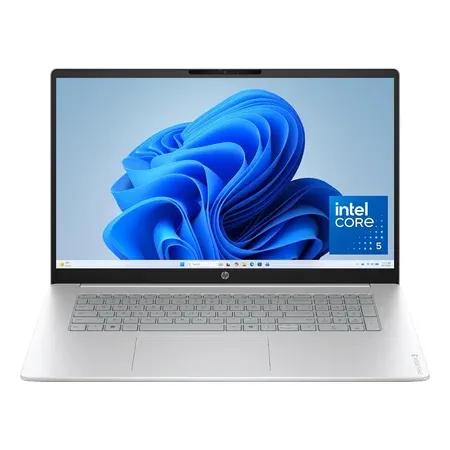
Cheapest backlit laptop on amazon
HP OmniBook 3 17 (17-dk0099nr, Core 5 120U, 8GB, 512GB)
Backlit full-size keyboard, 17.3-inch 1920x1080, 512GB SSD. $499.99 sold by Amazon on November 23, 2026.
3. Dell XPS 13 (DX13260): Lightest Backlit Laptop
Dell’s revived XPS 13 has a backlit keyboard, weighs 2.2 lb and has a 13.4-inch 2560x1600 120Hz touchscreen at 500 nits. Dell claims up to 20 hours from its 52 Wh battery. Memory is 8GB and storage 256GB, and its only ports are two Thunderbolt 4. It was $549.99 on dell.com.
4. Acer Aspire 16 AI: Best Backlit Laptop With 16GB on Amazon
The Aspire 16 AI has a backlit keyboard, a Core Ultra 5 226V with 16GB, a 512GB SSD, a 16-inch 120Hz screen covering 100% sRGB and two Thunderbolt 4 ports. Acer claims up to 26.5 hours of video. It was $599.99 sold by Amazon.
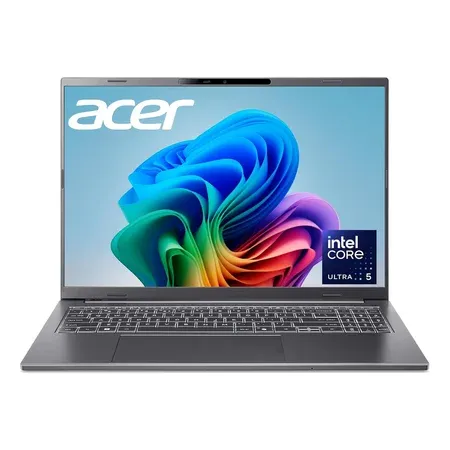
Best backlit laptop with 16GB
Acer Aspire 16 AI (Core Ultra 5 226V, 16GB, 512GB)
Backlit keyboard, 16GB, 16-inch 120Hz 100% sRGB, 2x Thunderbolt 4. $599.99 sold by Amazon on November 23, 2026.
5. HP OmniBook 5 16 (Snapdragon X): Best Backlit Battery Life
The 16-fb0299nr pairs a backlit keyboard with a Snapdragon X X1-26-100, 16GB and a 512GB SSD in a 3.52 lb, 16-inch body. HP’s listing claims up to 34 hours 45 minutes. It was $699.99 sold by Amazon.
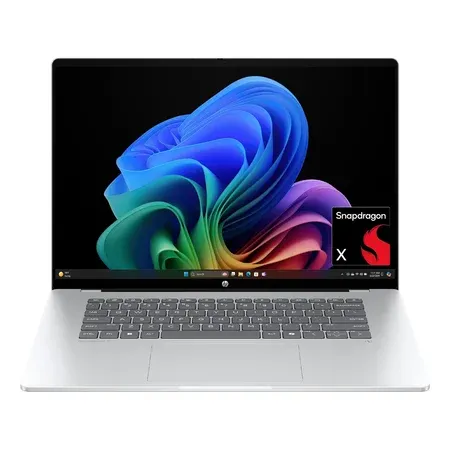
Best backlit battery life
HP OmniBook 5 16 (Snapdragon X, 16GB, 512GB)
Backlit keyboard, 16-inch 1920x1200, 16GB, HP claims up to 34 h 45 min. $699.99 sold by Amazon on November 23, 2026.
6. Acer Chromebook Plus 514: Best Backlit Chromebook
The CB514-5HT-33RD has a backlit keyboard, a 14-inch touchscreen, a Core i3-1315U, 8GB and a 256GB SSD. Google’s Auto Update Expiration date for the CB514-5HT is June 2033. It was $499.99 sold by Amazon. See best budget Chromebooks for more.
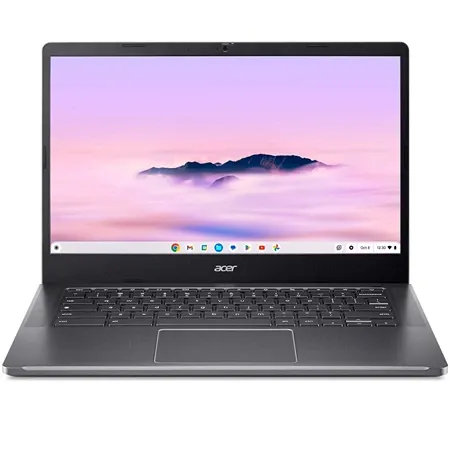
Best backlit chromebook
Acer Chromebook Plus 514 (CB514-5HT, Core i3-1315U, 8GB, 256GB)
Backlit keyboard, 14-inch touchscreen, updates to June 2033. $499.99 sold by Amazon on November 23, 2026.
FAQ
Does the MacBook Neo have a backlit keyboard?
No. Apple’s compare page lists a plain Magic Keyboard on the Neo and a backlit Magic Keyboard on the MacBook Air.
Do Dell budget laptops have backlit keyboards?
The base Dell 14, Dell 15 (D15261, D15266, DC15255) and Dell 16 DC16250 don’t. The Dell 15 DC15250, Dell 14 Plus, Dell 16S, XPS 13 and Inspiron 14 2-in-1 do.
How do I check if a laptop has a backlit keyboard?
Look for “backlit” in the keyboard line of the maker’s spec page for the exact model number.
How do I turn on a laptop keyboard backlight?
Most laptops use a function key marked with a keyboard-light symbol, sometimes pressed together with Fn. The maker.s user guide names the key for your model.