

The short answer: the ASUS ROG Strix Scar 18 (2026) has the best cooling of any gaming laptop you can buy. ASUS gives it an end-to-end vapor chamber sandwiched between two heatsinks, three fans and Conductonaut Extreme liquid metal on both the CPU and GPU. In independent testing under heavy gaming loads, it held the CPU at roughly 75–85°C and the GPU at about 65–72°C while running its RTX 5090 at 175 W. The Alienware 18 Area-51 and Lenovo’s Legion 9i 18 and Legion Pro 7i are the other standouts; the Legion 9i 18 held its RTX 5090 near 68°C in a 60-minute independent test.
What Makes a Gaming Laptop Cool Well
- Vapor chamber instead of plain heat pipes. A flat copper chamber spreads heat across more of the heatsink. ASUS and Alienware use them across these models.
- Liquid metal thermal compound on the CPU and GPU. It moves heat from the chip much better than paste. ASUS uses Thermal Grizzly’s Conductonaut Extreme on the Scar 18 and on the RTX 5070 Ti and 5080 Strix G16s.
- More fans and intake area. Three or four fans, plus big bottom intakes. Alienware’s Cryo-Chamber props the laptop up to enlarge the intake.
- A big chassis. 18-inch laptops have more fin area and can run quieter for the same power.
Best-Cooled Gaming Laptops
| Laptop | Cooling hardware (maker) | GPU (max power) | Independent temperatures | Price (Nov 20) |
|---|---|---|---|---|
| ASUS ROG Strix Scar 18 (2026) | End-to-end vapor chamber, sandwiched heatsink, Tri-Fan (fans with up to 84 blades), liquid metal on CPU and GPU | RTX 5080 / 5090 (175 W) | CPU ~75–85°C, GPU ~65–72°C gaming | $4,199.99 / $4,999.99 (Amazon) |
| Alienware 18 Area-51 | Cryo-Chamber intake, quad fans, up to 7 heat pipes, vapor chamber 4x larger than Dell’s previous 18-inch | RTX 5070 Ti to 5090 (175 W) | — | $3,999.99 RTX 5080 (Amazon) |
| Alienware 16 Area-51 | Cryo-Chamber, quad fans, 3x more copper and a 40% larger vapor chamber than Dell’s other 16-inch | RTX 5080 / 5090 (175 W) | — | from $3,899.99 (Dell) |
| Lenovo Legion 9i 18 (Gen 10) | Large 18” chassis | RTX 5090 | GPU averaged ~68°C at ~164 W over 60 min of gaming | lenovo.com |
| Lenovo Legion Pro 7i Gen 10 | 175 W GPU limit, 400 W adapter | RTX 5070 Ti to 5090 (175 W) | strong sustained GPU; CPU runs warmer | lenovo.com |
| ASUS ROG Strix G16 (2026) | Same end-to-end vapor chamber design and Tri-Fan as the Scar; liquid metal on GPU for 5070 Ti/5080 | RTX 5060 to 5080 (115–175 W) | — | asus.com |
| ASUS ROG Zephyrus G16 (2026) | Vapor chamber, Tri-Fan, liquid metal | RTX 5060 to 5090 (115–160 W) | — | asus.com |
The Picks
Best cooling overall: ASUS ROG Strix Scar 18 (2026)
ASUS pushed the Scar 18’s vapor chamber all the way to the rear of the chassis and sandwiched it between upper and lower heatsinks. It also uses liquid metal on both chips and redesigned fans with up to 84 blades. The result in independent testing was among the lowest GPU temperatures of any 175 W laptop. It’s an 8.2 lb machine with a 450 W adapter, so it’s built for a desk.
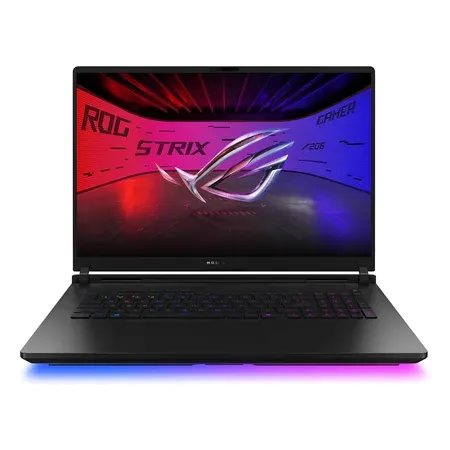
Best cooling overall
ASUS ROG Strix Scar 18 (2026), RTX 5090
Vapor chamber, Tri-Fan and liquid metal on CPU and GPU; 175 W RTX 5090, 18-inch 4K 240 Hz mini-LED. $4,999.99 on Nov 20.
Best Alienware: Alienware 18 Area-51
Dell’s Cryo-Chamber is a raised structure on the bottom of the laptop that enlarges the air intake and channels air to the CPU and GPU. Dell pairs it with quad fans and up to 7 heat pipes, and says the design moves up to 37% more air and runs up to 15% quieter. It allows 175 W for the GPU plus 105 W for the CPU, the highest combined limit here at 280 W.
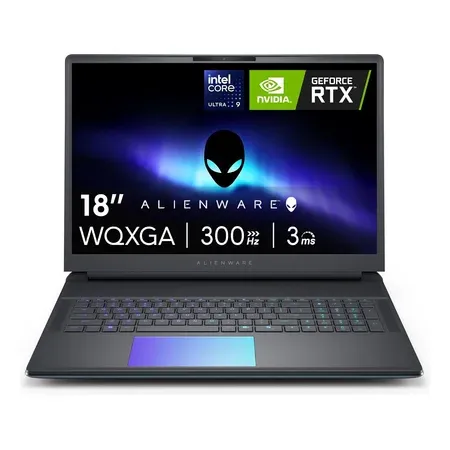
Best alienware cooling
Alienware 18 Area-51, RTX 5080
Cryo-Chamber intake, quad fans, up to 7 heat pipes; 175 W RTX 5080, Core Ultra 9 290HX Plus, 18-inch 300 Hz. $3,999.99 on Nov 20.
Best 16-inch: Lenovo Legion Pro 7i Gen 10 or ASUS ROG Strix G16 (2026)
The Legion Pro 7i sustains its 175 W GPU well in long sessions, though its CPU runs warmer than ASUS’s and Alienware’s under combined loads. The 2026 Strix G16 brings the Scar’s vapor chamber design and Tri-Fan cooling down to a cheaper 16-inch, with liquid metal on the GPU for the RTX 5070 Ti and 5080 models. It also has a tool-less bottom panel for RAM, SSD and fan access.
See Legion laptops at Lenovo · See the Strix G16 (2026) at ASUS
Best cooling for its size: ASUS ROG Zephyrus G16 (2026)
Thin laptops can’t match an 18-inch cooler, but ASUS gives the 2026 G16 a vapor chamber, three fans and liquid metal. It also tunes the GPU to 160 W rather than 175 W to match what that cooler can handle.
How to Keep Any Gaming Laptop Cooler
- Lift the back 1–2 inches, or use a stand, so the bottom intakes can breathe.
- Use a cooling pad with fans under the intakes if your laptop draws air from the bottom.
- Clean dust from fans and fins every year or two.
- Cap frame rates and use DLSS, so the GPU does less work for the same smoothness.
- Undervolt where your laptop allows it.
- Don’t block exhausts. Most vent out the back and sides.
Gaming Laptop Cooling FAQ
What gaming laptop has the best cooling?
The ASUS ROG Strix Scar 18 (2026). It has an end-to-end vapor chamber, three fans and liquid metal on both CPU and GPU. In independent testing it held the GPU around 65–72°C at 175 W.
Is 90°C too hot for a gaming laptop?
It’s within spec for most laptop CPUs, which throttle near 95–100°C, but it’s a sign the cooler is near its limit. GPUs usually run cooler, in the 60s–80s °C.
Do 18-inch gaming laptops run cooler?
Usually. More chassis space means larger heatsinks and fans. The Scar 18 and Legion 9i 18 posted some of the best GPU temperatures in independent tests.
Does liquid metal make a difference in laptops?
Yes, it transfers heat from the chip to the cooler better than standard paste. ASUS uses it on its Scar, Strix and Zephyrus models.




