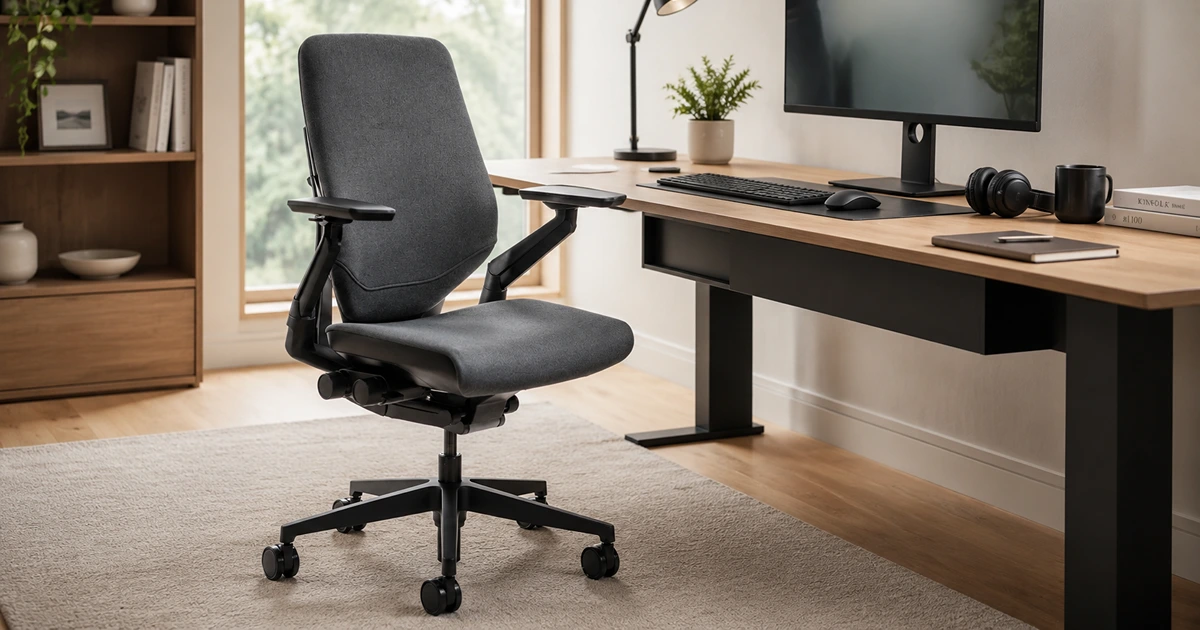

A good office chair should support movement rather than reward one supposedly perfect pose. Over a full workday, people sit upright, lean toward a screen, recline on calls, reach for a notebook, and shift their weight constantly. The chairs that remain comfortable through all of that combine a well-shaped seat with a responsive back, useful arm placement, and controls that can be adjusted without interrupting work.
Fit matters more than a long feature list. Seat height should let your feet rest firmly, the front edge should clear the backs of your knees, and the lumbar curve should meet your lower back instead of pushing above or below it. We looked beyond first impressions to how the cushioning or suspension holds up, how smoothly each chair moves, which body types it accommodates, what owners repeatedly find frustrating, and whether the warranty makes sense for the price.
These recommendations span four very different approaches to daily seating, but the point is not to buy the most prestigious name. It is to find a chair whose proportions, support, temperature, and preferred sitting style agree with your body. Even an excellent ergonomic design can feel wrong when the seat is too deep, the frame catches your thighs, or the lumbar pressure is in the wrong place, so a trial period or showroom visit remains invaluable.
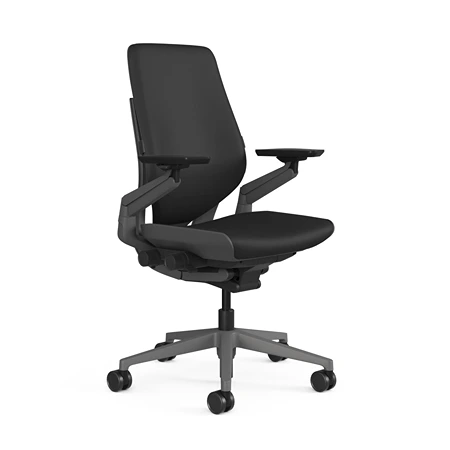
Steelcase Gesture
Best Overall Option
Exceptional ergonomic support, adjustability, and build quality for all-day comfort and productivity.
The Steelcase Gesture earns our top spot by accommodating the messy reality of desk work better than almost any single-position chair. Its seat, back, and arms continue to support you when you turn toward another monitor, pull a tablet into your lap, recline during a call, or sit upright at the keyboard. That versatility is more useful over eight hours than a dramatic lumbar pad or an unusually thick cushion.
Steelcase’s 3D LiveBack design allows the backrest to flex as the spine changes shape between upright and reclined positions. A core-equalizer mechanism changes the balance of support with the recline angle, while a tension control and multiple stop settings let you decide how freely the chair moves. The motion feels controlled and connected rather than like a backrest simply hinging away from the seat.
Nothing else in this group matches the Gesture’s arms. Each one can rise, lower, slide, pivot, and swing across a broad arc, allowing the pads to meet your forearms when a device or input position moves. The mechanism is easy to reposition but remains steady under normal use, making the chair especially good for people who alternate among a full keyboard, mouse, laptop, phone, game controller, or drawing tablet.
Underneath, the foam seat is deliberately supportive rather than plush. Seat-depth adjustment accommodates different thigh lengths, and flexible edges reduce the hard pressure behind the knees that can interrupt circulation or encourage slouching. The cushion distributes weight effectively for many users, although repeated long-term feedback shows that people sensitive around the tailbone sometimes find it too thin or firm.
Subscribe to Product Bible
Stay updated with the latest product reviews, buying guides, and expert recommendations. Fresh advice on the best things we've researched, tested, and reviewed, sent to your inbox weekly.
Want to know more about how we handle your data or opt out of marketing emails? Check out our Privacy Policy. If you have any questions, we're always here to help.
The substantial frame and smooth controls help justify some of the price. Gesture chairs are rated for users up to 400 pounds, and Steelcase backs the chair with 12-year, multi-shift coverage for parts and labor under its limited lifetime warranty. Upholstery, frame finish, casters, optional lumbar support, and headrest availability vary by configuration, so check the exact listing instead of assuming every Gesture includes the same equipment.
Its compromises are just as consistent as its strengths. The upholstered back and seat run warmer than suspended mesh, the chair is heavy to move, and the lumbar contour can feel too subtle for someone who wants forceful lower-back pressure. The many controls also take a little experimentation. Once dialed in, however, the Gesture offers the broadest mix of ergonomic support, relaxed movement, and device-friendly arm positioning in this guide.
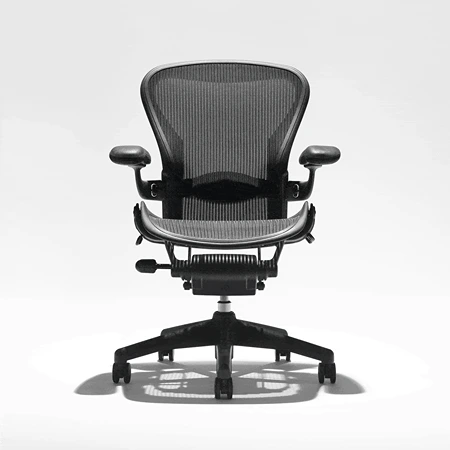
Herman Miller Aeron
Best Runner-Up
Breathable mesh comfort with a timeless design and excellent ergonomic adjustments for long workdays.
Suspension rather than padding defines the Herman Miller Aeron Chair. Its 8Z Pellicle material uses zones of differing tension across the seat and back to distribute weight while leaving air free to circulate. For anyone who runs hot or dislikes the slow compression of foam, the springy mesh remains one of the Aeron’s most persuasive advantages.
That suspension creates a firm, buoyant sit instead of a cushioned one. The Harmonic 2 tilt keeps the seat and back moving together through recline, and properly adjusted tension lets you lean back without fighting the chair. Depending on configuration, a tilt limiter and forward seat angle add useful positions for reclining or leaning into detailed work, but those controls are not standard on every listing.
Unlike most ergonomic chairs, the Aeron comes in A, B, and C frames rather than using a sliding seat pan to fit nearly everyone. Each size changes the seat width and depth, back proportions, and adjustment range; size B covers the broadest middle of Herman Miller’s chart. This can produce a remarkably tailored fit, but the fixed seat depth means the wrong size cannot be corrected later with a lever.
Back support also depends on the version. The basic Pellicle provides zoned tension, while adjustable lumbar and PostureFit SL configurations add more explicit support. PostureFit SL uses one pad at the sacrum and another at the lumbar region, encouraging the pelvis and lower spine toward a supported working posture. Some people love that firm contact and others barely notice it, which is another good reason to sit in the chair before buying.
Durability helps the high price make sense. A new Aeron purchased through an authorized channel carries a 12-year warranty that includes parts and labor, and the chair arrives fully assembled. There is also a large secondhand and refurbished market, but used buyers should confirm the chair’s generation, size, included controls, mesh condition, and warranty status rather than treating every Aeron as equivalent.
The rigid perimeter is the defining limitation of the design. If the chair is undersized, the frame can press into the thighs, and people who sit cross-legged or tuck a foot underneath themselves often find the sculpted mesh seat restrictive. Its arms also cannot follow as many positions as the Gesture’s. For upright task work, warm rooms, and users who fit one of its three frames correctly, though, the Aeron’s cool suspension and balanced recline are still exceptional.
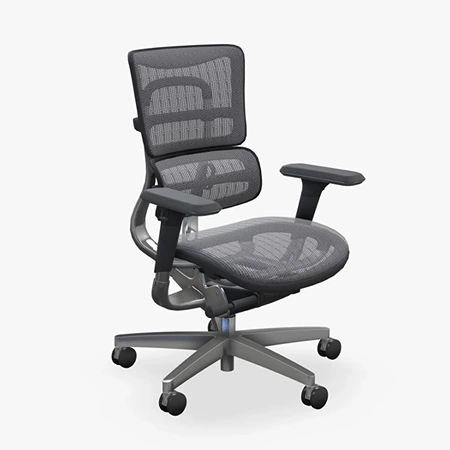
UPLIFT Intuition Ergonomic Chair
Best Reclining Option
Dynamic lumbar support and a deep, lock-anywhere recline with an adjustable headrest.
Recline is often treated as a secondary office-chair feature, but the UPLIFT Intuition Ergonomic Chair makes it central to the design. The back travels roughly 45 degrees from upright and can lock at essentially any point along the way, giving you far more control than the usual three or four preset stops.
That range works because the rest of the chair supports it. Adjustable tension lets you decide how much resistance the back provides, while a synchro-tilt mechanism moves the seat at a gentler rate so the motion feels controlled rather than like the entire chair is tipping backward. The included mesh headrest adjusts by height and angle, providing useful neck support during calls, reading, or any other stretch of work spent away from the keyboard.
The Intuition is equally assertive about lower-back support. Its curved lumbar section flexes as the sitter shifts instead of behaving like a static plastic pad, and four back-height positions help place that curve against the right part of the spine. Our editor reports better posture and less back discomfort through long workdays, although people who prefer light lumbar contact may need time to adjust to the chair’s firmer pressure.
Useful controls continue beneath the seat. Its depth slides from 17.75 to 19.75 inches, and the levers are labeled LIFT, SLIDE, and TILT, which is refreshingly clear beside chairs covered in look-alike paddles. The arm pads rise, slide forward and backward, and pivot inward or outward, but the complete arm assemblies cannot move closer together or farther apart. Buyers who need precise shoulder-width alignment will get more flexibility from true 4D arms.
Mesh across the seat, back, and headrest keeps the chair cooler than thick foam or upholstery, and the suspension has enough give to distribute weight rather than feeling like hard plastic. It is still a firm seat, not a plush one, and the texture can feel scratchy against exposed legs when wearing shorts, particularly during a deep recline. Assembly is unusually simple, polished-aluminum components make the lower frame feel substantial, and UPLIFT backs the chair with a 15-year warranty.
Choose the Intuition if reclining is a real part of how you work and you want the head, back, and lumbar support to remain useful as your position changes. Someone who sits upright all day, prefers a soft cushion, or needs adjustable arm width can spend less or find a more suitable fit elsewhere. For frequent position changes and relaxed calls, though, its precise recline does more than add comfort; it gives the chair a distinct reason to choose it over the more conventional options in this guide.
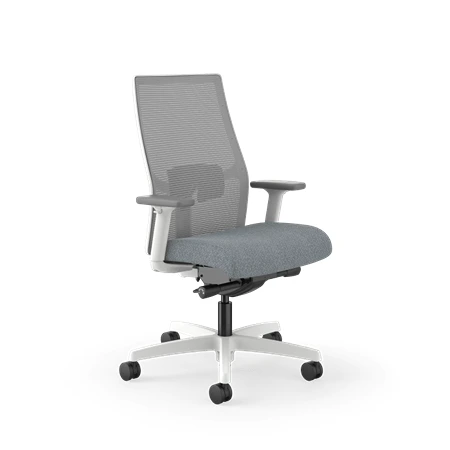
HON Ignition 2.0
Best Budget Option
Impressive comfort, adjustability, and build quality at an affordable price for budget ergonomic support.
Budget office chairs often imitate the appearance of ergonomic seating while omitting the controls that make it fit. The HON Ignition 2.0 takes the opposite approach: its plastics and fabric are ordinary, but the commonly sold task-chair configuration includes the adjustments that materially affect a workday. That makes it a strong first serious chair for a home office, student desk, or shared workspace.
The contoured foam seat feels welcoming immediately and spreads weight more evenly than the shallow pads on many cheaper chairs. A seat glide changes the depth for different leg lengths, while the waterfall front edge reduces pressure behind the knees. The cushion is softer than the seats on our premium picks, although extended testing and owner feedback suggest that it can flatten during prolonged daily use.
Across the back, four-way stretch mesh adds flexibility and ventilation without the rigid perimeter of a mesh seat. The separate lumbar piece slides vertically so it can meet different lower backs, but its thin plastic construction and limited travel divide opinion. Some users find it reassuringly firm; others wish it could move higher or become less prominent.
Synchro-tilt coordinates the seat and back as you recline, with tension adjustment and a lock for controlling the motion. The adjustable arms move vertically and change width on the typical retail model, and the seat height covers many average desk setups. These are not Gesture-level controls, but they are the right controls to prioritize when cost is limited.
Ignition is a broader chair family, so exact specifications matter more than the name on the listing. HON sells mesh-back, all-mesh, upholstered, ReActiv, stool, and big-and-tall variations, and features such as the seat slider, arms, lumbar support, headrest, and tilt mechanism can change. The standard task chair is warranted for users up to 300 pounds, while HON’s broader warranty terms give seating controls and four-way stretch mesh 12 years of coverage and textiles five years under qualifying use.
Shorter users should be especially careful: the lowest seat position can still leave feet unsupported, and the arm pads do not pivot toward a narrow keyboard position. Assembly is straightforward, but the finished chair lacks the dense materials and precise movement of a premium model. Even with those caveats, the Ignition 2.0 delivers unusually useful fit adjustments, a cool back, and credible manufacturer support for its typical street price.
Treat the adjustment period as part of buying the chair. Our desk height calculator estimates your seat and desk heights from your height. Set the seat height first, then depth, lumbar position, recline resistance, and arms; changing everything at once makes it difficult to identify what feels wrong. If your feet do not reach the floor after the desk and arm height are correct, add a stable footrest rather than lowering the chair until your shoulders hunch toward the keyboard.
An ergonomic chair can make comfortable movement easier, but it cannot turn sitting into a neutral activity or repair a badly arranged workstation. Keep the screen at a comfortable viewing height, bring input devices close enough that you are not reaching, and stand or walk periodically. The best result is a workspace that lets you change posture freely, with a chair supportive enough to fade into the background while you work.