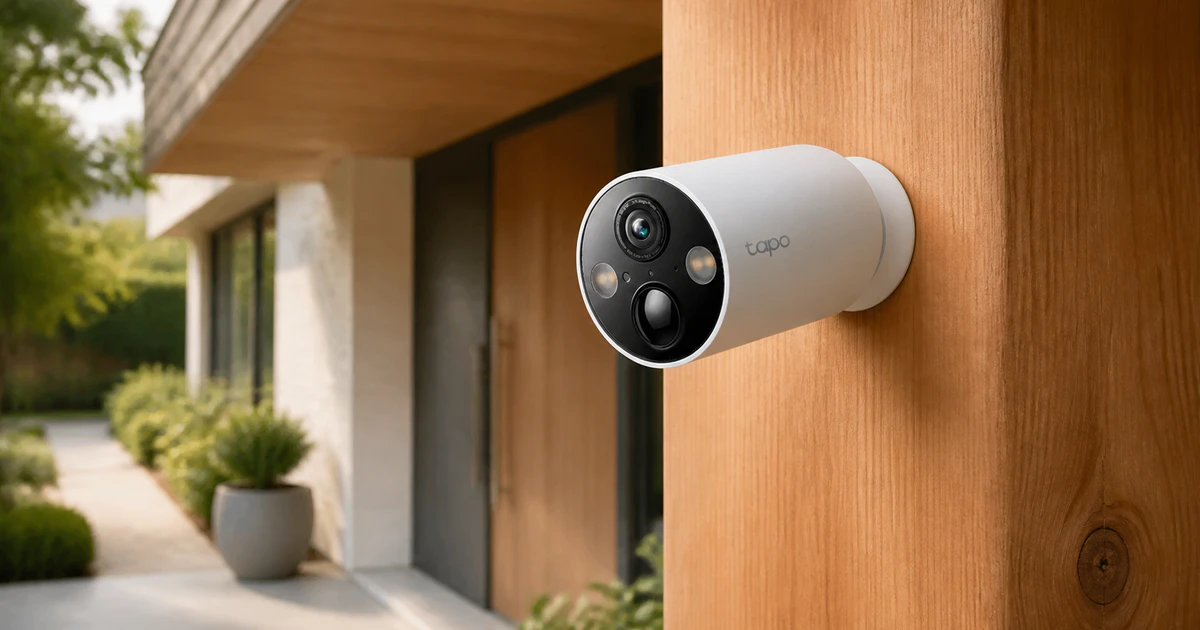

A good home security camera should make it easier to understand what is happening, not leave you sorting through vague alerts and unusable clips. Clear video matters, but so do dependable detection, sensible notification controls, and a view that fits the area you need to watch. A camera aimed at a front door has a different job from one covering a driveway, while an indoor model needs to balance awareness with the privacy of everyone who lives there.
Power and storage shape the experience as much as image quality. Battery cameras can go where wiring cannot, though they usually record events instead of continuous video and eventually need charging. Wired models can watch more consistently, but installation may limit placement or require electrical work. Local storage avoids a recurring cloud fee, yet footage stored on the camera can disappear if the device is stolen or damaged.
Before buying, decide whether you need event clips or around-the-clock recording, check the strength of your Wi-Fi at the mounting point, and make sure the camera works with the storage and smart-home setup you actually plan to use. A model that fits its location, power source, and storage plan will usually be more dependable than one chosen for its resolution alone.
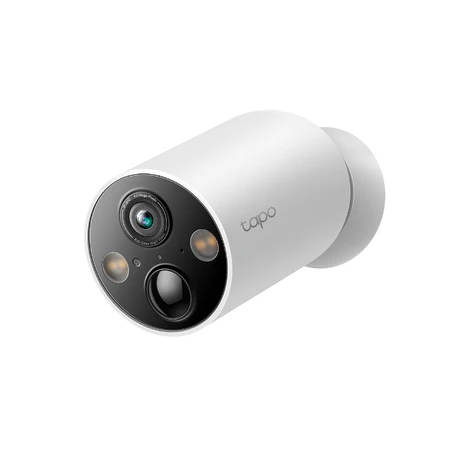
TP-Link Tapo MagCam C425
Best Outdoor Option
Wireless 2K coverage with free smart alerts and expandable local storage.
The TP-Link Tapo Wire-Free MagCam C425 is the outdoor camera to buy when the hardest part of the job is getting a useful view without running power. Its rechargeable battery, adjustable magnetic base, and hub-free design make it easy to position near a side gate, detached garage, or rental entrance. An IP66-rated body gives it the weather resistance expected of an outdoor model, while the broad 2K QHD image covers more of the scene than a narrow fixed view.
That placement freedom is backed by useful detection that does not demand a monthly plan. The camera can distinguish people, pets, and vehicles on the device, and activity zones let you concentrate on the part of the frame that belongs to you. This is particularly important with a wide outdoor view, which can otherwise include a neighbor’s property, a busy sidewalk, or tree movement that creates needless alerts.
Recordings can go to a microSD card of up to 512GB, purchased separately, or to the optional Tapo Care cloud service. Local storage keeps the camera’s core event history from depending on a subscription, but the card remains inside the outdoor camera. Anyone worried about losing footage with a stolen or damaged device should weigh that risk against cloud storage or a system that records to hardware kept indoors.
After dark, the C425 offers conventional infrared footage as well as spotlight-assisted color video. Color can help identify clothing or a vehicle when the subject is within the useful range of the lights, but it is not automatically the clearer mode in every scene. Nearby faces can be overlit and distant subjects may receive too little illumination, so infrared is often the better default for a difficult or unevenly lit yard.
Battery power also creates the C425’s main compromises. TP-Link’s longest runtime estimate assumes only a few minutes of daily activity, and actual endurance changes with traffic, recording length, live viewing, temperature, signal strength, and night settings. The battery is built in, so the whole camera comes off its mount to charge. An optional solar panel can reduce that chore, but it does not turn the camera into a guaranteed maintenance-free device.
This is an event-driven camera, not a substitute for a continuously recording wired system. It does not provide normal 24/7 recording or RTSP/ONVIF support for an NVR or NAS, and it connects only over 2.4GHz Wi-Fi. Choose it for flexible, subscription-optional outdoor awareness in a spot that would be awkward to wire. If uninterrupted recording or deep local-network integration matters more than easy placement, a powered camera is the better foundation.
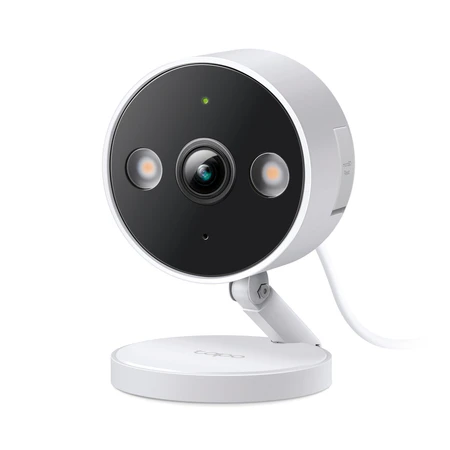
TP-Link Tapo C120
Best Indoor Option
Compact 2K camera with local storage, smart detection, and RTSP/ONVIF support.
Indoor cameras benefit from being small, continuously powered, and selective about what deserves your attention. The TP-Link Tapo C120 gets that balance right with a compact magnetic design, a 2K QHD view, and a broad set of on-device detections. It can sit on a shelf or attach to a wall, making it a natural fit for watching an entryway, pet area, nursery, or room that stays empty while you are away.
Its corded power means there is no battery schedule to manage and no need to conserve energy between events. That makes repeated live checks and longer recording schedules more practical than they are on a battery camera. The tradeoff is a cable that must reach an outlet, and although the camera body is IP66-rated, the power connection should be protected from weather if you ever move it outside.
The C120 can recognize people, pets, and vehicles, but its indoor sound alerts are just as useful. It can listen for a baby crying, glass breaking, barking, or meowing, then let you decide which conditions should trigger a notification. Activity zones and line-crossing detection provide more control in a busy room, and two-way audio gives you a quick way to speak to someone or check on a pet.
Subscribe to Product Bible
Stay updated with the latest product reviews, buying guides, and expert recommendations. Fresh advice on the best things we've researched, tested, and reviewed, sent to your inbox weekly.
Want to know more about how we handle your data or opt out of marketing emails? Check out our Privacy Policy. If you have any questions, we're always here to help.
Storage is unusually flexible for a compact camera. A microSD card of up to 512GB can keep recordings local, while Tapo Care offers paid cloud history. The C120 also supports RTSP and ONVIF Profile S for a compatible NVR or NAS, a meaningful advantage for buyers building a broader local-camera setup. There is one limitation to plan around: Tapo Care, microSD recording, and NVR/NAS recording cannot all operate at once, so you must choose two of those three options.
Video is sharp enough for the camera’s intended room-scale work, and the two infrared modes give you a choice between visible and less-visible nighttime illumination. Built-in spotlights can produce color footage when their visible light is acceptable. Fast movement in low light can blur, audio can lag slightly, and a smart-display stream may take longer to load than the phone app, so this is better viewed as a strong everyday monitor than a zero-latency surveillance system.
Privacy deserves more attention indoors than any extra feature. The C120 has no documented physical shutter, so it should be placed with the knowledge of everyone in the home and unplugged when you want a visible, unambiguous guarantee that it is off. It also uses 2.4GHz Wi-Fi and does not support Apple HomeKit. For households comfortable with app-based controls, it earns the indoor designation through its clear video, continuous power, capable free detection, and several sensible ways to store footage.
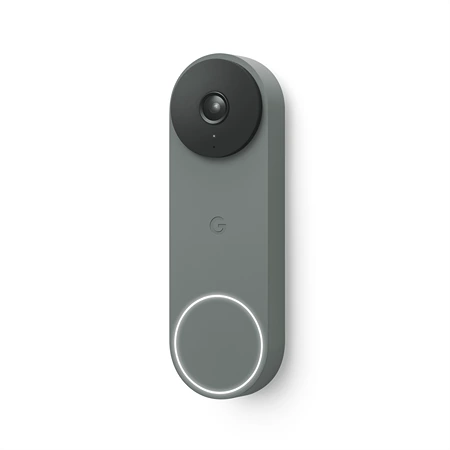
Google Nest Doorbell (Wired, 3rd Gen)
Best Doorbell Camera
Wired 2K doorbell with a square view, useful alerts, and polished Google Home integration.
A doorbell camera has to show both the visitor and what was left near their feet. The Google Nest Doorbell (Wired, 3rd Gen) handles that job with a square 2K HDR image and a wide 166-degree diagonal view. It is an especially good fit for a Google Home household that already has compatible doorbell wiring and wants a clean, unified experience across phones, speakers, and smart displays.
The doorbell identifies people, packages, animals, and vehicles on the device, with Activity Zones available to focus alerts on the porch instead of the street. Its 1:1 frame gives useful vertical context without forcing a narrow portrait crop, though the wide lens produces visible curvature near the edges. Full-duplex two-way audio with noise cancellation makes it easier to hold a conversation rather than taking turns through a delayed push-to-talk exchange.
Wired power provides 24/7 live viewing and removes charging from the routine, but it does not mean every recording is kept. The included service provides up to six hours of recent event previews, with clips lasting up to 10 seconds. That can tell you something happened, yet it is too brief and temporary to serve as a meaningful archive when you need to review an earlier delivery or incident.
Useful retained history is the central ongoing cost. Google Home Premium Standard adds 30 days of event history, while the Advanced tier extends event history and adds 10 days of continuous 24/7 recording. Paid plans also unlock familiar-face and additional Gemini features. AI descriptions and search can be convenient, but they can misinterpret a scene and should never replace watching the relevant clip yourself.
Installation is straightforward only when the existing setup meets the requirements. The doorbell needs a compatible 16-to-24-volt AC transformer, and some homes will need a transformer or chime upgrade. A 20-degree wedge and chime connector come in the box, but a stand-alone plug-in chime does not. Temporary network outages are less damaging than they could be because the doorbell can buffer up to an hour of events and upload them once the connection returns.
Nest is the strongest general doorbell recommendation here for buyers who value a polished wired experience, a useful face-and-package view, and the Google ecosystem. It is a poor match for anyone who wants local storage or refuses a recurring fee for substantial history. Our guide to the best doorbell cameras explores the category in more depth, but within this home-security lineup, Nest offers the clearest wired-first package.
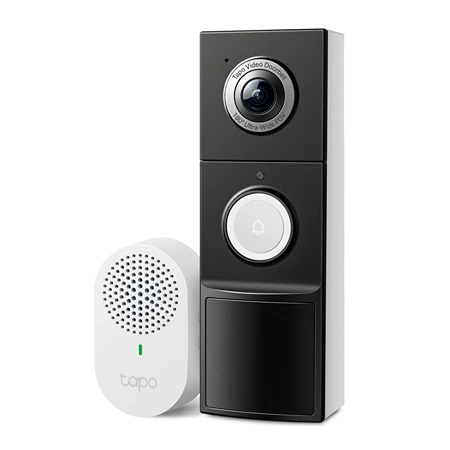
TP-Link Tapo D225
Best Battery-Operated Doorbell Camera
Hybrid-power 2K doorbell with local storage, smart alerts, and head-to-toe coverage.
Renters and homes without suitable doorbell wiring need a different answer. The TP-Link Tapo D225 Video Doorbell Camera runs on a built-in 10,000mAh battery, includes a plug-in indoor chime, and still leaves the option of hardwiring open for a future installation. That hybrid design, combined with local storage and free on-device detection, makes it the most adaptable battery-operated doorbell in this group.
The 2K 4MP camera uses a tall 4:3 view that captures visitors from head to toe and leaves room for packages near the threshold. Its very wide perspective creates fisheye distortion near the edges, but the extra coverage is useful on a small porch where a narrower lens could cut off the doormat. Person, package, pet, and vehicle detection can be assigned to Activity Zones, and up to four seconds of pre-roll helps preserve the moments just before an event triggered recording.
Tapo’s app provides granular control over which events are recorded and which ones interrupt you. A doorbell press can arrive as a phone-style Ring Call or a conventional push notification, and quick responses are available when you cannot talk. Live and recorded clips load promptly under good network conditions, but the doorbell uses only 2.4GHz Wi-Fi, so placement and signal quality still have a large effect on responsiveness.
With a microSD card of up to 512GB, the D225 can maintain local event history without a required subscription. That keeps recurring costs down, though the card lives inside the doorbell and can leave with it if the unit is stolen. Tapo Care provides an optional cloud route. Infrared footage is often the clearer nighttime choice, while the visible light can add color when the subject is close enough and the extra illumination is welcome.
Battery operation makes installation flexible, but the doorbell’s deep body is conspicuous and the complete unit must come off the mount to recharge. TP-Link advertises up to eight months between charges under its test conditions. Real use varies with motion traffic, clip length, live viewing, Wi-Fi strength, temperature, and night settings, so the advertised figure should be treated as a ceiling rather than a schedule.
Hardwiring unlocks capabilities that battery mode cannot provide, but the details matter. Continuous recording and RTSP require the jumper cable and Always-On mode, which bypasses a compatible existing mechanical chime. Hardwiring without that mode can preserve existing-chime use, and the included plug-in chime remains available either way. Pick the D225 when battery flexibility, local storage, and head-to-toe coverage matter more than a slim design. Buyers committed to continuous recording should decide whether the chime tradeoff is acceptable before installation.
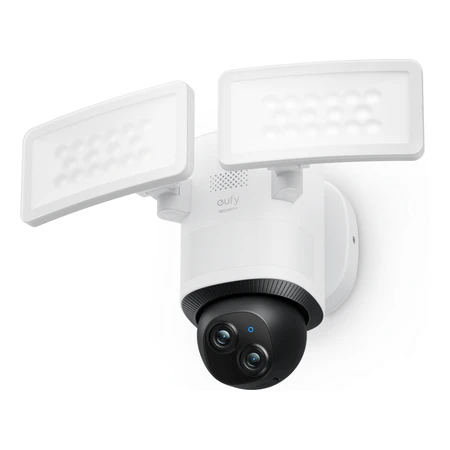
Eufy Floodlight Camera E340
Best Floodlight Option
Dual-camera floodlight with 360-degree panning and 2,000-lumen lighting.
The Eufy Floodlight Camera E340 is built for a driveway or yard where a fixed camera would leave too much outside the frame. It combines two adjustable light panels with a motorized dual-camera head, then follows detected movement across the scene. The hardwired design is more involved to install than a battery camera, but mains power supports stronger lighting and the option of continuous recording.
Its two lenses handle different parts of the job. The 3K wide camera provides context, while the 2K telephoto camera supplies a closer view of a person or vehicle. Both point in the same direction as the camera pans and tilts, so the system is not recording every angle simultaneously. Its 360-degree horizontal rotation instead lets it turn toward activity and reduce the blind spots of a conventional fixed floodlight.
The paired panels produce up to 2,000 lumens and can be aimed to suit a garage, side yard, or back entrance. That visible light enables useful color footage after dark, while infrared remains available when you do not want the area brightly illuminated. On-device person, vehicle, and pet recognition helps direct tracking, and a four-second pre-recording buffer preserves more context at the start of an event.
Local storage is a major part of the E340’s appeal. A microSD card supports event clips or continuous recording without a required cloud subscription, though direct card capacity tops out at 128GB. High-resolution 24/7 footage can fill that space quickly. HomeBase 3 is a separate purchase that adds much more off-camera storage, while Eufy’s cloud service protects footage away from the camera but limits uploaded video to 1080p.
Dual-band Wi-Fi 6 gives the camera more network flexibility than the 2.4GHz-only Tapo models, and compatible Alexa and Google Assistant displays can show its live view. The app also provides control over lighting, detection, tracking, and camera position. Those features make the E340 capable enough to anchor a busy outdoor area, although it is less compelling as the center of a complete alarm system than it is as a camera and light.
The practical objections are physical. This is a large, utilitarian fixture that needs a suitable mains-powered junction box, so an electrician may be the sensible choice if no floodlight is already in place. It also looks in one direction at a time, and its motorized coverage should not be mistaken for simultaneous 360-degree surveillance. For a buyer who wants bright lighting, detailed wide and close views, local recording, and active tracking in one installation, those compromises are reasonable.
Start by choosing the power source that matches each location. A battery model can solve a difficult outdoor placement with minimal installation, while a corded or hardwired camera makes more sense where continuous power, frequent live viewing, or 24/7 recording matters. For doorways and narrow approaches, check the shape of the image as well as its stated field of view so faces and packages both fit without capturing more neighboring space than necessary.
Storage deserves the same attention as the camera itself. Local recording can eliminate monthly fees, but an outdoor microSD card is vulnerable to theft or damage. Cloud history provides off-site redundancy at an ongoing cost, and the quality or length of stored clips may differ from the camera’s native feed. If a recording could matter after a break-in, make sure the storage plan remains useful when the camera is no longer accessible.
Whichever model you choose, spend time on placement, detection zones, notification settings, account security, and household privacy. A well-positioned camera with selective alerts is more useful than a higher-resolution model that constantly records the wrong area or gets ignored because it sends too many notifications. The right system is the one you will keep powered, connected, updated, and configured for the events that genuinely matter around your home.