
The short answer: for Valorant, Fortnite and other esports games, buy the fastest screen and CPU you can afford, not the biggest GPU. An RTX 5060 is plenty for these games; what you’ll notice is a 240–300 Hz display, a strong CPU and a MUX switch. The ASUS ROG Strix G16 (2026), with a 300 Hz IPS panel option and up to a Core Ultra 9 290HX Plus, is the best esports laptop. The MSI Crosshair A16 HX (240 Hz, Ryzen 9 8940HX) is the best value at $2,294 on Amazon. On a budget, the 2025 Strix G16 with a 16-core Core i7-14650HX and RTX 5060 was $1,179.99 on November 20, 2026.
What Matters for Esports Games
| Spec | Why | Aim for |
|---|---|---|
| Refresh rate | Valorant and CS2 run at hundreds of fps; a fast screen shows them | 240 Hz; 300 Hz for competitive players |
| CPU | Esports games are often CPU-limited at high fps | Intel HX (14650HX, 275HX, 290HX Plus) or Ryzen 9 8940HX/9955HX |
| MUX switch / Advanced Optimus | Sends frames straight from the Nvidia GPU to the screen, cutting latency and adding fps | MUX or Advanced Optimus (avoid MSHybrid-only models) |
| GPU | Fortnite with Lumen and high settings is the heaviest of these | RTX 5060 is enough; 5070 for Fortnite at high settings and 1440p |
| Response time | Less motion blur | 3 ms IPS or OLED |
Best Laptops for Valorant, Fortnite and Esports
| Laptop | Screen | CPU | GPU | Price (Nov 20) |
|---|---|---|---|---|
| ASUS ROG Strix G16 (2026) | 16” 2.5K IPS 300 Hz (or mini-LED 240 Hz) | up to Core Ultra 9 290HX Plus | RTX 5060 / 5070 (115 W), 5080 (175 W) | asus.com |
| ASUS ROG Strix G18 (2026) | 18” 2.5K IPS 300 Hz | Core Ultra 9 290HX Plus | RTX 5070 Ti (140 W) | $3,199.99 (Amazon) |
| Alienware 18 Area-51 | 18” 2560×1600, 300 Hz | Core Ultra 9 290HX Plus | RTX 5070 Ti to 5090 | from $3,949.99 (Dell) |
| ASUS TUF Gaming F16 (2026) | 16” 2.5K IPS 300 Hz (or OLED 165 Hz) | Core Ultra 9 290HX Plus | RTX 5060 / 5070 (115 W) | asus.com |
| MSI Crosshair A16 HX | 16” 2.5K, 240 Hz | Ryzen 9 8940HX | RTX 5070 | $2,294.00 (Amazon) |
| ASUS ROG Strix G16 (2025) | 16” 1920×1200, 165 Hz | Core i7-14650HX | RTX 5060 | $1,179.99 (Amazon) |
| Lenovo LOQ 15 (2026) | 15.3” 1920×1200, 165 Hz | Ryzen 7 250 | RTX 5060 | $1,149.99 (Amazon) |
The Picks
Best overall: ASUS ROG Strix G16 (2026)
The 2026 Strix G16 offers a 16-inch 2560×1600 IPS-level panel rated 300 Hz with 3 ms response and G-Sync, plus a MUX switch with Advanced Optimus and up to a 24-core Core Ultra 9 290HX Plus. ASUS’s spec page says the panel runs at 240 Hz in Standard, Eco and Optimized GPU modes; set the GPU mode to Ultimate in Armoury Crate to get 300 Hz. It has two SO-DIMM slots and a tool-less bottom panel. An RTX 5070 is the sweet spot for Fortnite at high settings.
Best value: MSI Crosshair A16 HX
A 16-core Ryzen 9 8940HX, an RTX 5070, 32 GB of DDR5 and a 2560×1600 240 Hz screen for $2,294.00 sold by Amazon. That’s enough CPU to push Valorant and CS2 past 240 fps, and enough GPU for Fortnite at high settings.
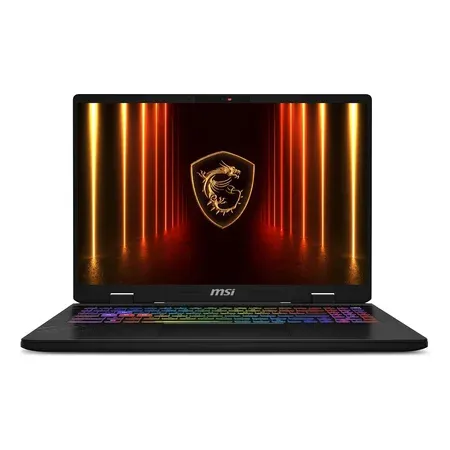
Best value for esports
MSI Crosshair A16 HX, RTX 5070
16-inch 2.5K 240 Hz, 16-core Ryzen 9 8940HX, RTX 5070, 32 GB DDR5, 1 TB. $2,294.00 sold by Amazon on Nov 20.
Best budget: ASUS ROG Strix G16 (2025)
The 2025 Strix G16 (G615JMR) pairs a 16-core Core i7-14650HX, a strong CPU for high-fps esports, with an RTX 5060 and a 1920×1200 165 Hz screen. It was $1,179.99 sold by Amazon. 165 Hz is the compromise; everything else is right for Valorant and Fortnite.
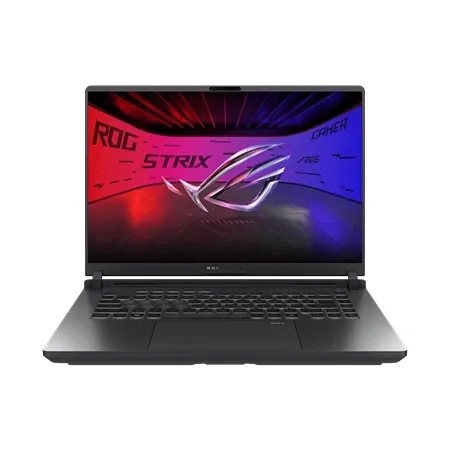
Best budget esports laptop
ASUS ROG Strix G16 (2025), RTX 5060
Core i7-14650HX, RTX 5060, 16-inch 1920x1200 165 Hz, 16 GB DDR5, 1 TB (G615JMR-AS74). $1,179.99 sold by Amazon on Nov 20.
Best 18-inch 300 Hz: ASUS ROG Strix G18 (2026)
The Strix G18 has a 300 Hz 2560×1600 18-inch IPS-level panel, a Core Ultra 9 290HX Plus and a 140 W RTX 5070 Ti. The bigger screen is easier to track targets on at a desk. It was $3,199.99 sold by Amazon.
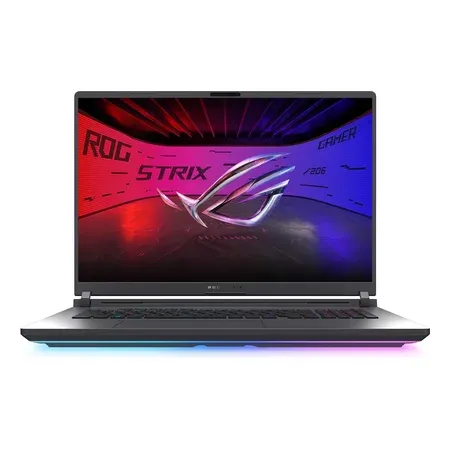
Best 18-inch 300 hz
ASUS ROG Strix G18 (2026), RTX 5070 Ti
18-inch 2.5K 300 Hz, Core Ultra 9 290HX Plus, 140 W RTX 5070 Ti, 32 GB DDR5, 1 TB. $3,199.99 sold by Amazon on Nov 20.
Valorant vs. Fortnite: What Each Needs
- Valorant and CS2 are light on the GPU and lean on the CPU at high fps. Any RTX 5060 laptop runs them well past 165 fps; an HX-class CPU and a 240–300 Hz screen are what make a difference.
- Fortnite is heavier. Its high and Epic presets use Unreal Engine 5’s Lumen and Nanite, and those want an RTX 5070 or better at 1440p. Most competitive players run Performance mode or low settings for maximum fps, which any RTX 50 laptop handles.
- Overwatch 2, Apex Legends, Rocket League fall in between; an RTX 5060 with a 165–240 Hz screen is plenty.
Settings for Competitive Play on a Laptop
- Plug in and use the Performance or Turbo mode.
- Switch the GPU to Ultimate or dGPU-only mode (MUX) in the maker’s app.
- Turn on Nvidia Reflex in games that support it.
- Set the screen to its maximum refresh rate in Windows display settings.
- Use a wired mouse or a 1,000 Hz+ wireless one, and Ethernet if you can.
Esports Laptop FAQ
What’s the best laptop for Valorant?
The ASUS ROG Strix G16 (2026) with its 300 Hz panel and an HX-class CPU. On a budget, the 2025 Strix G16 with a Core i7-14650HX and RTX 5060 ($1,179.99 on Amazon on November 20, 2026).
Do I need an RTX 5070 for Fortnite?
Not for competitive settings; an RTX 5060 runs Fortnite’s Performance mode at high fps. For high or Epic settings with Lumen at 1440p, an RTX 5070 or better.
Is 165 Hz enough for Valorant?
It’s fine for casual play. Competitive players benefit from 240–300 Hz, because Valorant easily runs above 165 fps on any RTX 50 laptop.
Does a MUX switch matter for esports?
Yes. With the MUX in dGPU mode, frames skip the integrated GPU, which lowers latency and usually raises fps. Budget models with MSHybrid only, like the ASUS TUF Gaming 16 (2026), lack it.
Can I play Valorant on a laptop without a dedicated GPU?
It runs on modern integrated graphics at lower fps, but a gaming laptop with an RTX GPU and a 165 Hz+ screen gives a much better experience.




