Buy the U2724DE if you’ll plug in a laptop: its Thunderbolt 4 port carries video, data and 90W charging over one cable, and it adds Thunderbolt daisy chaining, 2.5GbE Ethernet and a KVM. Buy the U2724D if the monitor connects to a desktop PC by DisplayPort or HDMI: it has the same 27-inch 1440p 120Hz IPS Black panel and stand for less. On November 23, 2026 Dell charged $439.99 for the U2724D and $599.99 for the U2724DE (Dell’s reference price $639.99). On Amazon, third-party sellers listed the U2724D at $349.99 and the U2724DE at $449.99.
U2724D vs. U2724DE: Side by Side
| Dell UltraSharp U2724D | Dell UltraSharp U2724DE | |
|---|---|---|
| Size / resolution | 27” 2560x1440 | 27” 2560x1440 |
| Panel | IPS Black | IPS Black |
| Refresh / response (Dell) | 120Hz / 5ms (Fast) | 120Hz / 5ms (Fast) |
| Thunderbolt | None | Thunderbolt 4 upstream, 90W power delivery |
| Daisy chain | DisplayPort out (MST) | Thunderbolt 4 downstream, plus DP out |
| USB-C | Upstream for data only; 15W downstream | Thunderbolt 4 (USB-C) upstream and downstream |
| Laptop charging | No | 90W |
| Ethernet | Not in the port list | 2.5GbE RJ45 |
| KVM | No | Yes |
| HDMI | HDMI (HDCP 1.4), QHD 120Hz, not FRL | Same |
| Stand | Height, tilt, swivel, pivot | Height, tilt, swivel, pivot |
| Warranty | 3-year Advanced Exchange; Premium Panel Exchange | Same |
| Price at Dell, Nov 23, 2026 | $439.99 | $599.99 (ref. $639.99) |
| Price on Amazon, Nov 23, 2026 | $349.99 (Focus Camera) | $449.99 (Shop Dot Bazaar) |
Dell’s U2724D spec table says RJ45 “Yes” while its port list shows none, so the table above goes by the port list.
The Differences That Matter
One cable for a laptop. This is the whole reason the DE exists. Its Thunderbolt 4 upstream port sends video and USB data to a laptop and charges it at up to 90W. The U2724D’s USB-C upstream port carries data only, so a laptop needs a separate video cable and its own charger.
Two monitors from one port. The DE’s Thunderbolt 4 downstream port can drive a second display; both models also have DisplayPort out for MST daisy chaining from a PC. On a Mac, daisy chaining doesn’t add displays beyond what the chip supports: a MacBook Air M2 drives one, an M4 or M5 Air two.
Network and KVM. The DE adds 2.5GbE Ethernet, handy for laptops without a port, and a KVM to share a keyboard and mouse between two computers.
What’s the same. Same 27-inch 1440p IPS Black panel at 120Hz, same height/tilt/swivel/pivot stand, same 3-year Advanced Exchange warranty and Premium Panel Exchange (Dell replaces the panel during warranty even for one bright pixel). Neither has a true HDMI 2.1 port: Dell lists HDMI with HDCP 1.4 running QHD at 120Hz and “VRR as per specified in HDMI 2.1”, not an FRL port.
Price. At Dell the DE costs $160 more; the Amazon third-party listings were $100 apart. Dell’s Black Friday page didn’t include the U2724D.
Prices on November 23, 2026
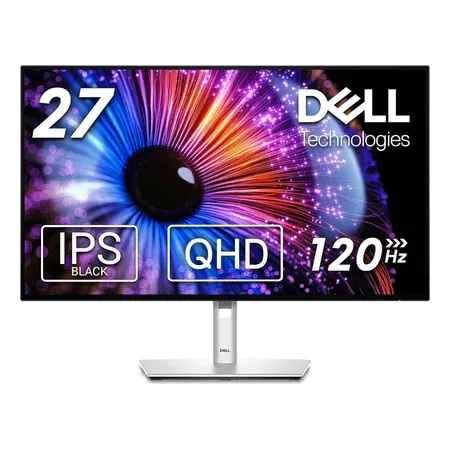
For Laptops: one Cable, 90W
Dell UltraSharp U2724DE
27-inch 1440p 120Hz IPS Black with Thunderbolt 4 (90W), daisy chain and 2.5GbE. $449.99 on Amazon on Nov 23, 2026.
The Amazon listing is sold by Shop Dot Bazaar, a third-party seller. Dell’s own price was $599.99 on dell.com, with Dell’s extended holiday returns to January 15, 2027.
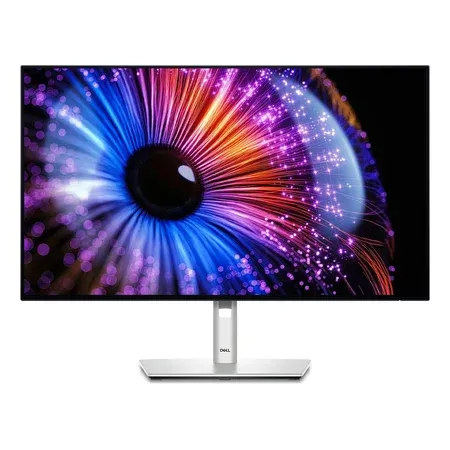
For desktops
Dell UltraSharp U2724D
Same 27-inch 1440p 120Hz IPS Black panel without Thunderbolt or charging. $349.99 on Amazon on Nov 23, 2026.
Sold by Focus Camera on Amazon; $439.99 on dell.com. If you want 4K instead, the UltraSharp U2725QE adds a 4K panel and 140W Thunderbolt 4 ($849.99 at Dell). For other Thunderbolt and USB-C screens, see our best monitors.
U2724D vs. U2724DE FAQ
What is the difference between the Dell U2724D and U2724DE?
The U2724DE adds a Thunderbolt 4 hub: one-cable video, data and 90W laptop charging, Thunderbolt daisy chain, 2.5GbE Ethernet and a KVM. The panel, refresh rate and stand are the same.
Does the Dell U2724D have USB-C?
It has a USB-C upstream port for data only and a 15W downstream USB-C port. It can’t carry video from or charge a laptop.
Does the U2724DE have HDMI 2.1?
No. Neither model has an HDMI 2.1 FRL port; Dell lists HDMI with HDCP 1.4 at QHD 120Hz.
Is the U2724DE good for a MacBook?
Yes for a one-cable desk: Thunderbolt 4 carries video and charges up to 90W. Two-monitor daisy chains still depend on the Mac’s own display limit.