For programming on a budget, buy RAM first: 16GB now, or a free slot to get there later. The Lenovo IdeaPad Slim 3 Gen 10 (AMD) at $549.99 on lenovo.com is the best value because it pairs 8GB of soldered memory with an empty SODIMM slot, so one stick takes it to 24GB. The Acer Aspire 16 AI at $599.99 on Amazon has 16GB out of the box and a 120Hz 16-inch screen. The HP OmniBook 3 14 (Snapdragon X, 16GB) at $499 is the cheapest 16GB machine on Amazon, but it runs Windows on Arm, so check your toolchain first. For Swift and iOS apps you need a Mac, and the MacBook Neo ($649 on Amazon, $699 at Apple) is the cheapest one, with 8GB that can never be upgraded. Prices are from November 23, 2026.
Budget Programming Laptops Compared
| Laptop | CPU | RAM | Storage | Display | Weight | Battery (maker claim) | Ports | Backlit | Price (Nov 23, 2026) |
|---|---|---|---|---|---|---|---|---|---|
| Lenovo IdeaPad Slim 3 Gen 10 15” AMD (83KA003CUS) | Ryzen 5 8540U (Zen 4, 6C/12T) | 8GB soldered + 1 free SODIMM, max 24GB | 512GB SSD, 2x M.2 2242 slots | 15.3” 1920x1200 IPS, 300 nits, touch | from 1.59 kg (3.5 lb) | 50 or 60 Wh; 11.5 or 14.8 h video at 150 nits | 2x USB-A 5Gbps, USB-C 5Gbps (PD, DP 1.2), HDMI 1.4 | Optional | $549.99 (Lenovo) |
| Acer Aspire 16 AI (A16-52M-58A1) | Core Ultra 5 226V (Lunar Lake) | 16GB LPDDR5X on package, fixed | 512GB PCIe Gen 4 | 16” 1920x1200, 120Hz, 100% sRGB | 3.4 lb | up to 26.5 h video | 2x Thunderbolt 4, HDMI 2.1 | Yes | $599.99 (Amazon) |
| HP OmniBook 3 14 (14-hz0588nr) | Snapdragon X X1-26-100 (Arm, 8 cores) | 16GB onboard, fixed | 256GB SSD | 14” 1920x1200 OLED, 300 nits | 3.13 lb | 60 Wh; up to 41 h 45 min | 2x USB-A 5Gbps, 2x USB-C 10Gbps, HDMI 2.1 | No | $499 (Amazon) |
| ASUS Vivobook 16 (F1605VA-RS51) | Core i5-13420H (8 cores, 45 W) | 8GB on board + 1 SO-DIMM, max 32GB | 512GB PCIe 4.0 | 16” 1920x1200, 45% NTSC | 4.14 lb | 42 Wh; up to 8 h | USB 2.0-A, USB-C (PD), 2x USB-A, HDMI 1.4 | Not listed | $549.99 (ASUS) |
| Apple MacBook Neo 13” | A18 Pro (6-core) | 8GB unified, fixed | 256GB SSD | 13” 2408x1506, 500 nits | 2.7 lb | 36.5 Wh; 16 h video, 11 h web | USB-C USB 3 (10Gb/s), USB-C USB 2, 3.5mm | No | $649 (Amazon), $699 (Apple) |
Lenovo quotes video playback at 150 nits; HP, Acer, ASUS and Apple quote their own tests. The runtimes aren’t directly comparable.
What Matters for Coding on a Budget
- RAM. An IDE, a browser full of docs, a local dev server and a container add up fast. 16GB is the comfortable floor. Most budget laptops solder their memory, so whatever you buy is what you keep unless the spec sheet lists a free slot. Our RAM guide covers the 8GB question.
- x86 or Arm. Snapdragon laptops run Windows on Arm. Microsoft says its Prism emulator runs x86 and x64 apps in user mode only: “Any kernel mode components must be compiled as Arm64.” Any tool that installs its own driver needs an Arm64 build. Most editors, Git, Python, Node and browsers ship Arm64 versions. See Snapdragon X vs Intel.
- S mode. Some cheap Windows laptops ship in Windows 11 S mode, which only installs Microsoft Store apps. Leaving S mode is free and one-way (Settings > System > Activation > Go to the Store).
- Screen. 1920x1200 (16:10) shows more lines of code than 1920x1080. Avoid 1366x768 panels, which some HP Laptop 15 configurations still ship with.
1. Lenovo IdeaPad Slim 3 Gen 10 (AMD): Best Value for Programming
The 83KA003CUS has a Ryzen 5 8540U (six Zen 4 cores, 12 threads), 8GB of DDR5 soldered to the board and one empty SODIMM slot. Lenovo’s PSREF lists a 24GB maximum (8GB + 16GB), so a single 16GB stick triples the memory. It also has two M.2 2242 slots for a second SSD, a 15.3-inch 1920x1200 touchscreen and USB-C charging. The panel is 300 nits, fine indoors. It’s sold on lenovo.com, where returns run through January 27, 2027 for orders placed November 2 to December 13.
2. Acer Aspire 16 AI: Best 16GB Laptop for Coding on Amazon
The Aspire 16 AI uses Intel’s Core Ultra 5 226V with 16GB of LPDDR5X on the chip package. Intel caps the 226V at 16GB and the memory can’t be replaced, so this is a 16GB machine for life. It runs x86 Windows, so drivers and tools install as usual. You also get a 16-inch 1920x1200 120Hz screen, two Thunderbolt 4 ports for a dock and an external monitor, Wi-Fi 7 and a backlit keyboard. Acer claims up to 26.5 hours of video playback.
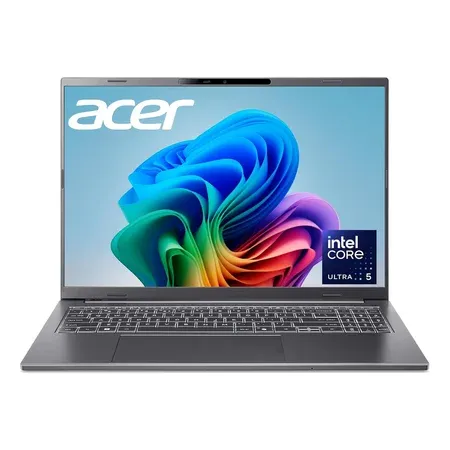
Best 16GB laptop for coding
Acer Aspire 16 AI (Core Ultra 5 226V, 16GB, 512GB)
16-inch 1920x1200 120Hz, 2x Thunderbolt 4, backlit keyboard. $599.99 sold by Amazon on November 23, 2026.
3. HP OmniBook 3 14 (Snapdragon X): Best Battery for Web and Script Work
At $499 on Amazon, the 14-hz0588nr is the cheapest laptop here with 16GB. It has a Snapdragon X X1-26-100 (eight cores, 45 TOPS NPU, a Copilot+ PC), a 14-inch 1920x1200 OLED and a 60 Wh battery. HP claims up to 41 hours 45 minutes. The 256GB SSD is small for big repos, and the keyboard isn’t backlit. Choose it if your work is web, Python or cloud-based and your tools have Arm64 builds. Skip it if you rely on kernel drivers or x64-only toolchains. The Snapdragon laptop guide covers the alternatives.
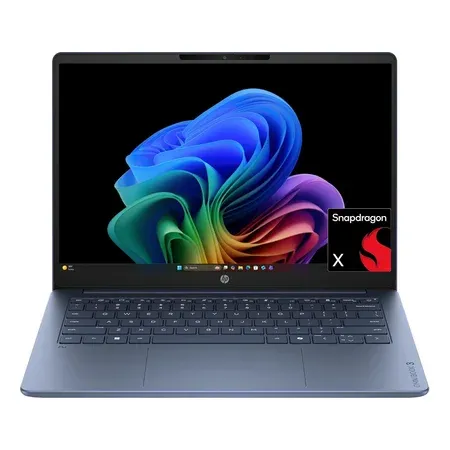
Cheapest 16GB laptop
HP OmniBook 3 14 (Snapdragon X, 16GB, 256GB)
14-inch 1920x1200 OLED, 3.13 lb, HP claims up to 41 h 45 min. $499 sold by Amazon on November 23, 2026.
4. ASUS Vivobook 16 (F1605VA): Best for Upgrading to 32GB
The F1605VA-RS51 has a 13th-gen Core i5-13420H (eight cores, 45 W base power) with 8GB soldered plus one SO-DIMM slot, and ASUS lists a 32GB maximum. That’s the most headroom here for virtual machines, at $549.99 on the ASUS eShop. The trade-offs are a 42 Wh battery (ASUS claims up to 8 hours), a 45% NTSC panel and a 4.14 lb body. ASUS adds a year of accidental damage cover if you register within 60 days. ASUS also charges a 15% restocking fee on opened returns.
5. Apple MacBook Neo: Best Budget Laptop for iOS and Mac Development
Xcode runs only on macOS, so Swift and iOS developers need a Mac. The MacBook Neo is Apple’s cheapest: an A18 Pro, 8GB of unified memory that can’t be upgraded, 256GB of storage and a 13-inch 2408x1506 display. It supports one external display, has one USB 3 port and one USB 2 port, and has no keyboard backlight. Apple sells it for $699 ($649 with education pricing). Amazon had it for $649 on November 23. If you can stretch, the M5 MacBook Air starts with 16GB. Read Is the MacBook Neo worth it? before you buy.
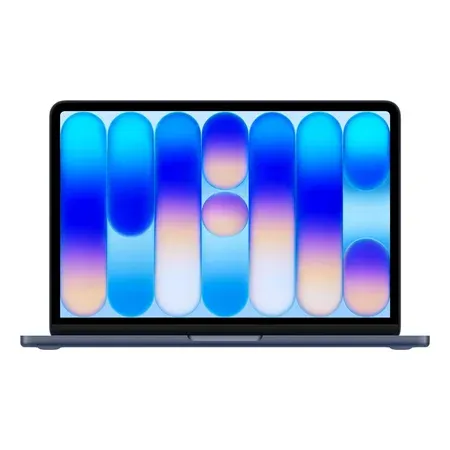
Cheapest mac for xcode
Apple MacBook Neo 13-inch (A18 Pro, 8GB, 256GB)
8GB fixed, 2.7 lb, up to 16 h video (Apple). $649 sold by Amazon on November 23, 2026; $699 at Apple.
What to Skip
- 4GB laptops. ASUS still sells 4GB Vivobook Go 15 models (E1504TA-ES04, E1504FA-DS04) at $299.99, the same price as an 8GB version. The memory is soldered and capped at 4GB.
- Intel N-series chips (N100, N150, N200, Core 3 N355) for anything beyond light scripting. Intel lists one memory channel and a 16GB maximum.
- Gaming laptops as a default. They make sense if you need an Nvidia GPU for CUDA work. See are gaming laptops good for programming.
FAQ
How much RAM do I need for programming?
16GB is the practical minimum for an IDE, a browser and a local server or container. 8GB works for learning and light web work, but budget laptops usually solder their memory, so buy for what you’ll need later.
Is a Snapdragon laptop OK for programming?
For many workflows, yes: most editors, Git, Python and Node ship Arm64 builds. Microsoft’s emulator doesn’t run kernel-mode code, so tools that install their own drivers need native Arm64 versions.
Can I learn to code on a Chromebook?
Yes, for web development and Python in the browser or ChromeOS’s Linux environment. For Windows-only tools or Xcode you need Windows or a Mac. See Chromebook vs cheap Windows laptop.
Is the MacBook Neo good enough for Xcode?
It runs macOS, so it runs Xcode, but its 8GB of memory is fixed. For larger projects the M5 MacBook Air, with 16GB as standard, is the safer Mac.
Sources
- Lenovo PSREF: IdeaPad Slim 3 15AHP10 (PDF) and lenovo.com product page
- Intel Core Ultra 5 226V specifications
- HP OmniBook 3 14-HZ000 product page
- ASUS Vivobook 16 F1605VA-RS51 and ASUS eShop returns
- Apple MacBook Neo specs
- Microsoft Learn: how x86/x64 emulation works on Arm
- Microsoft: Windows 11 in S mode FAQ
- Intel Processor N150 specifications