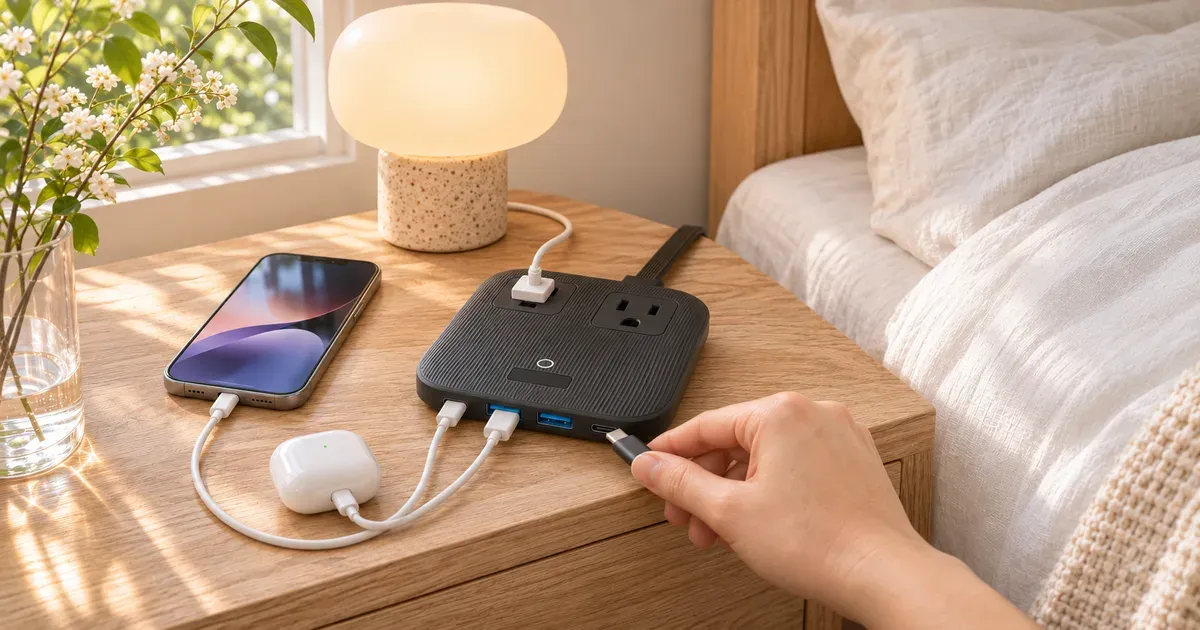
I bought the Anker Nano Charging Station (6-in-1, 67W) in July to clean up my nightstand. It replaced a power strip and the separate charging bricks that used to crowd it, and now one flat box charges my phone and earbuds and powers the things on my nightstand that need a regular outlet. I haven’t had a single problem with it.
The short answer: for about $40, it’s an easy way to turn a nightstand or desk full of bricks into one small box. Just know that it isn’t a surge protector, and its 67W is split between ports once you plug in more than one device.
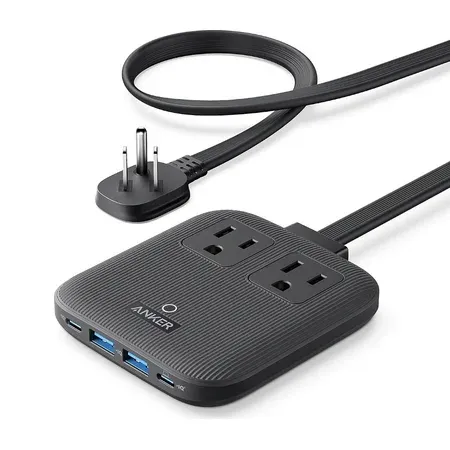
Best small charging station for a nightstand
Anker Nano Charging Station (6-in-1, 67W)
Two AC outlets, two USB-C and two USB-A ports in a flat box that replaced every charger on my nightstand.
Anker Nano Charging Station Review: Quick Verdict
This is one of the simplest upgrades I’ve made this year. Before it, my nightstand relied on a power strip with separate charging bricks, and every brick took up a full outlet. Now the station sits flat on the nightstand, the USB ports handle my phone and earbuds, and the two AC outlets take care of the rest.
I have no complaints about it since July. It charges what I need, and I haven’t had to think about it, which is exactly what I want from a charger.
Anker Nano Charging Station (6-in-1, 67W) specs
| Spec | Value | Note |
|---|---|---|
| Price | $39.99 | At Amazon |
| Model | A9129 | |
| Outlets and ports | 2 AC outlets, 2 USB-C, 2 USB-A | |
| Max USB-C output | 67W | One port in use |
| Two USB-C ports | 45W + 20W | |
| USB-A output | 12W, or 15W shared between both ports | |
| AC rating | 125V, 15A (1,875W) | |
| Size | 3.9 x 3.7 x 0.7 in | |
| Weight | 13.7 oz | |
| Cord | 5 ft, flat plug, not detachable | |
| Surge protection | No | |
| Warranty | 24 months | Plus a $200,000 connected equipment warranty |
Why I Bought It
I picked it for one reason: fewer bricks. A regular power strip is a poor fit for chargers, because each brick blocks the outlet next to it and the whole thing ends up as a tangle behind the nightstand. A charging station builds the USB chargers into the strip, so the cables plug straight into it and the AC outlets stay free.
The Anker is also small enough to sit on top of a nightstand instead of on the floor. At 3.9 by 3.7 inches and less than an inch tall, it takes up about as much room as a coaster.
How I Use It
On my nightstand, it does two jobs every night:
- Phone and earbuds charge from the USB ports. Neither needs anything close to 67W, so the power sharing never comes into play.
- AC devices plug into the two outlets, so the things on my nightstand that need a regular plug don’t need a separate strip.
That’s a light load for this charger. Phones and earbuds draw a fraction of what its USB-C ports can deliver, and the AC outlets pass wall power straight through.
How the 67W Is Shared Between Ports
The 67W on the box is the maximum from one USB-C port at a time. That’s enough to charge many laptops, including a 13-inch MacBook Pro, which Anker says it can fully charge in under two hours.
Once you plug in more devices, Anker splits the power:
- Both USB-C ports: 45W and 20W. The port marked with a computer icon gets priority, so plug a laptop into that one.
- One USB-C plus USB-A: 45W and 12W.
- All four USB ports: 20W, 30W and 15W shared between the two USB-A ports.
For a nightstand, none of that matters. An iPhone fast-charges at about 20 to 27W, and earbuds need only a few watts. It matters more on a desk, where a laptop on 45W charges more slowly than it would on a dedicated 65W or larger charger.
The USB-A ports are the weak spot. They share 15W between them, which is fine for earbuds, a watch or an older phone, but slow for anything bigger. If most of your cables are USB-C, that won’t matter.
What to Know Before You Buy
It isn’t a surge protector. Anker says so on the listing. It has over-voltage and short-circuit protection for the charging circuits, but it doesn’t have the surge suppression you’d want for a TV, a computer or other expensive electronics. For those, plug into a real surge protector instead.
The cord is permanent. The 5-foot cord can’t be removed or swapped for a longer one. The flat plug is useful behind furniture, because it sits close to the wall, but you need an outlet within 5 feet.
It’s sold as a travel power strip, too. Amazon’s listing calls it a travel power strip, and it is small enough to pack. Its USB ports work on 125 to 240V, but the AC outlets are rated for US 125V power, so it isn’t a voltage converter.
Anker’s own store has it sold out. It’s still available on Amazon, where it sells for about $40.
Anker Nano Charging Station vs. a Power Strip and Separate Chargers
Anker Nano Charging Station vs. a power strip and two chargers
| Spec | Anker Nano Station | Strip + chargers |
|---|---|---|
| Price | About $40 | Varies, often similar |
| Footprint | One flat box | Strip plus a brick per device |
| Free AC outlets | 2 | Fewer, since bricks block outlets |
| Max laptop charging | 67W from one USB-C port | Depends on the charger |
| Surge protection | No | Available on many strips |
If you already own a good surge-protecting strip and a single high-wattage charger, you don’t need this. If, like me, you have a nightstand or small desk with a strip and several bricks, it’s a cleaner setup.
Is the Anker Nano Charging Station Worth It?
For me, yes. It cost $43.89 with tax, it took the clutter off my nightstand, and I haven’t had a single complaint since July. I’d buy it again.
Buy it if you charge a phone, earbuds and maybe a laptop in one spot and also need a couple of AC outlets, and you want one small box instead of a strip full of bricks.
Skip it if you need surge protection for expensive electronics, want full 65W or faster laptop charging while other devices charge, or still rely on several USB-A devices that need fast charging.
Anker Nano Charging Station FAQ
Is the Anker Nano Charging Station a surge protector?
No. Anker lists over-voltage and short-circuit protection, but the station doesn’t have surge protection. Use a surge protector for TVs and computers.
Can it charge a MacBook?
Yes. A single USB-C port delivers up to 67W, and Anker says that fully charges a 13-inch MacBook Pro in under two hours. With both USB-C ports in use, the laptop port drops to 45W.
How many devices can it charge at once?
Six: two through the AC outlets and four through its two USB-C and two USB-A ports.
Can you use it on a nightstand?
Yes. That’s how I use it. It’s flat and small enough to sit on top of the nightstand, and the flat plug fits behind furniture.
How much does the Anker Nano Charging Station cost?
It’s $39.99 on Amazon. I paid $43.89 with tax in July 2026.